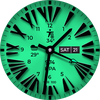
Roman Analog Classic Wear OS

ASO Keyword Dashboard
Tracking 187 keywords for Roman Analog Classic Wear OS in Google Play
Roman Analog Classic Wear OS tracks 187 keywords (1 keyword ranks; 186 need traction). Key metrics: 0% top-10 coverage, opportunity 70.7, difficulty 45.4, best rank 11.
A Watchface with Roman Hours Analog Index Has Bright & Colorful Customizations
Tracked keywords
187
1 ranked • 186 not ranking yet
Top 10 coverage
0%
Best rank 11 • Latest leader —
Avg opportunity
70.7
Top keyword: faces
Avg difficulty
45.4
Lower scores indicate easier wins
Opportunity leaders
- 63.6
faces
Opportunity: 75.0 • Difficulty: 40.5 • Rank —
Competitors: 391
- 62.5
analog
Opportunity: 74.0 • Difficulty: 38.5 • Rank —
Competitors: 190
- 65.2
hands
Opportunity: 74.0 • Difficulty: 42.3 • Rank —
Competitors: 650
- 66.0
developer
Opportunity: 74.0 • Difficulty: 41.2 • Rank —
Competitors: 584
- 62.9
fix
Opportunity: 74.0 • Difficulty: 44.9 • Rank —
Competitors: 841
Unranked opportunities
faces
Opportunity: 75.0 • Difficulty: 40.5 • Competitors: 391
analog
Opportunity: 74.0 • Difficulty: 38.5 • Competitors: 190
hands
Opportunity: 74.0 • Difficulty: 42.3 • Competitors: 650
developer
Opportunity: 74.0 • Difficulty: 41.2 • Competitors: 584
fix
Opportunity: 74.0 • Difficulty: 44.9 • Competitors: 841
High competition keywords
access
Total apps: 341,442 • Major competitors: 12,594
Latest rank: — • Difficulty: 58.5
make
Total apps: 326,182 • Major competitors: 20,145
Latest rank: — • Difficulty: 57.5
every
Total apps: 258,169 • Major competitors: 14,416
Latest rank: — • Difficulty: 55.6
best
Total apps: 257,136 • Major competitors: 18,535
Latest rank: — • Difficulty: 57.4
without
Total apps: 210,647 • Major competitors: 11,387
Latest rank: — • Difficulty: 56.2
All tracked keywords
Includes opportunity, difficulty, rankings and competitor benchmarks
| Major Competitors | |||||||
|---|---|---|---|---|---|---|---|
| roman | 72 | 100 | 33 | 53 2,259 competing apps Median installs: 3,236 Avg rating: 4.2 | 11 | 11 | 93 major competitor apps |
| play | 66 | 100 | 60 | 85 208,943 competing apps Median installs: 7,217 Avg rating: 4.0 | — | — | 20,417 major competitor apps |
| best | 66 | 100 | 57 | 86 257,136 competing apps Median installs: 3,988 Avg rating: 4.1 | — | — | 18,535 major competitor apps |
| messaging | 73 | 100 | 55 | 68 19,605 competing apps Median installs: 871 Avg rating: 4.0 | — | — | 839 major competitor apps |
| maps | 73 | 100 | 56 | 69 20,186 competing apps Median installs: 3,803 Avg rating: 4.0 | — | — | 1,506 major competitor apps |
| calendar | 71 | 100 | 51 | 72 35,422 competing apps Median installs: 740 Avg rating: 4.2 | — | — | 1,049 major competitor apps |
| 69 | 100 | 50 | 77 69,714 competing apps Median installs: 2,557 Avg rating: 4.0 | — | — | 3,089 major competitor apps | |
| customization | 73 | 100 | 45 | 68 17,858 competing apps Median installs: 4,232 Avg rating: 4.1 | — | — | 1,248 major competitor apps |
| follow | 69 | 100 | 53 | 78 83,569 competing apps Median installs: 1,629 Avg rating: 4.1 | — | — | 4,471 major competitor apps |
| mode | 69 | 100 | 56 | 77 69,832 competing apps Median installs: 5,252 Avg rating: 4.0 | — | — | 5,820 major competitor apps |
| change | 68 | 100 | 52 | 79 91,034 competing apps Median installs: 4,830 Avg rating: 4.0 | — | — | 6,404 major competitor apps |
| changes | 72 | 100 | 45 | 71 27,690 competing apps Median installs: 1,431 Avg rating: 4.0 | — | — | 1,088 major competitor apps |
| device | 68 | 100 | 60 | 80 108,936 competing apps Median installs: 3,365 Avg rating: 3.9 | — | — | 6,846 major competitor apps |
| make | 65 | 100 | 57 | 88 326,182 competing apps Median installs: 2,543 Avg rating: 4.0 | — | — | 20,145 major competitor apps |
| phone | 67 | 100 | 60 | 83 153,357 competing apps Median installs: 3,571 Avg rating: 4.0 | — | — | 9,542 major competitor apps |
| via | 68 | 100 | 53 | 81 115,711 competing apps Median installs: 1,833 Avg rating: 4.0 | — | — | 4,543 major competitor apps |
| connected | 69 | 100 | 50 | 78 74,667 competing apps Median installs: 648 Avg rating: 4.0 | — | — | 2,414 major competitor apps |
| within | 68 | 100 | 51 | 80 102,378 competing apps Median installs: 1,538 Avg rating: 4.0 | — | — | 4,031 major competitor apps |
| wear | 71 | 100 | 61 | 72 32,797 competing apps Median installs: 382 Avg rating: 4.1 | — | — | 869 major competitor apps |
| analog | 74 | 100 | 39 | 63 8,475 competing apps Median installs: 502 Avg rating: 4.2 | — | — | 190 major competitor apps |
| clock | 73 | 100 | 46 | 68 19,120 competing apps Median installs: 1,470 Avg rating: 4.1 | — | — | 837 major competitor apps |
| date | 68 | 100 | 53 | 79 93,795 competing apps Median installs: 807 Avg rating: 4.1 | — | — | 2,942 major competitor apps |
| wear os | 72 | 100 | 60 | 70 24,439 competing apps Median installs: 294 Avg rating: 4.2 | — | — | 300 major competitor apps |
| simply | 69 | 100 | 49 | 78 83,598 competing apps Median installs: 1,694 Avg rating: 4.0 | — | — | 3,736 major competitor apps |
| setting | 72 | 100 | 50 | 70 23,503 competing apps Median installs: 3,786 Avg rating: 4.0 | — | — | 1,354 major competitor apps |
App Description
A Watchface with Roman Hours Analog Index Has Bright & Colorful Customizations
NOTICE: READ THIS ALWAYS BEFORE AND AFTER DOWNLOADING OUR WATCH FACE TO AVOID ANY SITUATION YOU DON'T LIKE.
=======================================================
1. BEST WAY TO CUSTOMIZE THIS WATCH FACE IS BY LONG PRESSING ON WATCH FACE HOME SCREEN & ACCESS THE CUSTOMIZATION MENU.
2. Before you buy this watch face you must know this watch face has more than 9 customization menu options and Customization via Galaxy Wearable Samsung Galaxy Wearable app tends not to behave nice randomly with watch faces made in Samsung Watch Face Studio. This happens irrespective of the watch face developer if the watch face has many Customization Options. So DO NOT buy this watch face if you only are used to do customization via phone.. This bug is for last 4 years and ONLY Samsung can fix Galaxy Wearable App. Stock Watch faces on Samsung Watches are made in Android Studio & NOT Samsung Watch face Studio, so this issue does not exist on them. If you bought it by mistake just email within 24 hours of purchase & you will be refunded 100 percent .
3. DO NOT PAY TWICE FROM WATCH PLAY STORE . Wait for your purchases to be synced or if you do not want to wait you can always select direct install to watch method without even helper app.Just ensure that you select your connected watch in install button drop down menu where your wearable device will be shown.Just simply ensure that when you install from phone play store app.
4. Use this link if you don't know how to install or having problems in Installation. Copy it and read official Install Guide Showing 3 x methods that work 100 percent to install the watch face properly.
https://developer.samsung.com/sdp/blog/en-us/2022/11/15/install-watch-faces-for-galaxy-watch5-and-one-ui-watch-45
======================================================
FEATURES AND FUNCTIONS
======================================================
This watch face for WEAR OS has following features:-
1. Tap on 6 o clock hour number to open watch Google Maps app.
2. Tap on 12 o clock hour number to open watch Google Play Store App.
3. Tap on 10 o clock hour number to open watch Battery app.
4. Tap on Date or Day Text to open watch Calendar app.
5. Tap on 2 o clock hour number to open watch settings app.
6. Tap on 4 o clock hour number to open watch phone app.
7. Tap on 8 o clock hour number to open watch messaging app.
8. 4 x Different logos are available for AOD Display ONLY via customization
menu.Last selection turns off logo.
9. Backgrounds:-
a. Non Gradient:- This is default and 1st Background .It follows the main
color customization option in the customization menu.
b. Gradient Backgrounds:- Rest 9 backgrounds are of gradient nature
when these will be selected they don't change color with main color
styles. Only AoD display & AoD Hands will follow color customization
main option.
c. AoD Background:-Is fixed to pure black Background. and is not affected
by above selections.
10. Hour & Minutes Hands Color for Main Display can be switched off from customization Menu to make them full black.
11. You can increase the shadow behind the Hour Numbers Main Index via
customization menu.
12. Dim Mode added as customization options for AoD Display in
customization menu.
13. AoD Glow Style Option by default is set to Normal Glow Mode. 2nd
setting changes it to more glow. 3rd setting changes to plain with no
glow.And last setting turns off color and activates dark hours colorless
index style for hours index numbers.Customization Option is available in
watchface customization menu.
14. Only Hands Mode Customization Option is available in watchface
customization menu by long pressing on the main watchface display for
AoD Mode . Which turns off every thing except the hour and minutes
hands.