Diving watch

ASO Keyword Dashboard
Tracking 81 keywords for Diving watch in Google Play
Diving watch tracks 81 keywords (no keywords rank yet; 81 need traction). Key metrics: opportunity 70.9, difficulty 45.2.
Watch face for Wear OS smartwatches
Tracked keywords
81
0 ranked • 81 not ranking yet
Top 10 coverage
—
Best rank — • Latest leader —
Avg opportunity
70.9
Top keyword: analog
Avg difficulty
45.2
Lower scores indicate easier wins
Opportunity leaders
- 62.5
analog
Opportunity: 74.0 • Difficulty: 38.5 • Rank —
Competitors: 190
- 59.9
output
Opportunity: 74.0 • Difficulty: 37.7 • Rank —
Competitors: 282
- 66.2
guarantee
Opportunity: 74.0 • Difficulty: 42.3 • Rank —
Competitors: 753
- 61.2
zone
Opportunity: 74.0 • Difficulty: 43.0 • Rank —
Competitors: 432
- 61.2
ultra
Opportunity: 74.0 • Difficulty: 55.1 • Rank —
Competitors: 629
Unranked opportunities
analog
Opportunity: 74.0 • Difficulty: 38.5 • Competitors: 190
output
Opportunity: 74.0 • Difficulty: 37.7 • Competitors: 282
guarantee
Opportunity: 74.0 • Difficulty: 42.3 • Competitors: 753
zone
Opportunity: 74.0 • Difficulty: 43.0 • Competitors: 432
ultra
Opportunity: 74.0 • Difficulty: 55.1 • Competitors: 629
High competition keywords
information
Total apps: 268,493 • Major competitors: 8,215
Latest rank: — • Difficulty: 54.8
want
Total apps: 190,764 • Major competitors: 11,477
Latest rank: — • Difficulty: 53.9
take
Total apps: 188,663 • Major competitors: 11,660
Latest rank: — • Difficulty: 55.4
us
Total apps: 188,421 • Major competitors: 9,349
Latest rank: — • Difficulty: 55.3
data
Total apps: 182,626 • Major competitors: 7,206
Latest rank: — • Difficulty: 56.5
All tracked keywords
Includes opportunity, difficulty, rankings and competitor benchmarks
| Major Competitors | |||||||
|---|---|---|---|---|---|---|---|
| weather | 72 | 100 | 55 | 70 23,750 competing apps Median installs: 3,317 Avg rating: 4.0 | — | — | 1,550 major competitor apps |
| mode | 69 | 100 | 56 | 77 69,568 competing apps Median installs: 5,246 Avg rating: 4.0 | — | — | 5,796 major competitor apps |
| change | 68 | 100 | 52 | 79 90,853 competing apps Median installs: 4,822 Avg rating: 4.0 | — | — | 6,400 major competitor apps |
| order | 67 | 100 | 52 | 82 142,512 competing apps Median installs: 558 Avg rating: 4.1 | — | — | 4,310 major competitor apps |
| party | 72 | 100 | 53 | 70 25,255 competing apps Median installs: 5,716 Avg rating: 4.0 | — | — | 2,324 major competitor apps |
| wear | 71 | 100 | 61 | 72 32,741 competing apps Median installs: 379 Avg rating: 4.1 | — | — | 868 major competitor apps |
| analog | 74 | 100 | 39 | 63 8,451 competing apps Median installs: 496 Avg rating: 4.2 | — | — | 190 major competitor apps |
| date | 68 | 100 | 53 | 79 93,615 competing apps Median installs: 797 Avg rating: 4.1 | — | — | 2,927 major competitor apps |
| dial | 73 | 100 | 37 | 59 4,907 competing apps Median installs: 629 Avg rating: 4.0 | — | — | 205 major competitor apps |
| wear os | 72 | 100 | 60 | 70 24,400 competing apps Median installs: 292 Avg rating: 4.2 | — | — | 300 major competitor apps |
| information | 65 | 100 | 55 | 86 268,493 competing apps Median installs: 1,201 Avg rating: 4.0 | — | — | 8,215 major competitor apps |
| menu | 71 | 100 | 52 | 73 40,645 competing apps Median installs: 699 Avg rating: 4.1 | — | — | 1,335 major competitor apps |
| complication | 73 | 100 | 64 | 58 4,472 competing apps Median installs: 373 Avg rating: 4.3 | — | — | 34 major competitor apps |
| write | 71 | 100 | 49 | 73 35,950 competing apps Median installs: 5,428 Avg rating: 4.1 | — | — | 2,185 major competitor apps |
| account | 68 | 100 | 54 | 79 94,456 competing apps Median installs: 2,059 Avg rating: 3.9 | — | — | 4,986 major competitor apps |
| watch | 68 | 100 | 57 | 80 105,087 competing apps Median installs: 1,213 Avg rating: 4.0 | — | — | 5,780 major competitor apps |
| operation | 73 | 100 | 44 | 68 17,509 competing apps Median installs: 2,518 Avg rating: 3.9 | — | — | 757 major competitor apps |
| galaxy | 73 | 100 | 50 | 68 18,260 competing apps Median installs: 802 Avg rating: 4.3 | — | — | 673 major competitor apps |
| take | 66 | 100 | 55 | 84 188,663 competing apps Median installs: 2,353 Avg rating: 4.0 | — | — | 11,660 major competitor apps |
| hand | 71 | 100 | 45 | 72 32,069 competing apps Median installs: 2,095 Avg rating: 4.1 | — | — | 1,709 major competitor apps |
| social | 68 | 100 | 53 | 81 120,717 competing apps Median installs: 2,910 Avg rating: 4.1 | — | — | 6,799 major competitor apps |
| face | 69 | 100 | 50 | 76 63,721 competing apps Median installs: 1,310 Avg rating: 4.0 | — | — | 3,770 major competitor apps |
| current | 68 | 100 | 51 | 79 89,795 competing apps Median installs: 1,678 Avg rating: 4.0 | — | — | 3,657 major competitor apps |
| want | 66 | 100 | 54 | 84 190,764 competing apps Median installs: 3,680 Avg rating: 4.0 | — | — | 11,477 major competitor apps |
| second | 72 | 100 | 45 | 70 24,357 competing apps Median installs: 2,420 Avg rating: 4.0 | — | — | 1,209 major competitor apps |
App Description
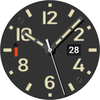
Watch face for Wear OS smartwatches
- Current date display.
- Battery charge display as an analog scale instead of the number "9"
- The second hand has a quartz movement
CUSTOMIZATION
You can customize the information zone on the watch face to display the current weather. To do this, in the watch face menu, set this complication to display data from the Weather application. Of course, you can set the output of data from any other application of your watch. But I want to warn you that they may not be optimized for display on the watch face and either be displayed incorrectly or not be displayed at all.
IMPORTANT! I can guarantee the correct operation of the information zone only on watches manufactured by Samsung. Unfortunately, I cannot guarantee operation on watches of other manufacturers. Please take this into account when purchasing the watch face.
There is also one peculiarity in displaying the weather on the Samsung Galaxy Watch Ultra watch - as of 11/24/24, weather data (stock Samsung application) in this watch is displayed incorrectly due to software. You can use weather data from third-party applications.
You can change the color of the second hand and battery indicator through the dial settings menu.
I made an original AOD mode for this dial. In order for it to be displayed, you need to activate it in the menu of your watch.
For comments and suggestions, please write to e-mail: eradzivill@mail.ru
Join us on social networks
https://vk.com/eradzivill
https://radzivill.com
https://t.me/eradzivill
https://www.facebook.com/groups/radzivill
Sincerely,
Eugeniy Radzivill