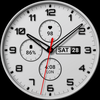
Watch face 10h08.com #134

ASO Keyword Dashboard
Tracking 71 keywords for Watch face 10h08.com #134 in Google Play
Watch face 10h08.com #134 tracks 71 keywords (no keywords rank yet; 71 need traction). Key metrics: opportunity 70.3, difficulty 49.6.
3 complications. Full AOD or 4 minimalist AOD styles. 30 themes color palette.
Tracked keywords
71
0 ranked • 71 not ranking yet
Top 10 coverage
—
Best rank — • Latest leader —
Avg opportunity
70.3
Top keyword: analog
Avg difficulty
49.6
Lower scores indicate easier wins
Opportunity leaders
- 62.5
analog
Opportunity: 74.0 • Difficulty: 38.5 • Rank —
Competitors: 189
- 64.2
sharp
Opportunity: 74.0 • Difficulty: 44.1 • Rank —
Competitors: 924
- 63.1
minimalist
Opportunity: 74.0 • Difficulty: 39.8 • Rank —
Competitors: 246
- 61.8
scroll
Opportunity: 74.0 • Difficulty: 46.7 • Rank —
Competitors: 424
- 59.4
aod
Opportunity: 74.0 • Difficulty: 35.7 • Rank —
Competitors: 13
Unranked opportunities
analog
Opportunity: 74.0 • Difficulty: 38.5 • Competitors: 189
sharp
Opportunity: 74.0 • Difficulty: 44.1 • Competitors: 924
minimalist
Opportunity: 74.0 • Difficulty: 39.8 • Competitors: 246
scroll
Opportunity: 74.0 • Difficulty: 46.7 • Competitors: 424
aod
Opportunity: 74.0 • Difficulty: 35.7 • Competitors: 13
High competition keywords
find
Total apps: 304,556 • Major competitors: 17,604
Latest rank: — • Difficulty: 58.6
simple
Total apps: 252,408 • Major competitors: 12,157
Latest rank: — • Difficulty: 55.2
play
Total apps: 204,818 • Major competitors: 20,205
Latest rank: — • Difficulty: 60.1
available
Total apps: 197,052 • Major competitors: 10,388
Latest rank: — • Difficulty: 58.5
world
Total apps: 193,391 • Major competitors: 14,978
Latest rank: — • Difficulty: 57.5
All tracked keywords
Includes opportunity, difficulty, rankings and competitor benchmarks
| Major Competitors | |||||||
|---|---|---|---|---|---|---|---|
| play | 66 | 100 | 60 | 85 204,818 competing apps Median installs: 7,950 Avg rating: 2.8 | — | — | 20,205 major competitor apps |
| social media | 71 | 100 | 48 | 73 38,008 competing apps Median installs: 3,428 Avg rating: 2.4 | — | — | 2,253 major competitor apps |
| weather | 72 | 100 | 55 | 70 23,401 competing apps Median installs: 3,705 Avg rating: 2.7 | — | — | 1,529 major competitor apps |
| follow | 69 | 100 | 53 | 78 81,668 competing apps Median installs: 1,609 Avg rating: 2.6 | — | — | 4,367 major competitor apps |
| page | 72 | 100 | 47 | 71 28,099 competing apps Median installs: 3,966 Avg rating: 2.5 | — | — | 1,606 major competitor apps |
| right | 67 | 100 | 57 | 83 157,815 competing apps Median installs: 2,044 Avg rating: 2.5 | — | — | 8,780 major competitor apps |
| software | 71 | 100 | 49 | 72 31,357 competing apps Median installs: 1,562 Avg rating: 2.3 | — | — | 1,109 major competitor apps |
| classic | 70 | 100 | 51 | 76 60,457 competing apps Median installs: 3,756 Avg rating: 2.8 | — | — | 4,799 major competitor apps |
| heart | 71 | 100 | 47 | 74 42,165 competing apps Median installs: 951 Avg rating: 2.2 | — | — | 1,593 major competitor apps |
| wear | 71 | 100 | 61 | 72 32,356 competing apps Median installs: 354 Avg rating: 1.9 | — | — | 871 major competitor apps |
| analog | 74 | 100 | 39 | 62 8,334 competing apps Median installs: 467 Avg rating: 2.0 | — | — | 189 major competitor apps |
| wear os | 72 | 100 | 60 | 70 24,100 competing apps Median installs: 273 Avg rating: 1.7 | — | — | 297 major competitor apps |
| find | 65 | 100 | 59 | 87 304,556 competing apps Median installs: 3,102 Avg rating: 2.6 | — | — | 17,604 major competitor apps |
| option | 70 | 100 | 49 | 74 47,196 competing apps Median installs: 3,385 Avg rating: 2.5 | — | — | 2,521 major competitor apps |
| available | 66 | 100 | 58 | 84 197,052 competing apps Median installs: 2,971 Avg rating: 2.5 | — | — | 10,388 major competitor apps |
| swipe | 72 | 100 | 49 | 69 22,119 competing apps Median installs: 4,567 Avg rating: 2.8 | — | — | 1,647 major competitor apps |
| video | 69 | 100 | 58 | 79 85,565 competing apps Median installs: 5,715 Avg rating: 2.6 | — | — | 6,825 major competitor apps |
| install | 70 | 100 | 49 | 76 58,762 competing apps Median installs: 3,502 Avg rating: 2.5 | — | — | 2,824 major competitor apps |
| watch | 68 | 100 | 57 | 80 103,057 competing apps Median installs: 1,134 Avg rating: 2.3 | — | — | 5,705 major competitor apps |
| galaxy | 73 | 100 | 50 | 68 18,086 competing apps Median installs: 744 Avg rating: 2.5 | — | — | 671 major competitor apps |
| pro | 71 | 100 | 54 | 72 33,467 competing apps Median installs: 4,090 Avg rating: 2.7 | — | — | 2,695 major competitor apps |
| smart | 68 | 100 | 55 | 81 119,649 competing apps Median installs: 1,774 Avg rating: 2.5 | — | — | 6,382 major competitor apps |
| hand | 71 | 100 | 45 | 72 31,575 competing apps Median installs: 2,308 Avg rating: 2.5 | — | — | 1,682 major competitor apps |
| open | 68 | 100 | 54 | 79 95,105 competing apps Median installs: 4,736 Avg rating: 2.7 | — | — | 7,238 major competitor apps |
| simple | 66 | 100 | 55 | 86 252,408 competing apps Median installs: 2,293 Avg rating: 2.4 | — | — | 12,157 major competitor apps |
App Description
3 complications. Full AOD or 4 minimalist AOD styles. 30 themes color palette.
User manual:
1. The watch face only works for devices running Wear OS 5 or later
Check in Watch settings - Watch info - Software info - Wear OS version
2. Your weather shows "?". Open Galaxy Wearable app - Watch settings - Apps - Find Weather app and open it - Settings - Enable location, local, adjust units,...
* With Wear OS 6 and One UI 8 or later, please open the Weather app on your watch, then tap settings to configure.
3. How to turn on Simple AOD mode? Customize watch face and select menu:
- AOD simple background: select option 2 to enable black background
- AOD simple hands style: select option 2 or 3 to choose the hand style
- AOD simple index style: select option 2 or 3 to choose the index ring
🟥 Information:
- High resolution, sharp images
- Classic and elegant design
- Analog time
- Day, date
- Heart rate
- World clock
- Battery level
- 3 complications: heart rate, world clock, battery level
- The seconds hand of a stopwatch
- Full AOD or 4 minimalist AOD styles (please read the user manual)
- 30 themes color palette (video available on Google Play Store)
🟨 How to custom this watch face?
1. Press and hold watch face screen
2. Tap “Customize” button
3. Swipe left or right, up or down to customize watch face
🟦 How to install watch face on your watch?
1. Install watch face from Google Play store
2. Press and hold watch face screen
3. Swipe right to left and tap “Add watch face”
4. Scroll to the bottom of the page and selectwatch face in the “downloaded” section
🟧 Compatible with smart watches running Wear OS 5+ SDK 34+
For example: Galaxy Watch 6, Galaxy Watch 7 Ultra, Ticwatch Pro 5, Pixcel Watch 2, Watch 2 Pro,...
🟩 See all my watch faces: https://play.google.com/store/apps/dev?id=5487081600241990978
🟪 Follow my social media pages for the latest watch face updates:
https://10h08.com
https://facebook.com/10h08