x10: Racing Tachometer Face

ASO Keyword Dashboard
Tracking 195 keywords for x10: Racing Tachometer Face in Google Play
x10: Racing Tachometer Face tracks 195 keywords (no keywords rank yet; 195 need traction). Key metrics: opportunity 70.4, difficulty 47.1.
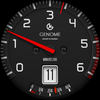
Sporty tachometer-style watch face with a unique fuel gauge battery indicator.
Tracked keywords
195
0 ranked • 195 not ranking yet
Top 10 coverage
—
Best rank — • Latest leader —
Avg opportunity
70.4
Top keyword: maintaining
Avg difficulty
47.1
Lower scores indicate easier wins
Opportunity leaders
- 63.7
maintaining
Opportunity: 75.0 • Difficulty: 39.6 • Rank —
Competitors: 271
- 65.7
tech
Opportunity: 74.0 • Difficulty: 42.9 • Rank —
Competitors: 634
- 62.5
analog
Opportunity: 74.0 • Difficulty: 38.6 • Rank —
Competitors: 179
- 66.0
api
Opportunity: 74.0 • Difficulty: 42.9 • Rank —
Competitors: 357
- 63.3
clarity
Opportunity: 74.0 • Difficulty: 39.5 • Rank —
Competitors: 318
Unranked opportunities
maintaining
Opportunity: 75.0 • Difficulty: 39.6 • Competitors: 271
tech
Opportunity: 74.0 • Difficulty: 42.9 • Competitors: 634
analog
Opportunity: 74.0 • Difficulty: 38.6 • Competitors: 179
api
Opportunity: 74.0 • Difficulty: 42.9 • Competitors: 357
clarity
Opportunity: 74.0 • Difficulty: 39.5 • Competitors: 318
High competition keywords
time
Total apps: 384,063 • Major competitors: 16,155
Latest rank: — • Difficulty: 58.5
access
Total apps: 339,099 • Major competitors: 11,565
Latest rank: — • Difficulty: 59.5
download
Total apps: 335,488 • Major competitors: 15,885
Latest rank: — • Difficulty: 56.8
find
Total apps: 307,196 • Major competitors: 16,297
Latest rank: — • Difficulty: 59.7
experience
Total apps: 291,062 • Major competitors: 15,372
Latest rank: — • Difficulty: 58.0
All tracked keywords
Includes opportunity, difficulty, rankings and competitor benchmarks
| Major Competitors | |||||||
|---|---|---|---|---|---|---|---|
| download | 65 | 100 | 57 | 88 335,488 competing apps Median installs: 1,672 Avg rating: 2.0 | — | — | 15,885 major competitor apps |
| play | 66 | 100 | 62 | 85 206,993 competing apps Median installs: 6,220 Avg rating: 2.3 | — | — | 18,537 major competitor apps |
| best | 66 | 100 | 59 | 86 255,700 competing apps Median installs: 3,148 Avg rating: 2.1 | — | — | 16,875 major competitor apps |
| sports | 71 | 100 | 51 | 73 37,465 competing apps Median installs: 1,846 Avg rating: 2.0 | — | — | 2,037 major competitor apps |
| racing | 73 | 100 | 53 | 66 14,649 competing apps Median installs: 27,572 Avg rating: 2.3 | — | — | 1,990 major competitor apps |
| level | 68 | 100 | 55 | 80 109,636 competing apps Median installs: 1,857 Avg rating: 2.1 | — | — | 6,418 major competitor apps |
| mode | 69 | 100 | 58 | 77 69,108 competing apps Median installs: 3,953 Avg rating: 2.2 | — | — | 5,277 major competitor apps |
| right | 67 | 100 | 58 | 83 159,342 competing apps Median installs: 1,586 Avg rating: 2.0 | — | — | 8,092 major competitor apps |
| device | 68 | 100 | 63 | 80 108,001 competing apps Median installs: 2,605 Avg rating: 2.1 | — | — | 6,163 major competitor apps |
| phone | 67 | 100 | 62 | 83 152,383 competing apps Median installs: 2,625 Avg rating: 2.1 | — | — | 8,541 major competitor apps |
| via | 68 | 100 | 53 | 81 116,083 competing apps Median installs: 1,479 Avg rating: 2.0 | — | — | 4,244 major competitor apps |
| connected | 69 | 100 | 51 | 78 74,141 competing apps Median installs: 551 Avg rating: 1.8 | — | — | 2,176 major competitor apps |
| experience | 65 | 100 | 58 | 87 291,062 competing apps Median installs: 1,458 Avg rating: 2.0 | — | — | 15,372 major competitor apps |
| active | 71 | 100 | 49 | 72 32,592 competing apps Median installs: 1,485 Avg rating: 2.0 | — | — | 1,392 major competitor apps |
| classic | 70 | 100 | 52 | 76 61,395 competing apps Median installs: 3,265 Avg rating: 2.2 | — | — | 4,541 major competitor apps |
| digital | 68 | 100 | 52 | 81 124,568 competing apps Median installs: 779 Avg rating: 1.8 | — | — | 4,267 major competitor apps |
| tech | 74 | 100 | 43 | 66 13,358 competing apps Median installs: 1,258 Avg rating: 2.0 | — | — | 634 major competitor apps |
| wear | 71 | 100 | 63 | 72 32,640 competing apps Median installs: 359 Avg rating: 1.6 | — | — | 811 major competitor apps |
| analog | 74 | 100 | 39 | 63 8,427 competing apps Median installs: 428 Avg rating: 1.7 | — | — | 179 major competitor apps |
| design | 68 | 100 | 53 | 80 99,535 competing apps Median installs: 1,619 Avg rating: 1.9 | — | — | 4,519 major competitor apps |
| dial | 73 | 100 | 38 | 59 4,896 competing apps Median installs: 636 Avg rating: 1.8 | — | — | 190 major competitor apps |
| wear os | 72 | 100 | 61 | 70 24,335 competing apps Median installs: 294 Avg rating: 1.5 | — | — | 289 major competitor apps |
| simply | 69 | 100 | 49 | 78 83,864 competing apps Median installs: 1,437 Avg rating: 2.0 | — | — | 3,333 major competitor apps |
| information | 65 | 100 | 55 | 86 267,605 competing apps Median installs: 1,023 Avg rating: 1.9 | — | — | 7,566 major competitor apps |
| used | 68 | 100 | 55 | 81 116,120 competing apps Median installs: 2,379 Avg rating: 2.0 | — | — | 4,640 major competitor apps |
App Description
Sporty tachometer-style watch face with a unique fuel gauge battery indicator.
x10: Automotive Racing Watch Face
Transform your Wear OS smartwatch with the x10 watch face, a design inspired by the high-performance world of automotive racing. 🏎️ Experience the thrill of a sports car dashboard right on your wrist. This unique analog watch face combines a classic tachometer aesthetic with modern functionality, offering a bold and dynamic look for your daily driver. If you appreciate precision engineering and a sporty analog design, the x10 is crafted for you.
This watch face is designed for Wear OS, bringing a powerful and stylish automotive theme to your device. The high-contrast display ensures that you can read the time and your essential data at a quick glance, just like a real instrument panel.
Key Features ✨
• Unique Analog Time Display: Read the minutes with a glance at the large red hand, inspired by a car's tachometer. The dial is marked "MINUTES X10" for an intuitive and stylish reading of the current minute. This analog design is both functional and visually striking.
• Clear Digital Hour: The current hour is prominently displayed in a crisp digital window, ensuring you never miss a beat. This hybrid approach combines the best of analog and digital styles.
• Dynamic Seconds Indicator: A subtle yet clear red marker sweeps around the outer edge of the dial, tracking the seconds with precision, adding a dynamic element to the watch face.
• Automotive-Style Battery Gauge: 🔋 Keep an eye on your watch's power level with a battery indicator designed to look like a classic fuel gauge. The gauge, marked from R to 4/4, provides a thematic way to monitor your battery life.
• Convenient App Shortcut: Features one integrated tap zone for quick access to your most-used application. Simply tap the center of the screen to launch your preferred app.
• High-Contrast Design: The bold black, white, and red color scheme provides excellent readability in various lighting conditions, mimicking the clarity of a real racing car's dashboard.
Always-On Display (AOD) Mode ⌚
The x10 watch face includes a power-efficient Always-On Display mode that keeps essential information visible without draining your battery.
• Displays the time with the digital hour and analog minute hand.
• Shows the current battery level via the fuel gauge indicator.
• Designed with a minimalist, dimmed aesthetic to maximize battery life while maintaining the core automotive style of the watch face.
Device Compatibility
• This watch face is compatible with all Wear OS API 30+ devices, including smartwatches from a variety of manufacturers. It is optimized to provide a smooth and responsive experience on your Wear OS watch.
Installation Instructions
1. Ensure your watch is connected to your phone via Bluetooth.
2. Open the Play Store on your watch and search for "x10 Watch Face".
3. Install the watch face directly onto your watch.
4. Alternatively, find the watch face on the Play Store on your phone and select your watch device from the dropdown menu to install.
5. After installation, long-press on your current watch face, scroll to find the x10 watch face, and set it as your active face.
Give your smartwatch a sporty, high-tech upgrade. The x10 watch face brings the excitement of the race track to your wrist with its distinctive analog design and practical features. Download now and put the power of a performance dashboard on your Wear OS device.