WS Trek Pro - Hybrid WatchFace

ASO Keyword Dashboard
Tracking 116 keywords for WS Trek Pro - Hybrid WatchFace in Google Play
WS Trek Pro - Hybrid WatchFace tracks 116 keywords (1 keyword ranks; 115 need traction). Key metrics: 100% top-10 coverage, opportunity 70.8, difficulty 46.9, best rank 8.
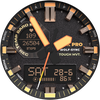
WS TrekPro is a modern hybrid informative watch face for Wear OS.
Tracked keywords
116
1 ranked • 115 not ranking yet
Top 10 coverage
100%
Best rank 8 • Latest leader —
Avg opportunity
70.8
Top keyword: faces
Avg difficulty
46.9
Lower scores indicate easier wins
Opportunity leaders
- 63.7
faces
Opportunity: 75.0 • Difficulty: 40.8 • Rank —
Competitors: 353
- 62.5
analog
Opportunity: 74.0 • Difficulty: 38.6 • Rank —
Competitors: 179
- 63.5
counter
Opportunity: 74.0 • Difficulty: 41.4 • Rank —
Competitors: 608
- 65.8
measure
Opportunity: 74.0 • Difficulty: 42.5 • Rank —
Competitors: 571
- 64.2
showing
Opportunity: 74.0 • Difficulty: 46.7 • Rank —
Competitors: 497
Unranked opportunities
faces
Opportunity: 75.0 • Difficulty: 40.8 • Competitors: 353
analog
Opportunity: 74.0 • Difficulty: 38.6 • Competitors: 179
counter
Opportunity: 74.0 • Difficulty: 41.4 • Competitors: 608
measure
Opportunity: 74.0 • Difficulty: 42.5 • Competitors: 571
showing
Opportunity: 74.0 • Difficulty: 46.7 • Competitors: 497
High competition keywords
make
Total apps: 327,400 • Major competitors: 18,245
Latest rank: — • Difficulty: 58.8
find
Total apps: 307,160 • Major competitors: 16,289
Latest rank: — • Difficulty: 59.7
choose
Total apps: 195,600 • Major competitors: 12,132
Latest rank: — • Difficulty: 56.3
support
Total apps: 170,973 • Major competitors: 7,331
Latest rank: — • Difficulty: 55.2
keep
Total apps: 170,391 • Major competitors: 8,136
Latest rank: — • Difficulty: 57.9
All tracked keywords
Includes opportunity, difficulty, rankings and competitor benchmarks
| Major Competitors | |||||||
|---|---|---|---|---|---|---|---|
| prowess | 72 | 100 | 38 | 54 2,411 competing apps Median installs: 5,575 Avg rating: 2.3 | 8 | 8 | 202 major competitor apps |
| 69 | 100 | 50 | 77 69,407 competing apps Median installs: 2,062 Avg rating: 2.1 | — | — | 2,882 major competitor apps | |
| right | 67 | 100 | 58 | 83 159,329 competing apps Median installs: 1,587 Avg rating: 2.0 | — | — | 8,094 major competitor apps |
| single | 69 | 100 | 52 | 78 75,074 competing apps Median installs: 1,819 Avg rating: 2.0 | — | — | 3,980 major competitor apps |
| try | 69 | 100 | 58 | 78 79,781 competing apps Median installs: 5,735 Avg rating: 2.3 | — | — | 7,171 major competitor apps |
| device | 68 | 100 | 63 | 80 107,977 competing apps Median installs: 2,606 Avg rating: 2.1 | — | — | 6,166 major competitor apps |
| make | 65 | 100 | 59 | 88 327,400 competing apps Median installs: 2,052 Avg rating: 2.1 | — | — | 18,245 major competitor apps |
| phone | 67 | 100 | 62 | 83 152,368 competing apps Median installs: 2,627 Avg rating: 2.1 | — | — | 8,547 major competitor apps |
| connected | 69 | 100 | 51 | 78 74,124 competing apps Median installs: 550 Avg rating: 1.8 | — | — | 2,176 major competitor apps |
| support | 67 | 100 | 55 | 83 170,973 competing apps Median installs: 1,241 Avg rating: 2.0 | — | — | 7,331 major competitor apps |
| heart | 71 | 100 | 47 | 74 42,623 competing apps Median installs: 795 Avg rating: 1.8 | — | — | 1,459 major competitor apps |
| wear | 71 | 100 | 63 | 72 32,641 competing apps Median installs: 359 Avg rating: 1.6 | — | — | 811 major competitor apps |
| wearos | 72 | 100 | 32 | 53 2,058 competing apps Median installs: 188 Avg rating: 1.3 | — | — | 11 major competitor apps |
| analog | 74 | 100 | 39 | 63 8,427 competing apps Median installs: 428 Avg rating: 1.7 | — | — | 179 major competitor apps |
| wear os | 72 | 100 | 61 | 70 24,337 competing apps Median installs: 294 Avg rating: 1.5 | — | — | 289 major competitor apps |
| list | 69 | 100 | 53 | 78 82,578 competing apps Median installs: 1,953 Avg rating: 2.0 | — | — | 3,303 major competitor apps |
| modern | 69 | 100 | 50 | 78 78,092 competing apps Median installs: 979 Avg rating: 1.8 | — | — | 3,245 major competitor apps |
| choose | 66 | 100 | 56 | 84 195,600 competing apps Median installs: 2,307 Avg rating: 2.1 | — | — | 12,132 major competitor apps |
| immediately | 72 | 100 | 43 | 69 22,283 competing apps Median installs: 2,482 Avg rating: 1.9 | — | — | 874 major competitor apps |
| find | 65 | 100 | 60 | 87 307,160 competing apps Median installs: 2,265 Avg rating: 2.1 | — | — | 16,289 major competitor apps |
| customizable | 71 | 100 | 49 | 73 40,923 competing apps Median installs: 1,101 Avg rating: 2.1 | — | — | 2,086 major competitor apps |
| rate | 70 | 100 | 48 | 75 50,251 competing apps Median installs: 2,150 Avg rating: 1.9 | — | — | 2,057 major competitor apps |
| swipe | 72 | 100 | 51 | 69 22,431 competing apps Median installs: 3,322 Avg rating: 2.2 | — | — | 1,526 major competitor apps |
| install | 70 | 100 | 50 | 76 59,106 competing apps Median installs: 2,465 Avg rating: 2.1 | — | — | 2,547 major competitor apps |
| watch | 68 | 100 | 58 | 80 104,310 competing apps Median installs: 1,014 Avg rating: 1.9 | — | — | 5,218 major competitor apps |
App Description
WS TrekPro is a modern hybrid informative watch face for Wear OS.
INSTALLATION OPTIONS:
1. Keep your watch connected to your phone.
2. Install in the phone. After installation, immediately check your watch face list in your watch by pressing and hold display then swipe to the very end and click Add watch face. There you can see the newly installed watch face and just activate it.
3. After installation, you can also check the following:
A. For Samsung watches, check your Galaxy Wearable app in your phone (install it if not yet installed). Under Watch faces > Downloaded, there you can see the newly installed watch face and then just apply it to connected watch.
B. For other smartwatch brands, for other Wear OS devices, please check the watch app installed in your phone that comes with your smartwatch brand and find the newly installed watch face in the watch face gallery or list.
4. Please also visit the link below showing many options how to install Wear OS watch face in your watch.
https://developer.samsung.com/sdp/blog/en-us/2022/11/15/install-watch-faces-for-galaxy-watch5-and-one-ui-watch-45
For support and request, you can email me at balloziwatchface@gmail.com
FEATURES:
- Analog clock
- Battery percent and progress bar with red indicator at 20% and below
- Steps counter editable complication
- 3x Background styles
- 3x Theme colors
- 3x Watch hand colors, index markers & stripes (customizable separately)
- 1x Editable complications
- 5x Preset app shortcuts
CUSTOMIZATION:
1. Press and hold display then hit "Customize".
2. Swipe left and right to choose what to customize.
3. Swipe up and down to choose options available.
4. Hit "OK".
PRESET APP SHORTCUTS:
1.Phone
2. Alarm
3. Music
4. Battery status
5. Messages
6. Calendar
7. Settings
8. Heart rate
Note:
If Heart Rate is 0, you probably missed the Allow permission
in the first installation. Please try solutions below:
1. Please do this two (2) times - switch to another watch face and switch back to this face to enable the permission
2. You can also enable permissions in the Settings> Apps> Permission> find this watch face.
3. Also this can be triggered by a single tap to measure the heart rate. Some of my watch faces are still in Manual Refresh
Supported Device List -
Xiaomi Watch 2 Pro
Xiaomi Watch 2
Xiaomi Watch 2 Pro
Galaxy Watch4 Classic
Galaxy Watch4 Classic
Galaxy Watch4 Classic
Galaxy Watch4 Classic
Galaxy Watch6 Classic
Galaxy Watch6 Classic
Galaxy Watch6 Classic
Galaxy Watch6 Classic
Galaxy Watch5 Pro
Galaxy Watch5 Pro
Galaxy Watch Ultra
Galaxy Watch Ultra
Galaxy Watch FE
Galaxy Watch FE
Galaxy Watch5
Galaxy Watch5
Galaxy Watch5
Galaxy Watch5
Galaxy Watch4
Galaxy Watch4
Galaxy Watch4
Galaxy Watch4
Galaxy Watch7
Galaxy Watch7
Galaxy Watch7
Galaxy Watch7
Galaxy Watch6
Galaxy Watch6
Galaxy Watch6
Galaxy Watch6
Pixel watch 3
Pixel watch 3
Pixel Watch
Pixel Watch
Pixel watch 3
Pixel watch 3
Pixel Watch 2
Pixel Watch 2
OnePlus Watch 3
OnePlus Watch 2R
OnePlus Watch 2
OPPO Watch X2
OPPO Watch X