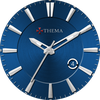
Classic One Wear Watch Face

ASO Keyword Dashboard
Tracking 76 keywords for Classic One Wear Watch Face in Google Play
Classic One Wear Watch Face tracks 76 keywords (1 keyword ranks; 75 need traction). Key metrics: 100% top-10 coverage, opportunity 70.1, difficulty 50.1, best rank 6.
Classic One Wear Watch Face is made for you : Design & Fashion !
Tracked keywords
76
1 ranked • 75 not ranking yet
Top 10 coverage
100%
Best rank 6 • Latest leader —
Avg opportunity
70.1
Top keyword: french
Avg difficulty
50.1
Lower scores indicate easier wins
Opportunity leaders
- 63.6
french
Opportunity: 75.0 • Difficulty: 41.3 • Rank —
Competitors: 525
- 63.6
faces
Opportunity: 75.0 • Difficulty: 40.5 • Rank —
Competitors: 392
- 66.2
preview
Opportunity: 74.0 • Difficulty: 55.4 • Rank —
Competitors: 1,010
- 62.7
bad
Opportunity: 74.0 • Difficulty: 54.4 • Rank —
Competitors: 778
- 61.2
gear
Opportunity: 74.0 • Difficulty: 44.9 • Rank —
Competitors: 777
Unranked opportunities
french
Opportunity: 75.0 • Difficulty: 41.3 • Competitors: 525
faces
Opportunity: 75.0 • Difficulty: 40.5 • Competitors: 392
preview
Opportunity: 74.0 • Difficulty: 55.4 • Competitors: 1,010
bad
Opportunity: 74.0 • Difficulty: 54.4 • Competitors: 778
gear
Opportunity: 74.0 • Difficulty: 44.9 • Competitors: 777
High competition keywords
free
Total apps: 323,639 • Major competitors: 24,336
Latest rank: — • Difficulty: 58.7
mobile
Total apps: 281,737 • Major competitors: 11,159
Latest rank: — • Difficulty: 55.7
using
Total apps: 221,131 • Major competitors: 12,080
Latest rank: — • Difficulty: 56.7
play
Total apps: 208,292 • Major competitors: 20,375
Latest rank: — • Difficulty: 59.9
start
Total apps: 201,871 • Major competitors: 13,032
Latest rank: — • Difficulty: 56.1
All tracked keywords
Includes opportunity, difficulty, rankings and competitor benchmarks
| Major Competitors | |||||||
|---|---|---|---|---|---|---|---|
| watch face | 72 | 100 | 43 | 69 22,747 competing apps Median installs: 258 Avg rating: 4.3 | 6 | 6 | 53 major competitor apps |
| free | 65 | 100 | 59 | 88 323,639 competing apps Median installs: 5,447 Avg rating: 4.1 | — | — | 24,336 major competitor apps |
| play | 66 | 100 | 60 | 85 208,292 competing apps Median installs: 7,199 Avg rating: 4.0 | — | — | 20,375 major competitor apps |
| top | 69 | 100 | 56 | 79 87,661 competing apps Median installs: 3,201 Avg rating: 4.0 | — | — | 6,244 major competitor apps |
| 69 | 100 | 50 | 77 69,614 competing apps Median installs: 2,543 Avg rating: 4.0 | — | — | 3,084 major competitor apps | |
| right | 67 | 100 | 57 | 83 160,130 competing apps Median installs: 1,940 Avg rating: 4.0 | — | — | 8,862 major competitor apps |
| version | 70 | 100 | 54 | 76 57,080 competing apps Median installs: 4,935 Avg rating: 4.0 | — | — | 3,388 major competitor apps |
| contact | 67 | 100 | 54 | 82 139,024 competing apps Median installs: 1,822 Avg rating: 4.0 | — | — | 6,349 major competitor apps |
| classic | 69 | 100 | 51 | 76 61,944 competing apps Median installs: 3,449 Avg rating: 4.1 | — | — | 4,865 major competitor apps |
| wear | 71 | 100 | 61 | 72 32,741 competing apps Median installs: 379 Avg rating: 4.1 | — | — | 868 major competitor apps |
| design | 68 | 100 | 52 | 80 100,148 competing apps Median installs: 1,963 Avg rating: 4.1 | — | — | 4,917 major competitor apps |
| wear os | 72 | 100 | 60 | 70 24,400 competing apps Median installs: 292 Avg rating: 4.2 | — | — | 300 major competitor apps |
| collection | 68 | 100 | 51 | 80 100,239 competing apps Median installs: 3,860 Avg rating: 4.1 | — | — | 4,639 major competitor apps |
| manage | 66 | 100 | 55 | 84 187,474 competing apps Median installs: 757 Avg rating: 3.9 | — | — | 7,313 major competitor apps |
| choose | 66 | 100 | 55 | 84 194,693 competing apps Median installs: 2,914 Avg rating: 4.0 | — | — | 13,472 major competitor apps |
| using | 66 | 100 | 57 | 85 221,131 competing apps Median installs: 2,891 Avg rating: 3.9 | — | — | 12,080 major competitor apps |
| available | 66 | 100 | 58 | 84 200,924 competing apps Median installs: 2,596 Avg rating: 4.0 | — | — | 10,490 major competitor apps |
| mobile | 65 | 100 | 56 | 87 281,737 competing apps Median installs: 1,458 Avg rating: 3.9 | — | — | 11,159 major competitor apps |
| process | 70 | 100 | 48 | 76 56,882 competing apps Median installs: 998 Avg rating: 3.9 | — | — | 1,932 major competitor apps |
| giving | 71 | 100 | 48 | 72 33,192 competing apps Median installs: 1,864 Avg rating: 4.0 | — | — | 1,558 major competitor apps |
| install | 70 | 100 | 49 | 76 59,328 competing apps Median installs: 3,188 Avg rating: 4.1 | — | — | 2,857 major competitor apps |
| store | 69 | 100 | 54 | 78 81,806 competing apps Median installs: 1,653 Avg rating: 4.1 | — | — | 4,257 major competitor apps |
| watch | 68 | 100 | 57 | 80 105,087 competing apps Median installs: 1,213 Avg rating: 4.0 | — | — | 5,780 major competitor apps |
| search | 67 | 100 | 58 | 82 131,916 competing apps Median installs: 3,369 Avg rating: 4.1 | — | — | 6,891 major competitor apps |
| start | 66 | 100 | 56 | 84 201,871 competing apps Median installs: 2,641 Avg rating: 4.0 | — | — | 13,032 major competitor apps |
App Description
Classic One Wear Watch Face is made for you : Design & Fashion !
This classic watch shows the basics of what a watch should display : hour & day.
The settings of the watch face are located in the "Wear OS" app of your mobile.
Just hit the gear icon over the watch face preview and the settings screen will show up!
★ Settings ★
This watch face allows you to choose your favorite background color (15 availables).
Settings are available in both watch and mobile (settings in the watch face selector).
★ Installation ★
🔸Wear OS 2.X / 3.X / 4.X
A notification will be displayed on your watch, right after your mobile installation. You just have to hit it to start the installation process of the watch face.
If the notification did not display for some reason, you can still install the watch face by using the Google Play Store available on your watch: just search the watch face by its name.
🔸Wear OS 6.X
Install the watch app to manage the watchface: the free version is automatically installed. Then use the "MANAGE" button in the top right shortcut of the watchface to update/upgrade your watch face.
Once installed, you can select the watch face from the Wear OS App.
Or long tap on the current watch face screen : watch face selector screen will open.
★ More watch faces ★
Visit my watch faces collection for Wear OS on the Play Store at https://goo.gl/CRzXbS
** If you have any issues or questions, feel free to contact me by email (English or French language) before giving a bad rating. Thanks!
Website: https://www.themaapps.com/
Youtube: https://youtube.com/ThomasHemetri
Twitter: https://x.com/ThomasHemetri
Instagram: https://www.instagram.com/thema_watchfaces