Liquid Glass KWGT Widgets


Liquid Glass KWGT Widgets Summary
Liquid Glass KWGT Widgets is a mobile Android app in Personalization by Space Dust. Released in Jul 2025 (8 months ago). It has about 181+ installs Based on AppGoblin estimates, it reaches roughly 5.00 monthly active users . Store metadata: updated Jul 29, 2025.
Recent activity: 1.00 installs this week (7.00 over 4 weeks) showing declining growth View trends →
Store info: Last updated on Google Play on Jul 29, 2025 .
0★
Ratings: 0
Screenshots


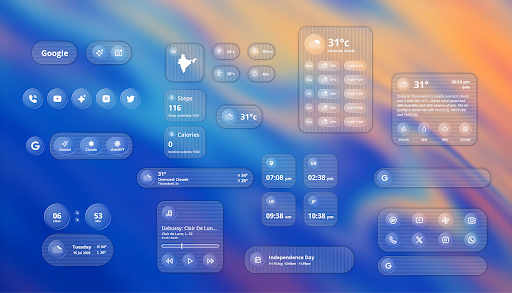

App Description
Liquid Glass KWGT widgets inspired by iOS 26 and Nothing Lenticular wallpapers
Fantastic Collection of Widgets inspired by iOS 26 Liquid Glass and Nothing Lenticular wallpapers
⚠️REQUIREMENTS:
- KWGT: https://play.google.com/store/apps/details?id=org.kustom.widget&hl=es&gl=US
- KWGT Pro Key: https://play.google.com/store/apps/details?id=org.kustom.widget.pro&hl=es&gl=US
Using a Custom launcher is advised.
Some Popular Custom launchers are Nova, Lawnchair, Niagara, Hyperion, etc.
INSTALLATION:
- Download "Liquid glass KWGT widgets" and KWGT with the PRO key
- Add a widget to your home screen and select the KWGT widget, once you have it tap on the widget, and the kwgt app will open
- Look for the "Liquid glass" KWGT widgets pack and select the one that you want
- Enjoy it!
HOW TO USE:
In the KWGT globals section, you will have all the options for each widget.
Some widgets depend on certain apps to function properly
How to customize?
- Every KWGT preset has its options under the "globals" tab with their descriptions, have fun playing with it!
- If a particular widget is not properly scaled, you can adjust the size with 'SCALE' under the layer option in the KWGT main editor.
RECOMMENDATIONS:
- Give KWGT all permissions needed
- Set the preferred music player in KWGT settings
- Widgets refresh every 5 seconds by default (you can change it to refresh by second but it will consume more battery)
Important Notes
- Exporting of Widgets and Komponents are locked to prevent pirates from exporting and using the widgets.
- Please install and leave a genuine review as it helps us a lot!
- Please contact us with any queries/issues before leaving a negative rating in the Play Store via the links provided below.
- Credits to Jahir Fiquitiva for his work on the Kuper dashboard.
- Credits to https://x.com/SachinXpert for his Weather Komponent.
⚠️ Disclaimer
- I'm not the owner of any of the trademarks named in this pack, this is just a conceptual design.