Passport Photo Maker Pro


Passport Photo Maker Pro Summary
Passport Photo Maker Pro is a mobile Android app in Photo And Video by Global Apps and Games. Released in Apr 2025 (10 months ago). It has about 433+ installs Based on AppGoblin estimates, it reaches roughly 63 monthly active users . Store metadata: updated Apr 20, 2025.
Recent activity: 49 installs this week (148 over 4 weeks) showing exceptional growth View trends →
Store info: Last updated on Google Play on Apr 20, 2025 .
0★
Ratings: 0
Screenshots

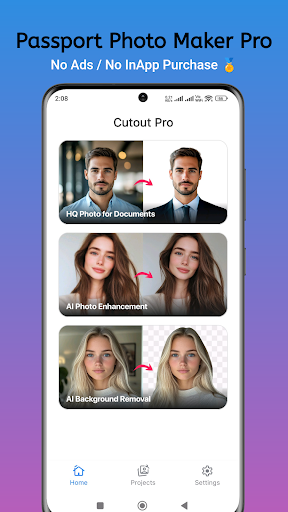


App Description
Easy Passport Photo Maker – Create perfect passport size photos in seconds.
Passport Photo Maker Pro – Create Perfect Passport & ID Photos Instantly
Create professional, regulation-compliant passport size photos right from your phone with Passport Photo Maker Pro—your all-in-one solution for creating, editing, and printing passport, visa, ID, and license photos at home or on the go. Whether you’re applying for a new passport or renewing a visa, this powerful yet easy-to-use app will help you save time, money, and effort.
Forget expensive photo studios—Passport Photo Maker Pro lets you generate multiple photos on a single printable sheet (3x4, 4x6, 5x7, or A4) so you can print them locally or order prints online with ease.
---
Why Choose Passport Photo Maker Pro?
1. Simple, Fast & User-Friendly Interface
Anyone can create high-quality passport photos in minutes—no expertise required.
2. Global Support for 100+ Official Sizes
Passport Photo Maker Pro supports official photo sizes for passports, IDs, visas, and licenses
3. Save Money with Multi-Photo Print Sheets
Combine multiple passport-size photos on a single sheet for standard print sizes like 3x4, 4x6, 5x7, or A4. Get your photos printed for less at local or online print services.
4. Professional Background Removal (Premium Feature)
Easily remove or change the background to meet official requirements. Replace the background with white, blue, or gray—commonly used for official documents. Our smart AI tool gives clean, accurate results in seconds.
5. Ink & Money Saver (Premium Feature)
Optimize your layout to use less ink during printing while preserving image quality—ideal for bulk printing.
6. Print Layout & Margin Customization
Tailor how many photos appear on a single sheet and customize margins and spacing for easy cutting and accurate prints.
7. Create From Camera or Gallery
Capture a new photo directly in the app or select from your device’s gallery. Use built-in editing tools to enhance and crop your image as needed.
8. Compliant & Reliable Output
Whether it’s for a passport, visa, or driving license, you’ll have the correct dimensions every time.
---
Key Features:
Combine multiple photos onto one print-ready sheet
Export photos for printing in sizes: 3x4, 4x6, 5x7, or A4
AI-powered background remover
Crop and auto-align photos using face detection
Adjust brightness, contrast, and positioning
Save, share, and print directly from your device
Offline functionality—no internet required to create or edit photos
How It Works:
1. Upload a photo or take a new one with your camera
2. Crop and align the photo using official guidelines
3. Remove or change the background (optional)
4. Create a print layout with multiple copies
5. Save or print your final image
---
Save Time & Money – Stay Photo Compliant
With Passport Photo Maker Pro, you no longer need to visit expensive studios or wait in long lines. Whether you're preparing official documents for yourself or your family, you can get the job done quickly and affordably right from your smartphone.
Users across the world trust Passport Photo Maker Pro for its accuracy, simplicity, and professional-quality output. It's the perfect app for frequent travelers, students, professionals, and families alike.