Enpass Password Manager

Enpass Password Manager Summary
Enpass Password Manager is a with in-app purchases Android app in the Productivity category, developed by Enpass Technologies Inc. First released 11 years ago(Feb 2015), the app has accumulated 1.5M+ total installs and 21.1K ratings with a 4.00★ (good) average rating.
Recent activity: 3.5K installs this week (15.4K over 4 weeks) showing steady growth , and 9.00 new ratings this week View trends →
Data tracking: SDKs and third-party integrations were last analyzed on Jan 29, 2026. The app's network data flows (API traffic to/from the app and its SDKs) were last crawled on Oct 17, 2025.
Store info: Last updated on Google Play on Nov 24, 2025 (version 1210).
Enpass Password Manager was last scanned for SDKs 2026-01-29. Below is the overview of third party companies detected in the app. The full list of raw SDKs, app permissions and unknown SDKs is available here.
 ReactiveX
 Kotlin
 Jake Wharton
 Firebase
 OpenTelemetry
 Google
4★
Ratings: 21.1K
Screenshots


App Description
Password management with storage you control, multiple vaults, layered security
CHOOSE YOUR OWN SAFEST PLACE TO STORE PASSWORDS & PASSKEYS
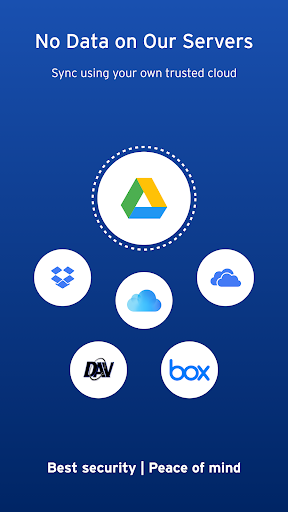
Enpass believes your data belongs to you. Instead of keeping everyone’s passwords on a central server like most password managers, with Enpass YOU choose where your encrypted vaults are stored and synced.
● Enpass works with Google Drive, OneDrive, Box, Dropbox, iCloud, NextCloud, WebDAV, or completely offline.
● And with support for storing and syncing passkeys across devices, Enpass is ready for the password-less future.
WHY YOU NEED A PASSWORD MANAGER
● Creating and typing in passwords is a hassle!
● Truly secure passwords are literally impossible to memorize
● When data breaches happen, you need to change your passwords quickly — and that needs to be easy
● Password managers keep your passwords safer, make them easier to use, and make them easier to change
WHY ENPASS IS SAFER
● Most password managers store every user’s vaults in their own central server, making a tempting single target for hackers
But with Enpass, hackers would have to
- Target you personally
- Know which cloud services you’ve chosen for your vaults
- Have the credentials to those cloud accounts
- Get past each account's multi-factor authentication
- And know your Enpass master password
● Enpass also includes password audit & breach monitoring — user-friendly tools to help keep you safe
WHY ENPASS IS BETTER
● Store and sync passkeys — ready for the password-less future
● Unlimited vaults — completely separate work passwords from personal, and more
● Wildly customizable — make your own templates, categories, and tags to organize your credentials and private files
● Customize each Item — add, remove, and rearrange fields, or make your own (even multi-line fields)
● Customizable password generator — tweak up to 10 parameters when creating strong new passwords
● Wear OS App: You can access your information right from your wrist without the need to pick up your phone.
● Attachments — include documents and images with your saved credentials
● Built-in authenticator (TOTP) — no need for a separate app for those 6-digit codes
● Easy import from other password managers and CSVs in the desktop app
AND ENPASS IS AFFORDABLE
● Sync up to 25 items for free (and Enpass desktop is completely free for individual users)
● Enpass Premium starts at just $1.99/mo, Enpass Family at $2.99/mo
● Enpass Business starts at $2.99/user/mo (or $9.99/mo flat for small teams)
● Visit enpass.io/pricing for more details. **
ENPASS IS ALSO BETTER FOR BUSINESS
● Decentralized storage & sync makes Enpass compliance-friendly
● Powerful security and recovery tools, and one-click sharing for teams
● Automatic provisioning and offboarding
● Easy integration with Google Workspace and Microsoft 365
ENPASS IS EVERYWHERE
● Enpass works across Android, iOS, Windows, Mac, Linux, and all major browsers
SECURITY
● Zero-knowledge AES-256 encryption on 100% of user data
● Certified compliance with ISO/IEC 27001:2013 standards
● Quick unlock with face or fingerprint authentication
● Quick unlock with a PIN
● Unlock with a keyfile as second-factor authentication
CONVENIENCE
● Auto-fills passwords, authentication codes, credit cards, and webforms
● Auto-saves new or changed credentials
● Stores and syncs passkeys across devices
● Syncs via your personal cloud accounts or via Wi-Fi
PASSWORD SAFETY
● Automatically checks for weak or compromised passwords
● Automatically monitors for website breaches
USE OF ACCESSIBILITY FEATURES
The Accessibility features help you to autofill the credentials into apps and websites saved in the Enpass.
** For in-app purchases, subscriptions will auto-renew unless disabled in the Play Store’s Payments & Subscriptions at least 24 hours before the renewal date
● Terms of Use: https://www.enpass.io/legal/terms
● Privacy Policy: https://www.enpass.io/legal/privacy
ENPASS SUPPORT
Email: support@enpass.io
Twitter: @EnpassApp
Facebook: Facebook.com/EnpassApp
Forums: https://discussion.enpass.io