To-Do List & Simple Reminders


To-Do List & Simple Reminders Summary
To-Do List & Simple Reminders is a ad-supported, with in-app purchases Android app in Productivity by TyabaApp. Released in Aug 2025 (6 months ago). It has about 1.5K+ installs Based on AppGoblin estimates, it reaches roughly 138 monthly active users and generates around $<10K monthly revenue (95% IAP / 5% ads). Store metadata: updated Aug 31, 2025.
Recent activity: 15 installs this week (63 over 4 weeks) showing below average growth View trends →
Store info: Last updated on Google Play on Aug 31, 2025 .
0★
Ratings: 0
Screenshots


App Description
Simple to-do list & task manager with reminders, widget, and offline checklist
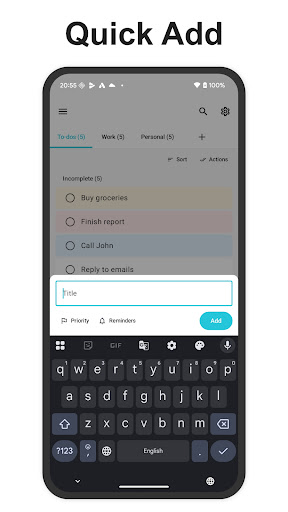
Manage your daily to-dos and shopping lists quickly, accurately, and effortlessly. Add tasks in seconds, set reminders, and check today's tasks at a glance with a home screen widget. No sign-in required — get started right away.
Key Features
- Fast entry: Add and edit tasks without friction
- Reminders: Set date and time notifications
- Subtasks: Break tasks into smaller steps and check them off (Free: 3 per task, Premium: unlimited)
- Drag and drop: Reorder tasks with saved order
- Tabs and search: Organize by tabs, search titles and subtasks instantly
- Priorities and notes: Highlight important tasks with notes for extra detail
- Widget: Preview subtasks and toggle completion right on your home screen
- Themes: Light and dark mode with adjustable text size
- Privacy first: Your data stays on your device
Why Choose This App
- Simple and distraction-free — focus on your to-do list
- Set reminders in one tap so you never forget important tasks
- Home screen widget for quick task checks, perfect for shopping lists too
Perfect For
- Anyone who wants a simple daily to-do list and checklist
- People who need to organize work, school, and personal tasks quickly
- Those who want a shopping list or packing list they can create in seconds
- Users who want reminders attached to their notes
Use Cases
- Daily to-do list: Morning routines, chores, and task management at work
- Shopping list: Add items as subtasks, check them off while shopping to avoid forgetting anything
- Recurring checklist: Use auto-reset to manage daily or weekly routines automatically
- Packing checklist: Prepare for trips or business travel and check items at a glance with the widget
Main Features
- Basics: Add, edit, delete tasks; mark complete or incomplete; drag to reorder
- Subtasks: Add, rename, delete; toggle completion (great for managing shopping list items)
- Tabs: Add, delete, rename (Free: up to 3 tabs, Premium: unlimited)
- Reminders: Set a reminder time per task with notifications (Free: up to 5, Premium: unlimited)
- Search: Real-time full-text search across titles and subtasks
- Auto reset: Automatically reset completed tasks at a set time per tab
- Widget: Display by tab, preview subtasks, and check them off on the spot
- Backup: Save and restore your to-do list to Google Drive
- Premium: No ads, unlimited tabs, reminders, and subtasks
Privacy
No account required. Your to-do list data is stored on your device. Backup to Google Drive is optional.
Whether it's a to-do list or a shopping list, keep everything organized with a simple task manager app. Try it free today.