Lucky Launcher


Lucky Launcher Summary
Lucky Launcher is a mobile Android app in Tools by HuBrowser. Released in Apr 2025 (11 months ago). It has about 453+ installs Based on AppGoblin estimates, it reaches roughly 36 monthly active users . Store metadata: updated Jan 28, 2026.
Recent activity: 8.00 installs this week (22 over 4 weeks) showing steady growth View trends →
Store info: Last updated on Google Play on Jan 28, 2026 .
0★
Ratings: 0
Screenshots



App Description
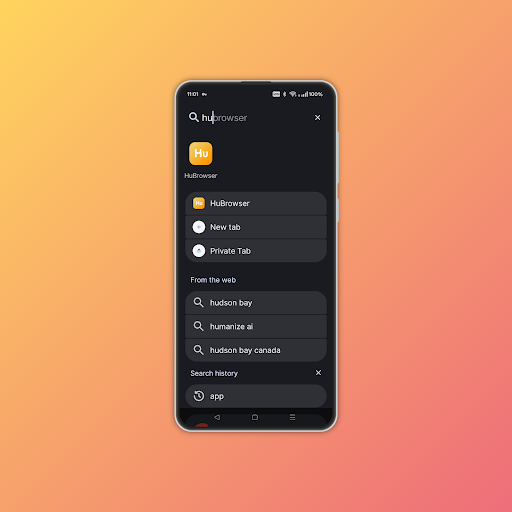
Fast, powerful, private launcher. Super fast search. App tags, notes, export.
⚡ Lightning‑Fast Search
⬆️ Swipe up → instant keyboard focus
🔍 Fuzzy search: apps, widgets, files, settings, contacts, web
➡️ Press → to launch top result instantly
🎬 Demo: youtube.com/shorts/GTPnOSwi9E4
🏷️ Smart Organization
🏷️ Tags: Custom tags (#work #kids) + combine search (vpn #work)
📝 Private Notes: App notes stored locally only
🔒 Hide Apps: Keep sensitive apps out of sight
🗂️ Dual Styles: Different icons for drawer vs home
🎨 Deep Personalization
🎨 Material You: Auto adapts to wallpaper colors
🖌️ Full Control: Customize grid, icon size, transparency, fonts, colors
🧩 Icon Packs: Choose from curated sets or add your own
⚙️ Drawer: Custom folder effects & layouts
🛡️ Speed & Privacy
💡 Ultra‑lightweight ~20MB, native C++ engine for best speed
🔒 Zero tracking, ads, or data collection
📱 Optimized for phones and tablets
🚫 Break free from manufacturer tracking
🛠️ How to Use
Quick Setup:
▶ Install and tap Lucky Launcher
⬆️ Swipe up to open drawer and search
🎯 Long‑press app → drag to home screen
⏳ Use it for 1 minute while search index builds (initial lag is normal)
✅ Set Lucky Launcher as default to stop the old launcher from running in background
🔄 Backup & Sync
🔄 One‑tap backup of settings & layout
📲 Restore instantly when switching devices
📱 Works across phones, foldables, tablets
🚀 Scene presets (e.g. work/study/travel) switch in seconds
✨ Gestures & Shortcuts
⚙️ Long‑press empty space → open settings
🔒 Double‑tap empty space → screen lock (needs Accessibility; no data collected)
⬆️ Swipe up → search / drawer
⬇️ Swipe down → notifications
🎯 Long‑press app icon → quick actions and app info
🗑️ Drag app icon up → uninstall or remove from home screen
📁 Drag & drop → create folders
🔢 Real‑time badge counts → see notifications at a glance
🏠 Tap "home" key → system settings
🎤 Long‑press home → voice assistant
🧩 Add widgets (video)
📏 Resize widgets freely
🌐 Install Web Apps
🌐 Install PWAs, use like native apps
📂 Organize, search, manage permissions
📊 App Insights & Export
🧩 Install Sources: Play/system/sideload/PWA
🔍 Pie Chart: Quickly see where the apps come from.
📤 Export: App list with package, version, time, source, size
🛡️ No private data in exports
P.S.
🎲 The logo is the Mahjong tile "發" (fā), representing luck and launch—arrange your apps like a neat stack of tiles and fire them instantly 🎮🍀
Built on Lawnchair & Google Launcher3.
More at https://hubrowser.com/guide/ecosystem/lucky-launcher/. More useful apps at HuBrowser official site: https://hubrowser.com/