Credit Card Manager


Credit Card Manager Summary
Credit Card Manager is a ad-supported, with in-app purchases Android app in the Finance category, developed by marcello.dev. First released 4 years ago(Jan 2021), the app has accumulated 123.1K+ total installs and 1.8K ratings with a 4.22★ (good) average rating.
Recent activity: 48 installs this week (365 over 4 weeks) showing steady growth , and -2 new ratings this week (4 over 4 weeks) with declining momentum. View trends →
Data tracking: SDKs and third-party integrations were last analyzed on Dec 16, 2025. The app's network data flows (API traffic to/from the app and its SDKs) were last crawled on Jun 16, 2025.
Store info: Last updated on Google Play on Dec 18, 2024 (version 33).
Credit Card Manager was last scanned for SDKs 2025-12-16. Below is the overview of third party companies detected in the app. The full list of raw SDKs, app permissions and unknown SDKs is available here.
 Airbnb Engineering
 Kotlin
 Bumptech
 Google
 Firebase
4.22★
Ratings: 1.8K
Screenshots

App Description
Manage the expenses of all your credit cards in just one place!
With the Credit Card Manager you have control of all your credit cards, in the palm of your hand!
You count on managing your expenses to fit your budget, without any unwanted surprises!
💳 Personalized cards
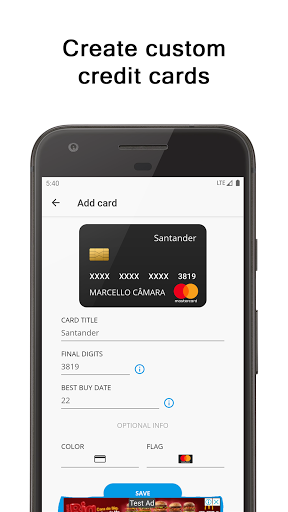
Create cards your way! You can choose a color, a flag and the name of the card. All of this, combined with the last 4 digits of your card, personalizes each of your expenses.
📊 Expenses in installments
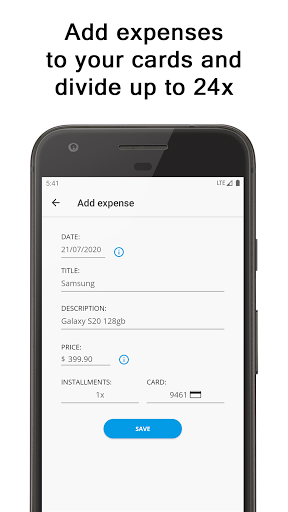
Separate expenses on each of your cards! You can split the amount up to 60x on the chosen card. If your card bill is already closed, the purchase will be inserted in the month following the informed purchase date. To understand how it works, read the topic "Best Buy Date".
📈 Monthly expenses
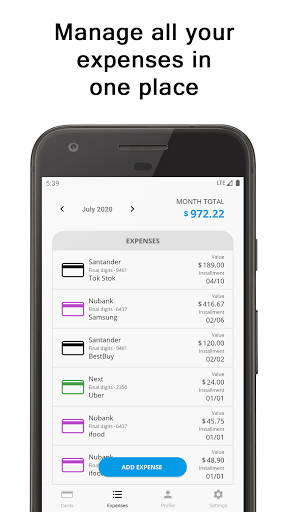
Every month, when there is an expense on the card, the total sum of all your credit card bills will be made automatically! You have a preview of your future expenses, your credit cards, every month.
📅 Best buy date
A new expense with the date (day) BEFORE the date (day) of the best credit card purchase, will be added in the same month as the date entered in the expense. If a data (day) reported in the expense, is AFTER the date (day) of the best purchase reported on the credit card, the expense will be automatically added in the month following the date reported in the new expense.
💰 Credit card limit
Keep track of your credit card limits! You have information on the limit used and available for use. The available limit for use is calculated using the card limit (if specified), subtracted from the total used limit.