Microphone Amplifier Live Mic

Microphone Amplifier Live Mic Summary
Microphone Amplifier Live Mic is a ad-supported, with in-app purchases Android app in the Music And Audio category, developed by White Goose Studio. First released 2 years ago(Oct 2023), the app has accumulated 40.6K+ total installs and 95 ratings with a 1.88★ (poor) average rating.
Recent activity: 151 installs this week (1.5K over 4 weeks) showing steady growth , and 1 new ratings this week (3 over 4 weeks) with stable momentum. View trends →
Store info: Last updated on Google Play on Jun 3, 2025 .
1.88★
Ratings: 95
Screenshots

App Description
A Mic to Speaker routing app with Amplifier, Stereo Balance, Equalizer & more.
Microphone Amplifier app is as sound amplifier & hearing amplifier to amplify sound from your surroundings for louder hearing. Microphone Amplifier use the device’s microphone or headset microphone for sound amplification. Sound Amplifier is an Live Mic app that helps people hear conversations or their surroundings, and amplify sound.
Microphone Amplifier lets you use your microphone as a sound amplifier and audio recorder to help you hear speech, conversations, TV, lectures and sounds from your surroundings more clearly. With Microphone Amplifier, you can use the microphone to amplify sound and route audio from mic to speaker or mic to headphones.
WHY USE MICROPHONE AMPLIFIER?
- Boost important sound such as speech and reduce background noise.
- Hear better sound from devices like TVs without disturbing others.
- Use as hearing aid device to stop hearing loss.
- Listen to lectures from the back.
- Know when something dangerous happens around you.
- Hear speech clearly during conversations and meetings.
- Stop asking people to repeat what they say.
- Record audio while listening.
- Save and apply your custom settings.
HOW TO USE MICROPHONE AMPLIFIER:
- Connect headphones (wired or Bluetooth).
- Launch Microphone Amplifier and tap "Listen".
- Listen to the clear sound coming through your headphones.
- Adjust the audio settings to your preferred levels.
FEATURES
1. Microphone Amplifier uses the phone microphone as sound amplifier to amplify sound from your surroundings for louder hearing.
2. App also allow you to select device microphone, headset microphone or Blutooth microphone.
3. You can also set Sound Booster, Noise Reduction / Noise Suppression, Echo Cancellation and Sound Equalizer.
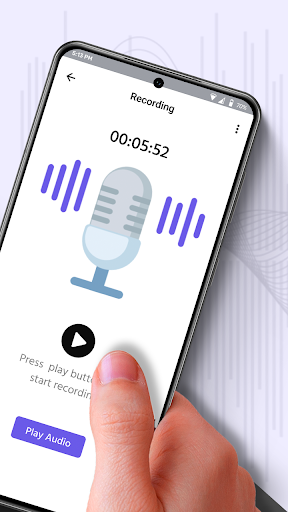
4. App also provide simple sound recording feature for record regular sounds or conversations.
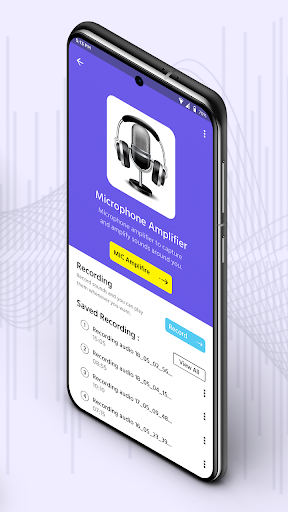
5. View all recorded sounds in saved recordings.
Disclaimer: Microphone Amplifier does not replace a medical hearing aid device. Consult your audiologist if you’re experiencing hearing loss.
Install the all new Microphone Amplifier Live MIC app for FREE!!!