시간때우기 스도쿠

ASO Keyword Dashboard
Tracking 69 keywords for 시간때우기 스도쿠 in Google Play
시간때우기 스도쿠 tracks 69 keywords (no keywords rank yet; 69 need traction). Key metrics: opportunity 70.7, difficulty 47.3.
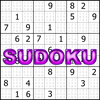
Enjoy each step of 1000 a total of 6,000 people Brain Games Sudoku (sudoku).
Tracked keywords
69
0 ranked • 69 not ranking yet
Top 10 coverage
—
Best rank — • Latest leader —
Avg opportunity
70.7
Top keyword: contain
Avg difficulty
47.3
Lower scores indicate easier wins
Opportunity leaders
- 64.8
contain
Opportunity: 74.0 • Difficulty: 48.6 • Rank —
Competitors: 582
- 62.8
notice
Opportunity: 74.0 • Difficulty: 45.9 • Rank —
Competitors: 489
- 64.4
keyboard
Opportunity: 74.0 • Difficulty: 60.2 • Rank —
Competitors: 1,038
- 66.0
kinds
Opportunity: 74.0 • Difficulty: 47.9 • Rank —
Competitors: 1,274
- 59.9
empty
Opportunity: 74.0 • Difficulty: 38.1 • Rank —
Competitors: 329
Unranked opportunities
contain
Opportunity: 74.0 • Difficulty: 48.6 • Competitors: 582
notice
Opportunity: 74.0 • Difficulty: 45.9 • Competitors: 489
keyboard
Opportunity: 74.0 • Difficulty: 60.2 • Competitors: 1,038
kinds
Opportunity: 74.0 • Difficulty: 47.9 • Competitors: 1,274
empty
Opportunity: 74.0 • Difficulty: 38.1 • Competitors: 329
High competition keywords
time
Total apps: 390,894 • Major competitors: 18,018
Latest rank: — • Difficulty: 57.8
access
Total apps: 333,951 • Major competitors: 12,343
Latest rank: — • Difficulty: 58.6
help
Total apps: 277,741 • Major competitors: 15,480
Latest rank: — • Difficulty: 58.5
enjoy
Total apps: 274,741 • Major competitors: 19,888
Latest rank: — • Difficulty: 57.4
information
Total apps: 264,552 • Major competitors: 8,149
Latest rank: — • Difficulty: 54.8
All tracked keywords
Includes opportunity, difficulty, rankings and competitor benchmarks
| Major Competitors | |||||||
|---|---|---|---|---|---|---|---|
| mode | 69 | 100 | 56 | 77 67,628 competing apps Median installs: 5,374 Avg rating: 2.7 | — | — | 5,720 major competitor apps |
| enjoy | 65 | 100 | 57 | 87 274,741 competing apps Median installs: 3,433 Avg rating: 2.6 | — | — | 19,888 major competitor apps |
| step | 69 | 100 | 51 | 78 81,888 competing apps Median installs: 1,408 Avg rating: 2.4 | — | — | 4,063 major competitor apps |
| information | 65 | 100 | 55 | 86 264,552 competing apps Median installs: 1,195 Avg rating: 2.2 | — | — | 8,149 major competitor apps |
| setting | 72 | 100 | 50 | 70 23,201 competing apps Median installs: 3,735 Avg rating: 2.6 | — | — | 1,344 major competitor apps |
| people | 68 | 100 | 54 | 80 102,172 competing apps Median installs: 2,927 Avg rating: 2.5 | — | — | 5,735 major competitor apps |
| convenient | 69 | 100 | 49 | 78 74,560 competing apps Median installs: 1,493 Avg rating: 2.3 | — | — | 3,335 major competitor apps |
| time | 64 | 100 | 58 | 89 390,894 competing apps Median installs: 1,407 Avg rating: 2.4 | — | — | 18,018 major competitor apps |
| help | 65 | 100 | 58 | 87 277,741 competing apps Median installs: 2,033 Avg rating: 2.5 | — | — | 15,480 major competitor apps |
| multiple | 67 | 100 | 55 | 81 127,263 competing apps Median installs: 2,935 Avg rating: 2.6 | — | — | 8,860 major competitor apps |
| update | 70 | 100 | 55 | 75 51,493 competing apps Median installs: 1,861 Avg rating: 2.5 | — | — | 2,605 major competitor apps |
| function | 71 | 100 | 47 | 73 36,934 competing apps Median installs: 4,216 Avg rating: 2.4 | — | — | 1,982 major competitor apps |
| small | 70 | 100 | 49 | 76 56,501 competing apps Median installs: 2,173 Avg rating: 2.4 | — | — | 2,896 major competitor apps |
| access | 65 | 100 | 59 | 88 333,951 competing apps Median installs: 1,156 Avg rating: 2.4 | — | — | 12,343 major competitor apps |
| view | 66 | 100 | 55 | 84 180,185 competing apps Median installs: 912 Avg rating: 2.4 | — | — | 6,138 major competitor apps |
| click | 69 | 100 | 50 | 77 66,351 competing apps Median installs: 4,342 Avg rating: 2.6 | — | — | 3,992 major competitor apps |
| contain | 74 | 100 | 49 | 65 11,629 competing apps Median installs: 4,876 Avg rating: 2.4 | — | — | 582 major competitor apps |
| personal | 67 | 100 | 55 | 83 152,870 competing apps Median installs: 1,388 Avg rating: 2.5 | — | — | 7,103 major competitor apps |
| want | 66 | 100 | 54 | 84 193,605 competing apps Median installs: 3,546 Avg rating: 2.6 | — | — | 11,643 major competitor apps |
| brain | 71 | 100 | 48 | 72 32,594 competing apps Median installs: 3,184 Avg rating: 2.9 | — | — | 2,603 major competitor apps |
| back | 70 | 100 | 53 | 75 53,610 competing apps Median installs: 3,325 Avg rating: 2.7 | — | — | 3,706 major competitor apps |
| must | 70 | 100 | 48 | 76 58,735 competing apps Median installs: 3,898 Avg rating: 2.5 | — | — | 3,361 major competitor apps |
| enter | 70 | 100 | 48 | 75 52,388 competing apps Median installs: 2,648 Avg rating: 2.4 | — | — | 2,723 major competitor apps |
| notice | 74 | 100 | 46 | 63 8,763 competing apps Median installs: 2,586 Avg rating: 2.5 | — | — | 489 major competitor apps |
| advance | 73 | 100 | 44 | 68 19,339 competing apps Median installs: 2,656 Avg rating: 2.5 | — | — | 1,197 major competitor apps |
App Description
Enjoy each step of 1000 a total of 6,000 people Brain Games Sudoku (sudoku).
- 6 levels for Sudoku enthusiast Total 6000 Sudoku (1000 steps)
- Filtering function in Sudoku list
- Hint function
- Can restore after setting branch
- 3 input modes
* Sudoku rules
1. There is only one number from 1 to 9 on the horizontal line,
2. There is only one number from 1 to 9 in the vertical line,
3. Small rectangle 3x3 must contain only one number from 1 to 9.
* Input mode (3 kinds of selection)
1. Button First: Click the number button you want to input first and then select the input cell of Sudoku board.
- Click the pencil button to activate the hint.
2. Sudoku First: Select the Sudoku cell and click the number button to enter the number.
- Click the pencil button to activate the hint.
3. Pop-up: When you select the Sudoku cell you want to input, the keyboard pops up.
- Click Edit Hint to enter the desired hint.
* Help function
1. View Hint button: Automatically displays all hints in empty Sudoku cells.
- After entering a value in Sudoku, click the View Hint button again to update the hint.
2. Hint Reset button: Reset all hints.
3. Point setting button: Click the Point setting button before entering the estimated value to set the restoration point.
- If you need to click the snap button multiple times, you can set the point in advance to return to the convenient point.
4. Point restore button: Restores to the point you set.
5. Snap button: Return Sudoku cell input immediately.
- If you click it several times, it goes back as much.
* Notice of Privacy and Access Rights
- Sudoku does not require any personal information or access privileges.