Moon Master PRO

ASO Keyword Dashboard
Tracking 143 keywords for Moon Master PRO in Google Play
Moon Master PRO tracks 143 keywords (2 keywords rank; 141 need traction). Key metrics: 0% top-10 coverage, opportunity 70.5, difficulty 47.4, best rank 17.
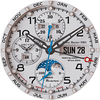
A classic look with beautiful Moon phases and GMT clock!
Tracked keywords
143
2 ranked • 141 not ranking yet
Top 10 coverage
0%
Best rank 17 • Latest leader —
Avg opportunity
70.5
Top keyword: faces
Avg difficulty
47.4
Lower scores indicate easier wins
Opportunity leaders
- 63.7
faces
Opportunity: 75.0 • Difficulty: 40.8 • Rank —
Competitors: 355
- 60.8
moon
Opportunity: 74.0 • Difficulty: 39.3 • Rank 20
Competitors: 274
- 61.5
tactical
Opportunity: 74.0 • Difficulty: 43.8 • Rank —
Competitors: 687
- 62.5
analog
Opportunity: 74.0 • Difficulty: 38.6 • Rank —
Competitors: 178
- 62.9
reveal
Opportunity: 74.0 • Difficulty: 41.0 • Rank —
Competitors: 499
Unranked opportunities
faces
Opportunity: 75.0 • Difficulty: 40.8 • Competitors: 355
tactical
Opportunity: 74.0 • Difficulty: 43.8 • Competitors: 687
analog
Opportunity: 74.0 • Difficulty: 38.6 • Competitors: 178
reveal
Opportunity: 74.0 • Difficulty: 41.0 • Competitors: 499
encounter
Opportunity: 74.0 • Difficulty: 44.5 • Competitors: 880
High competition keywords
make
Total apps: 328,331 • Major competitors: 18,397
Latest rank: — • Difficulty: 59.0
find
Total apps: 305,963 • Major competitors: 16,284
Latest rank: — • Difficulty: 59.8
experience
Total apps: 289,044 • Major competitors: 15,346
Latest rank: — • Difficulty: 58.0
play
Total apps: 206,179 • Major competitors: 18,547
Latest rank: — • Difficulty: 62.1
different
Total apps: 187,171 • Major competitors: 13,720
Latest rank: — • Difficulty: 58.0
All tracked keywords
Includes opportunity, difficulty, rankings and competitor benchmarks
| Major Competitors | |||||||
|---|---|---|---|---|---|---|---|
| approximate | 72 | 100 | 32 | 51 1,540 competing apps Median installs: 2,759 Avg rating: 1.9 | 17 | 17 | 72 major competitor apps |
| moon | 74 | 100 | 39 | 61 6,535 competing apps Median installs: 1,282 Avg rating: 2.0 | 20 | 18 | 274 major competitor apps |
| play | 66 | 100 | 62 | 85 206,179 competing apps Median installs: 6,324 Avg rating: 2.2 | — | — | 18,547 major competitor apps |
| top | 68 | 100 | 58 | 79 88,314 competing apps Median installs: 2,789 Avg rating: 2.1 | — | — | 5,845 major competitor apps |
| tactical | 74 | 100 | 44 | 61 7,215 competing apps Median installs: 7,186 Avg rating: 2.2 | — | — | 687 major competitor apps |
| right | 67 | 100 | 58 | 83 158,613 competing apps Median installs: 1,615 Avg rating: 2.0 | — | — | 8,097 major competitor apps |
| order | 67 | 100 | 52 | 82 141,210 competing apps Median installs: 494 Avg rating: 1.8 | — | — | 4,042 major competitor apps |
| try | 69 | 100 | 58 | 78 79,562 competing apps Median installs: 5,792 Avg rating: 2.3 | — | — | 7,172 major competitor apps |
| make | 65 | 100 | 59 | 88 328,331 competing apps Median installs: 2,060 Avg rating: 2.0 | — | — | 18,397 major competitor apps |
| phone | 67 | 100 | 62 | 83 151,879 competing apps Median installs: 2,662 Avg rating: 2.0 | — | — | 8,546 major competitor apps |
| images | 69 | 100 | 54 | 77 72,315 competing apps Median installs: 2,512 Avg rating: 1.9 | — | — | 2,951 major competitor apps |
| support | 67 | 100 | 55 | 83 169,442 competing apps Median installs: 1,290 Avg rating: 2.0 | — | — | 7,314 major competitor apps |
| experience | 65 | 100 | 58 | 87 289,044 competing apps Median installs: 1,501 Avg rating: 1.9 | — | — | 15,346 major competitor apps |
| contact | 67 | 100 | 54 | 82 137,882 competing apps Median installs: 1,525 Avg rating: 1.9 | — | — | 5,772 major competitor apps |
| section | 71 | 100 | 47 | 72 32,580 competing apps Median installs: 1,051 Avg rating: 1.8 | — | — | 1,050 major competitor apps |
| classic | 70 | 100 | 52 | 76 60,955 competing apps Median installs: 3,344 Avg rating: 2.2 | — | — | 4,527 major competitor apps |
| digital | 68 | 100 | 52 | 81 123,675 competing apps Median installs: 795 Avg rating: 1.7 | — | — | 4,256 major competitor apps |
| wear | 71 | 100 | 63 | 72 32,469 competing apps Median installs: 363 Avg rating: 1.6 | — | — | 813 major competitor apps |
| analog | 74 | 100 | 39 | 62 8,378 competing apps Median installs: 432 Avg rating: 1.7 | — | — | 178 major competitor apps |
| clock | 73 | 100 | 46 | 68 18,906 competing apps Median installs: 1,196 Avg rating: 2.0 | — | — | 776 major competitor apps |
| wear os | 72 | 100 | 61 | 70 24,185 competing apps Median installs: 297 Avg rating: 1.5 | — | — | 288 major competitor apps |
| team | 69 | 100 | 53 | 79 85,278 competing apps Median installs: 1,299 Avg rating: 1.9 | — | — | 3,964 major competitor apps |
| control | 67 | 100 | 55 | 82 135,108 competing apps Median installs: 1,562 Avg rating: 1.9 | — | — | 6,819 major competitor apps |
| people | 68 | 100 | 55 | 80 103,201 competing apps Median installs: 2,258 Avg rating: 2.0 | — | — | 5,279 major competitor apps |
| find | 65 | 100 | 60 | 87 305,963 competing apps Median installs: 2,299 Avg rating: 2.0 | — | — | 16,284 major competitor apps |
App Description
A classic look with beautiful Moon phases and GMT clock!
A must-have analog watch face for Wear OS enthusiasts.
NOTE: Please read the how to section and installation section and check out the images !!!
ⓘ Features:
- Classic design.
- Moon phases.
- BIG Moon phases.
- Photo moon phases.
- Day, Date, Month.
- Battery Indicator.
- GMT Clock.
- 30 Sec. indicator.
- 6 different color themes.
- SUPER Realistic!
- Moon-phase indicator.
- Always On Display.
ⓘ How to:
- To open the BIG Moon phase screen, tap once on the screen, tap once again to reveal photo of the Moon phase, tap once more to close the BIG Moon phases screen.
- To customize your watch face, touch and hold on the screen, then tap on customize.
Don't miss out our top REALISTIC watch faces:
Milirary ZULU Tactical - https://play.google.com/store/apps/details?id=wb.military.zulu
Tourbillon Aquamarine - https://play.google.com/store/apps/details?id=wb.tourbillon.aquamarine
LUNA BENEDICTA - https://play.google.com/store/apps/details?id=wb.luna.benedicta
Harmony GT Premium - https://play.google.com/store/apps/details?id=wb.harmony.gt
Classic GMT President - https://play.google.com/store/apps/details?id=wb.classic.gmt
VOYAGER WorldTimer - https://play.google.com/store/apps/details?id=wb.voyager.automatic
Analog Master - https://play.google.com/store/apps/details?id=wb.analog.master
ⓘ Installation
How to install: https://watchbase.store/static/ai/
After installation: https://watchbase.store/static/ai/ai.html
* Luna Benedicta watch face shown in "How to install" and "After installation". The same installation process is valid for all of our watch faces.
If you have any issues installing the watch face, please note that we have no control over the installation process or any other Google Play / Watch processes. The most common issue that people face is after they buy the watch face and install it, they can't see/find it.
In order to apply the watch face after you install it, touch and hold on the main screen (your current watch face) the swipe left to look for it. If you can't see it, tap on the " + " sign at the end (add a watch face) and find our watch face there.
We use a companion app for the phone to make the installation process easier. If you buy our watch face, tap on the install button (on the phone app) you must check your watch.. a screen will appear with the watch face.. tap install again and wait for the installation to finish. If you already bought the watch face and it still asks you to buy it again on the watch, don't worry you will not be charged twice. This is a common synchronization issue, just wait a little or try to restart your watch.
Another solution for installing the watch face is to try to install it from a browser, logged with your account (google play account that you use on the watch).
ⓘ Note: If you encounter any issues during installation, please refer to our comprehensive guide or contact our support team for assistance. We're here to ensure your experience with our watch faces is seamless and enjoyable.
ⓘ 30 seconds indicator (top subdial):
- The 30-second subdial indicator counts 30-second intervals (rotates twice per minute) with additional left/right digital counting for 0-30/30-60 seconds.
ⓘ Moon phases:
* The moon phase indicator provides an approximate visual representation of the current lunar phase, and does not adjust for hemisphere location.
JOIN WatchBase.
Facebook group (General watch faces group):
https://www.facebook.com/groups/1170256566402887/
Facebook page:
https://www.facebook.com/WatchBase
Instagram:
https://www.instagram.com/watch.base/
SUBSCRIBE to our YouTube channel:
https://www.youtube.com/c/WATCHBASE?sub_confirmation=1
https://www.youtube.com/c/WATCHBASE