Midi DJ remote lite

Midi DJ remote lite Summary
Midi DJ remote lite is a with in-app purchases iOS app in Music And Audio by Yuriy Kvasha. Released in Jun 2015 (11 years ago). It has 26 ratings with a 3.22★ (mixed) average. Based on AppGoblin estimates, it reaches roughly 110 monthly active users and generates around $<10K monthly revenue (100% IAP / 0% ads). Store last updated May 18, 2023
Midi DJ remote lite SDKs Summary
App not yet scanned for SDKs.
3.22★
Ratings: 26
Screenshots
App Description
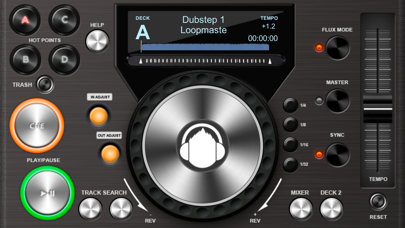
Midi DJ remote lite is a MIDI controller for PC/Mac DJ software, including Traktor Pro 2, Deckadance 2, Mixxx, Torq, and any other MIDI-enabled DJ software.
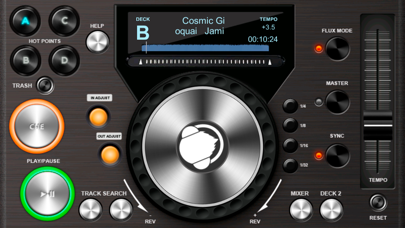
It allows you to send and receive MIDI messages over a Wi-Fi network, enabling remote control of your PC/Mac DJ software. With Midi DJ remote lite, you can eliminate the need for a mouse and trackpad. This app is fully compatible with Traktor Pro 2 for both Mac and PC, and it consists of DeckA, DeckB, and Mixer functionalities.
**DeckA/DeckB features:**
- Play/Pause
- Cue
- Track search buttons
- Tempo fader
- Jog control
- 4 programmable Hot points
- In/Out loop buttons with 1/4, 1/8, 1/16, and 1/32 time intervals
- Master mode
- Sync mode
- Flux mode
- Track position finger changer
Additional available features in Traktor Pro (refer to the guide at http://www.kvasha.us/guide/midi-dj/):
- LCD display showing track name, time (m:s:f), and track position indicator.
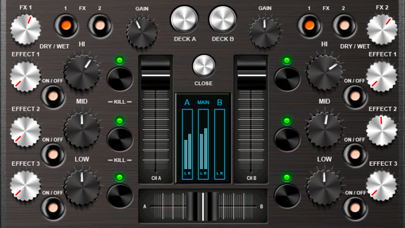
**Mixer:**
- Left/Right volume level faders
- Crossfader
- Mic gain fader
- Main output level protected fader (to prevent rapid volume changes)
- Hi, Mid, and Low frequency regulators
- Kill Hi, Mid, and Low buttons
- Gain control
- 3 FX regulators per channel
- 3 FX turn on/off buttons per channel
Additional available features in Traktor Pro (refer to the guide at http://www.kvasha.us/guide/midi-dj/):
- LCD left/right and main output level indicators
- File browsing using Up & Down keys
- Load to Deck A or B buttons
- Phones cueA & cueB buttons
To utilize all the features of Midi DJ remote lite, please consult the user's guide and watch the demonstration videos at http://www.kvasha.us/guide/midi-dj/
Demo video: https://www.youtube.com/watch?v=ZfV3kv906lE