Y-TRAC Data Logger

Y-TRAC Data Logger Summary
Y-TRAC Data Logger is a mobile iOS app in Sports by Yamaha Motor Co., Ltd.. Released in Jun 2015 (11 years ago). It has 8.00 ratings with a 2.00★ (poor) average. Based on AppGoblin estimates, it reaches roughly 33 monthly active users . Store metadata: updated Oct 30, 2024.
Store info: Last updated on App Store on Oct 30, 2024 .
2★
Ratings: 8.00
Screenshots
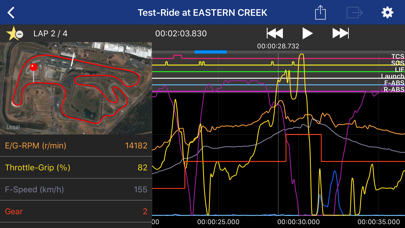
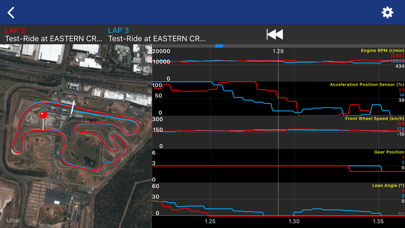


App Description
■Brief Description
Y-TRAC is an application that collects and analyzes data through the 2015-2020 model YAMAHA YZF-R1 / R1M equipped with CCU. Ride analysis can be performed by matching position information with vehicle condition in real time.
■Detailed Description
Let's ride the circuit together! Improve your time by carefully analyzing ride characteristics and vehicle condition!
Y-TRAC is a log viewer application for viewing vehicle information collected in the CCU (* 1). Many kinds of vehicle information are displayed visually in an easy-to-understand graph, such as vehicle speed and engine speed, accelerator opening, banking angle and brake pressure, as well as various types of control effects. In addition to vehicle information, position information is recorded simultaneously in the log data stored in the CCU. Due to this synchronization of position information and vehicle condition, you can quickly pick up information such as braking point at corner entry, brake pressure, vehicle speed, line, banking angle at turn, and throttle condition at exit. Since the graph displays each lap, you can easily understand the characteristics of a good line. Find a way to improve your lap time through careful study of the app's features.
* To record logs of laps to the CCU, it is necessary to dictate the record line to the CCU in advance.
* 1) Communication control unit (2015-2020 model year YAMAHA YZF-R1M equipped with data logger unit)
■How to use Y-TRAC and the CCU
1) Set the record line prior to circuit racing.
a) Determine the record line.
b) Send the record line to the CCU.
*) In recording mode, either "Track" or "Street" can be selected. Select "Track" for circuit racing.
That’s it for the preparation.
2) Come on, ride!
a) Have a blast while riding safely.
*) Ride conditions are being recorded in the CCU as a log.
3) After riding...
a) Using Y-TRAC, download the log recorded in the CCU.
b) Acquired data will be displayed in a list view. Tapping the data icon displays the graph.
■With Y-TRAC you can...
1) Acquire CCU logging data
Download the logging data in the CCU.
2) Display lap times
A list of lap times recorded by the CCU's auto lap function is displayed.
3) Display graphs
A graph is displayed for each lap.
4) 15 types of vehicle data and 6 types of control data are displayed in a line graph. You can choose which dat