Ferrite Recording Studio

Ferrite Recording Studio Summary
Ferrite Recording Studio is a with in-app purchases iOS app in Music And Audio by Wooji Juice Ltd. Released in Nov 2015 (10 years ago). It has 1.9K ratings with a 4.56★ (excellent) average. Based on AppGoblin estimates, it reaches roughly 7.2K monthly active users and generates around $<10K monthly revenue (100% IAP / 0% ads). Store metadata: updated Apr 26, 2026, version 3.2.5.20260423.1.
Recent activity: 6.00 new ratings this week View trends →
Data tracking: SDKs and third-party integrations were last analyzed on May 30, 2026.
Store info: Last updated on App Store on Apr 26, 2026 (version 3.2.5.20260423.1).
4.56★
Ratings: 1.9K
Screenshots




App Description
Ferrite is the award-winning app you need for creating podcasts, radio journalism, or other professional voice production work — lectures, speeches, voice-overs and more.
It combines the ease-of-use of a “voice memo” audio recorder, with a versatile multi-track editing studio. Powerful tools like effects and automation are available when you need them. With time-saving features and a UI designed to get out of your way, people around the world are switching to Ferrite.
— Streamlined Recording —
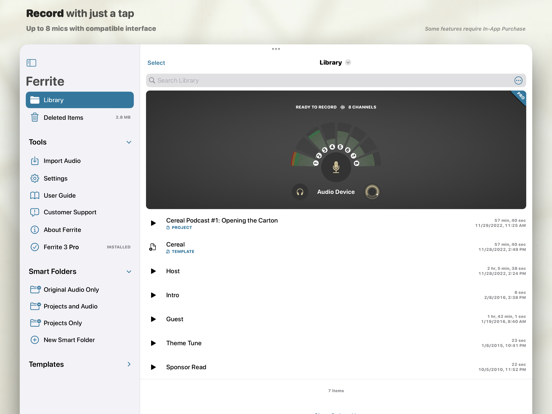
Open Ferrite and with just one tap you’re recording. No fuss, and it won't break a sweat even with hours-long sessions. Just make sure your device has enough free space!
Recording an interview and you want to highlight a few quotes? Have to take out some inappropriate language? Or just fluffed a sentence and need to fix it? Bookmark moments during your recording and they’ll be flagged up during edits, so you can jump right to them.
Monitor levels with live recording meters, or listen through headphones. Tag your audio to find it quickly later. And of course you can import audio from your Music Library, iCloud, and other services such as Dropbox.
Please note: the free version has limited duration for recording & editing projects. Upgrade to Pro and you can edit projects up to 24 hours long!
— Editing is a Snip —
Ferrite features full multi-track editing, from quick cuts, to producing a complete podcast or broadcast package. Zoom out to see hours at a glance, or zoom in all the way down to individual samples.
Take a single clip, or a bunch, and arrange them in an editing project: move, crop, slice, fade in and out, or crossfade between clips just by overlapping them. You have full control over each track’s volume and panning, and can Mute or Solo as needed.
And best of all, you needn’t fear trying out changes: Ferrite has great Undo/Redo — even if you quit the app and come back a month later, you can still undo all the way back to the moment you created your project!
— Advanced Features —
Need more? Ferrite also includes:
• Automatic ducking: set tracks to “duck under” others (e.g. ducking music behind voiceovers).
• Strip Silence: Carves away all the silent sections from a recording, making it easy to edit the remaining audio.
• (iPad only) Split View and Slide Over support: Use Ferrite side-by-side with other apps.