Blur Photo Editor

Blur Photo Editor Summary
Blur Photo Editor is a free, ad-supported, with in-app purchases iOS app in Photo And Video by Sohel Ibna Saad. Released in Nov 2015 (10 years ago). It has 33K ratings with a 4.45★ (good) average. Based on AppGoblin estimates, it reaches roughly 16K monthly active users and generates around $<10K monthly revenue (36% IAP / 64% ads). Store last updated Sep 28, 2026
Recent activity: 11 new ratings this week View trends →
SDK intelligence: AppGoblin detected 4 ad networks(e.g. Google), 4 development tools, 1 analytics: attribution,and 1 analytics: product integrated into Blur Photo Editor. View full SDK list →
Blur Photo Editor SDKs Summary
Blur Photo Editor was last scanned for SDKs on 2026-08-15. Below is the overview of third-party companies detected in the app. The full list of SDKs, permissions and unknowns is available here.
 Google
 Facebook
 AppLovin
 Snap Inc.
 Airbnb Engineering
 nanopb
 SDWebImage
 AppsFlyer
 Firebase
4.45★
Ratings: 33K
Screenshots



App Description
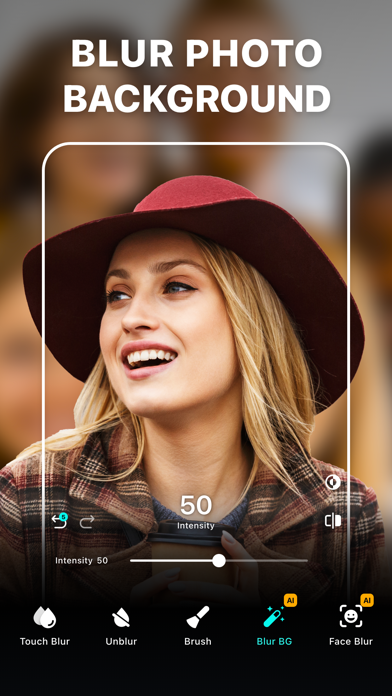
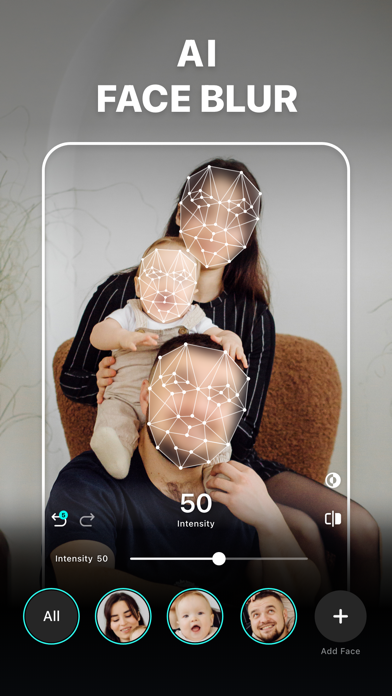
Blur Photo Editor is the best photo blurring and mosaic app for iPhone and iPad, designed to blur backgrounds and create professional-looking photos. Easily blur or pixelate faces, hide license plates, or redact sensitive information such as credit card numbers with precision. Use AI-powered face blur, background blur, and mosaic effects to keep your photos clean, private, and ready to share. When you're ready to go beyond privacy, unleash your creativity with powerful background removal, split color effects, and a massive library of ready-to-use templates.
Key Features:
• Wide range of blur and mosaic effects, including motion blur, point blur, bokeh, and more
• One-tap background blur with AI subject detection
• AI-powered face blur and mosaic for censoring
• Detect and redact sensitive text information like documents, IDs, and credit cards
• Unblur parts of accidentally edited images
• Zoom for precise editing
• Radial and linear blur for depth effects
• Shape blur tools to highlight or hide areas
• Large catalog of photo filters
• Edit with tools like crop, rotate, and fine-tune using brilliance, denoise, and more
• Instant background removal
• Artistic RGB split effects with Split Color
• Enhance photo to improve clarity and sharpness
• 200+ creative templates to make stunning edits in seconds
• Add custom text to photos with fonts, colors, and styles.
• Photo collage maker with layouts
• Blend images with artistic double exposure effects.
• "My Project" to save work in progress
Advanced Blur Editing Suite
Blur, censor, and stylize your photos with precision using a powerful mix of tools. Apply Gaussian blur, pixelate, motion blur, bokeh, and mosaic effects, or experiment with glass, water, distortion, and paint-styles to create depth and visual impact. Fine-tune focus with radial and linear blur for DSLR-style depth, and enhance with a wide range of filters including B&W, vintage, portrait, and classic styles for a professional finish.
Creative Templates & Design Studio
Explore a rich library of professionally designed templates to create eye-catching visuals in seconds. Choose from a wide variety of formats including collage templates, scrapbook styles, posters, frames, cutout collages, and many more creative categories designed for social media, stories, and marketing content. Simply add your photos, pers