Textastic Code Editor

Textastic Code Editor Summary
Textastic Code Editor is a free, with in-app purchases iOS app in Developer Tools by Alexander Blach. Released in Mar 2016 (10 years ago). It has 7.6K ratings with a 4.66★ (excellent) average. Based on AppGoblin estimates, it reaches roughly 19K monthly active users and generates around $<10K monthly revenue (100% IAP / 0% ads). Store last updated Oct 9, 2026
Recent activity: 5.00 new ratings this week View trends →
Textastic Code Editor SDKs Summary
App not yet scanned for SDKs.
4.66★
Ratings: 7.6K
Screenshots



App Description
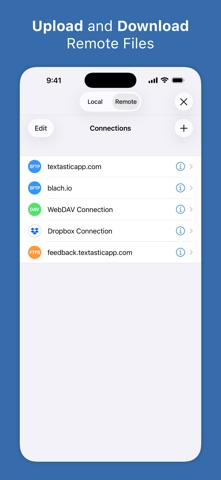
Textastic is a comprehensive and versatile text and code editor for iPad and iPhone. It supports syntax highlighting for more than 80 programming and markup languages. Connect to SFTP, FTP, and WebDAV servers or to your Dropbox account. Use the built-in SSH terminal to work directly on your server.
Features:
- Syntax highlighting for more than 80 languages, including HTML, JavaScript, CSS, C++, Swift, Objective-C, Rust, XML, Markdown, PHP, Perl, Python, Ruby, Lua, YAML, JSON, SQL, shell scripts, and many more (full list available on the website)
- Compatible with Sublime Text 3 and TextMate 1 syntax definitions and themes
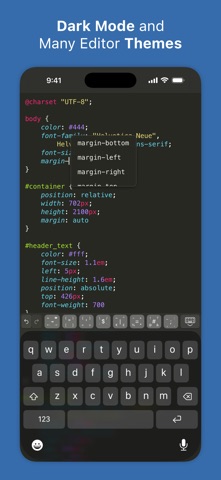
- Code completion for HTML, CSS, JavaScript, C, Objective-C, and PHP
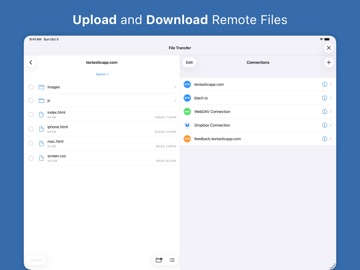
- SFTP (SSH), FTP, FTPS (FTP over SSL), WebDAV, and Dropbox clients
- SSH terminal connections
- Code formatter for HTML, CSS, JavaScript, and JSON
- Git repositories from the Git client app Working Copy can be opened as external folders in Textastic
- Emmet support
- JavaScript console
- iCloud Drive file synchronization
- WebDAV server for easy file transfer between Textastic and your Mac or PC over Wi-Fi
- Symbol list for quick navigation within a file
- Full support for external keyboards, trackpads, and mice
- Configurable keyboard shortcuts
- Additional keys above the virtual keyboard for frequently used programming characters
- Cursor navigation wheel for easy text selection
- Move the cursor using swipe gestures
- Split View and Slide Over multitasking on iPad
- Open multiple files in tabs
- Multiple windows on iPadOS
- Dark Mode support
- Support for common text encodings such as UTF-8, UTF-16, and ISO-8859-1
- Support for different tab widths and soft tabs (spaces instead of tabs)
- Custom fonts
- Find and Replace, including regular expression search
- Find in multiple files
- File information such as character and word counts
- Local and remote web preview for HTML and Markdown files
Pricing:
Textastic requires a monthly or yearly subscription or a one-time purchase. Each subscription includes a 7-day free trial with full access to all features.
Privacy Policy: https://www.textasticapp.com/privacy.html
Terms of Use: https://www.apple.com/legal/internet-services/itunes/dev/stdeula/