Trapezoid - Hammered Dulcimer
Trapezoid - Hammered Dulcimer Summary
Trapezoid - Hammered Dulcimer is a mobile iOS app in Music And Audio by Michael Eskin. Released in Dec 2015 (10 years ago). It has 9.00 ratings with a 4.11★ (good) average. Based on AppGoblin estimates, it reaches roughly 13 monthly active users . Store metadata: updated Jun 15, 2018.
Store info: Last updated on App Store on Jun 15, 2018 .
4.11★
Ratings: 9.00
Screenshots
App Description
Trapezoid is an amazing Hammered Dulcimer for the iPad.
Written by an experienced Hammered Dulcimer player, this virtual dulcimer sounds and plays like the real thing!
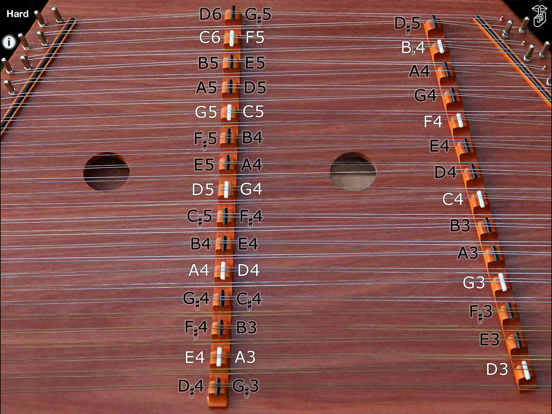
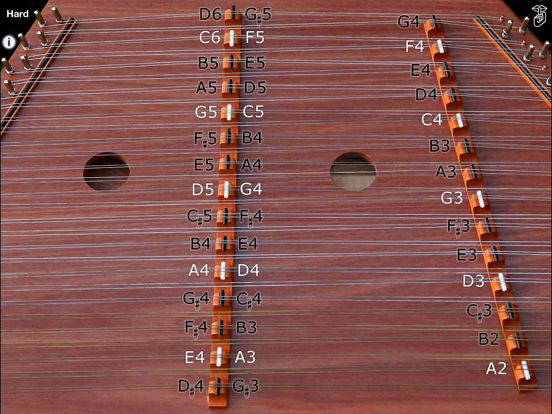
The app has the full range of a standard 15/14 instrument and supports both Standard and Michigan (octave) tunings.
15/14 means there are 15 bridges on the Treble (left) side of the instrument, 14 bridges on the Bass (right) side of the instrument.
To play, just touch the strings on either side of the left (Treble) bridge or the left side of the right (Bass) bridge just like on the real instrument.
To get repeated note "drag roll" effects, drag quickly horizontally across the strings. The drag roll sensitivity can be set on the settings screen. The higher the sensitivity, the shorter distance you need to move your finger to get the effect.
Toggle between Hard or Soft hammers sound by touching on the "Hard" or "Soft" label on the upper left corner of the screen.
The app also may be played from a MIDI keyboard connected to a hardware MIDI interface or other MIDI controller or MIDI file player apps.
When playing via MIDI, the app is velocity sensitive based on the velocity sent with the Note-on events.
Lowest MIDI note is A2 (MIDI note 45). MIDI range is fully chromatic from A2 to D6.
When playing via MIDI, the volume is based on the Treble bridge notes volume.
The app will respond to MIDI volume messages on the selected MIDI channel.
Touch the "?" on the upper left corner to show the note names for the strings.
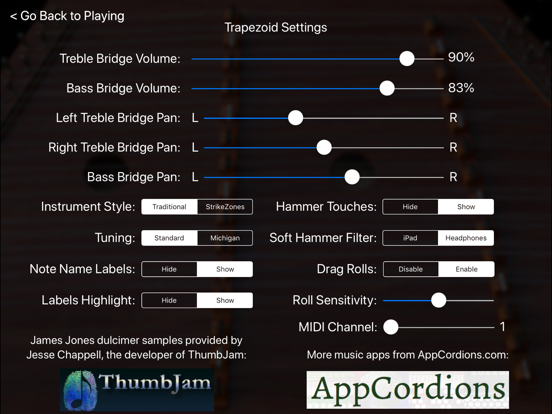
Touch the "i" on the upper left corner to show the settings screen where you may:
- Adjust the volume and right/left panning for the bass and treble bridges
- Choose between "Traditional" or "StrikeZones" instrument styles
The new "StrikeZones" instrument style shows you exactly where to touch on the screen for each note. The zones light up when touched. It is an excellent tool for understanding or teaching the layout of the instrument.
- Choose between Standard or Michigan (octave) tunings
- Show or hide the hammer touches
- Show or hide the note name highlights (when note labels are displayed)
- Enable or disable the drag rolls as well as set the sensitivity for how far you need to drag to get the roll effect
- Set the MIDI channel. Lowest MIDI note is 45 (A2)
- Using the "Soft Hammer Filter" control, choose between equalization of the soft hammer sounds for