Alarm & Timer

Alarm & Timer Summary
Alarm & Timer is a free, ad-supported, with in-app purchases iOS app in Lifestyle by KAZUTERU YOKOI. Released in Jan 2016 (10 years ago). It has 43K ratings with a 4.36★ (good) average. Based on AppGoblin estimates, it reaches roughly 83K monthly active users and generates around $10K+ monthly revenue (31% IAP / 69% ads). Store last updated Oct 30, 2026
Recent activity: 4.00 new ratings this week View trends →
SDK intelligence: AppGoblin detected 4 development tools(e.g. Google), 2 ad networks,and 1 analytics: product integrated into Alarm & Timer. View full SDK list →
Alarm & Timer SDKs Summary
Alarm & Timer was last scanned for SDKs on 2026-08-13. Below is the overview of third-party companies detected in the app. The full list of SDKs, permissions and unknowns is available here.
 Google
 AdMob
AdMob nanopb
 Alamofire
 SDWebImage
 Firebase
4.36★
Ratings: 43K
Screenshots



App Description
Simple, powerful, and customizable.
This all-in-one clock app combines Alarm, Timer, and Stopwatch functions into a clean, intuitive interface.
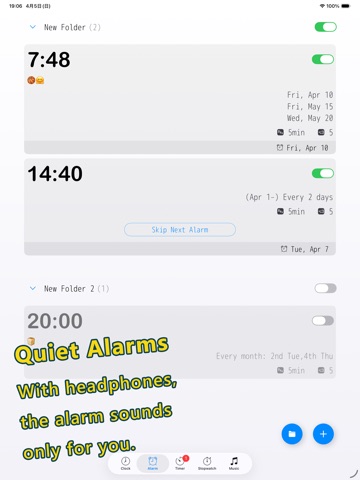
Privacy-friendly: When headphones are connected, the alarm sounds only through the headphones, not the device speakers.
By making advanced features optional, we maintain a minimalist design while meeting a wide range of user needs.
[General]
Customization: Color themes, "My Theme" creation, and adjustable font sizes.
Typography: Choose from system fonts, specialized clock fonts, or even add your own custom fonts.
Time Display: Toggle between 12/24-hour formats, customize 12:00 vs. 0:00 display, and enable/disable leading zeros (e.g., 09:00 vs. 9:00).
[Clock]
Dual analog and digital display with extensive layout options.
Design: Multiple dial designs and support for custom image/video backgrounds.
Visibility: Toggle seconds, choose second hand movement (Ticking vs. Smooth), and customize date formats/languages.
Dynamic Layout: Hide the status bar, tab bar, or settings button for a cleaner look. Digital-only mode available in landscape orientation.
Hourly Chime: Use simple presets or create a fully customized hourly schedule.
World Clock: View multiple cities and time zones simultaneously in a convenient list.
[Alarm]
Set unlimited alarms with full background notification support. Compatible with AlarmKit (iOS 26.1+), allowing alarms to sound even in Silent or Focus modes.
Scheduling: Powerful repeat options including daily, weekly, monthly, yearly, and custom intervals (e.g., every 2 days). Supports pause periods.
Sound: Use custom recordings or local music files (when the app is in the foreground).
Management: Organize alarms with folders, label search, and easy duplication. Sort by time or firing order.
Advanced Features: Checklist, Snooze, Auto-stop (by duration/repetition), Skip next, and one-tap global pause. New alarms can automatically inherit previous settings for faster setup.
[Timer]
Run multiple timers simultaneously ranging from 1 second to 10000 hours.
Quick Start: Access presets and history for instant activation.
Interface: Switch between list and full-screen views. Choose between 10-key or picker input with customizable units (1s/10s/1m/10m).
Foreground Features: Displays estimated completion time and supports auto-stop for sounds.
[Stopwatch]
Records: Capture lap times with precisi