CameraControl Pro for AXIS
CameraControl Pro for AXIS Summary
CameraControl Pro for AXIS is a with in-app purchases iOS app in Business by Egeniq. Released in Sep 2017 (8 years ago). It has 12 ratings with a 1.67★ (poor) average. Based on AppGoblin estimates, it reaches roughly 59 monthly active users and generates around $<10K monthly revenue (100% IAP / 0% ads). Store metadata: updated Jul 4, 2020.
Store info: Last updated on App Store on Jul 4, 2020 .
1.67★
Ratings: 12
Screenshots



App Description
Turn your iPad, iPhone or iPod into an AXIS IP camera watchdog and remotely control your PTZ camera from the palm of your hand.
Features include (depending on your camera model):
• Rich notifications / alerts (with sound selection)
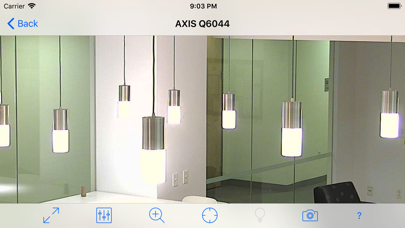
• 3 PTZ (Pan Tilt Zoom) control modes
• PTZ presets (from the camera)
• IO port control
• Audio support (G.711 audio only)
• Configurable connection profiles (full bandwidth control)
• Bonjour camera discovery service
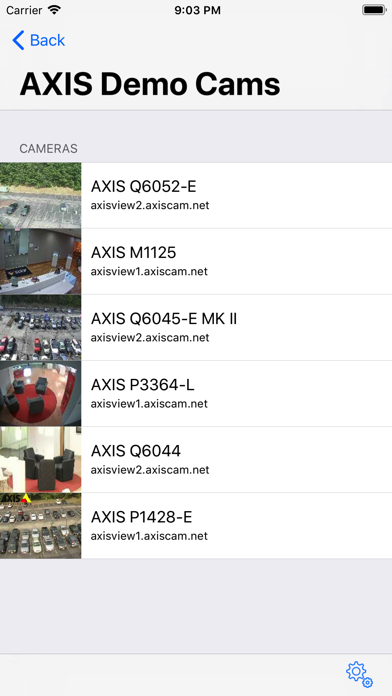
• Live thumbnail camera list
• Install as many AXIS surveillance IP cameras as you like
• Camera selection for AXIS video encoders
• HTTPS support
Although you want to keep an eye on your precious property, you won't be able to watch cameras all day long. AXIS cameras can warn you by email in the case of events such as a motion detection trigger or a door sensor connected to the input connector of the camera. With the CameraControl for AXIS app you can enhance this behavior by receiving alerts via notifications directly on the device. Instant notification when something is wrong, and one click away from watching your property, wherever you are.
If you own a PTZ enabled AXIS camera, you can remotely control the camera using three different methods:
1. Gesture control; swipe to control camera movement, pinch to zoom
2. Motion control; tilt and pan your device to tilt and pan the camera
3. Tap to focus; double tap the screen to center your area of interest, triple tap to zoom in
To make sure you get the most out of our app, we have recorded video tutorials that show you how to install your cameras and how to control them.
Using the gravity sensors (accelerometer) will take a little practice. You can turn on the built-in AXIS Communications demo cameras to get familiar with the different control modes.
Configuring your camera is very easy using the Bonjour discovery service: it will detect your camera in your home or office network within seconds.
If you want to observe your AXIS camera from a remote location, you can choose the optimum bandwidth settings for local Wi-Fi, remote Wi-Fi or 3G networks. You can display the actual bandwidth usage in the app.
The app supports multiple cameras, so you can add all the security cameras in your network.
To use the full functionality of this app you need a subscription:
• You can choose a subscription that is either monthly or yearly re