Shopping List - Grocery & Todo

Shopping List - Grocery & Todo Summary
Shopping List - Grocery & Todo is a free, ad-supported, with in-app purchases iOS app in Shopping by Komorebi Inc.. Released in Jun 2016 (10 years ago). It has 102K ratings with a 4.67★ (excellent) average. Based on AppGoblin estimates, it reaches roughly 294K monthly active users and generates around $10K+ monthly revenue (25% IAP / 75% ads). Store last updated Aug 29, 2026
Recent activity: 16 new ratings this week View trends →
SDK intelligence: AppGoblin detected 7 ad networks(e.g. Google), 2 development tools,and 1 analytics: product integrated into Shopping List - Grocery & Todo. View full SDK list →
Shopping List - Grocery & Todo SDKs Summary
Shopping List - Grocery & Todo was last scanned for SDKs on 2026-10-27. Below is the overview of third-party companies detected in the app. The full list of SDKs, permissions and unknowns is available here.
 Google
 AppLovin
 InMobi
 Vungle
 nanopb
 Firebase
4.67★
Ratings: 102K
Screenshots


App Description
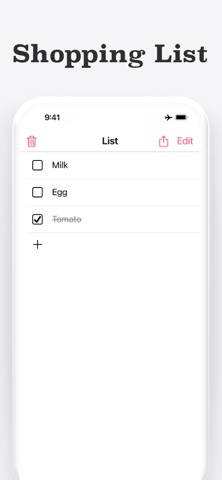
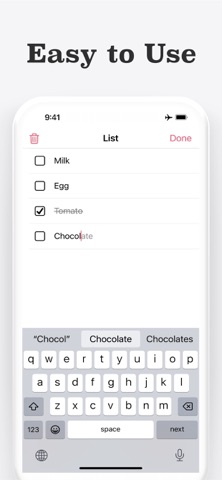
Shopping List is a simple shopping list app that leaves out multiple lists, categories, and due dates, letting you jot down what you need to buy in one list on one screen, with Home Screen widgets.
Write down items before you go shopping, then check them off at the store. The app works offline, needs no account or sign-up, and is useful for everyday grocery runs, household essentials, and anything you do not want to forget to buy.
[Main Features]
* Simple one-screen design
* Home Screen widget — view your list and check off items directly from the widget
* Checked items appear with a strikethrough
* Clear all checked items at once with the trash button
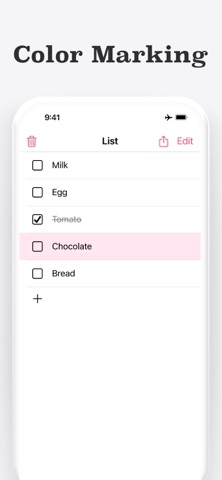
* Color-code items with 6 colors by swiping right
* Touch and hold an item, then drag to reorder it
* Swipe left on an item to delete it
* Share your list as text with the share button
* Enter items with the keyboard or iOS Dictation (voice input)
* Saves automatically, works offline, no account required
* Supports Dark Mode
[One List for All Your Shopping]
Shopping List is made for people who find most shopping apps too complicated, and for anyone who prefers to keep things simple. There is no support for multiple lists, product categories, due dates, quantities, or prices.
Multiple lists can seem convenient at first, but jumping between them soon makes managing your shopping feel like a chore. This app puts quick, everyday use first: open it, write down what you need, and go.
[Check Your List from the Home Screen]
Place the widget on your Home Screen to see your shopping list at a glance — like a sticky note that is always in view. You can also check off items right on the widget, so you can shop without opening the app.
Tapping the widget opens the app. When you notice that milk, bread, or shampoo is running low, you can jot it down the moment it comes to mind.
[Check Off Items as You Shop]
Tap an item to check it off — a strikethrough shows what is already in your cart, so you can see at a glance what is left to buy.
Swipe right on an item to give it one of 6 colors. Use colors to mark urgent items, distinguish food from household goods, or highlight things your family asked for. When you’re done shopping, tap the trash button to clear all checked items at once — anything you did not buy stays on the list for your next trip.
[Send Your List to Family]
With the share button, you can expor