Video to MP3 Converter App

Video to MP3 Converter App Summary
Video to MP3 Converter App is a free, ad-supported, with in-app purchases iOS app in Music And Audio by Penghui Zhao. Released in Jun 2016 (10 years ago). It has 6.5K ratings with a 4.58★ (excellent) average. Based on AppGoblin estimates, it reaches roughly 12K monthly active users and generates around $<10K monthly revenue (33% IAP / 67% ads). Store last updated Sep 24, 2026
Recent activity: 1.00 new ratings this week View trends →
SDK intelligence: AppGoblin detected 1 ad networks(e.g. Google) integrated into Video to MP3 Converter App. View full SDK list →
Video to MP3 Converter App SDKs Summary
Video to MP3 Converter App was last scanned for SDKs on 2026-09-24. Below is the overview of third-party companies detected in the app. The full list of SDKs, permissions and unknowns is available here.
 Google
4.58★
Ratings: 6.5K
Screenshots




App Description
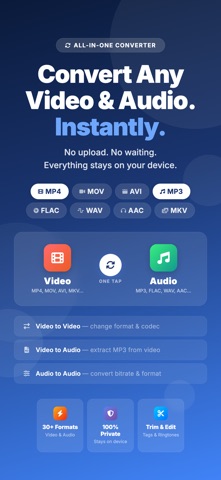
Media Converter is the ultimate app to convert video and audio files right on your iPhone or iPad. Easily change video formats, extract audio from videos, convert music files, trim clips, edit MP3 tags, and create custom ringtones — all in one simple, powerful app.
Convert MP4 to MP3, MOV to AVI, MP3 to WAV, and more with just a few taps.
Top Features:
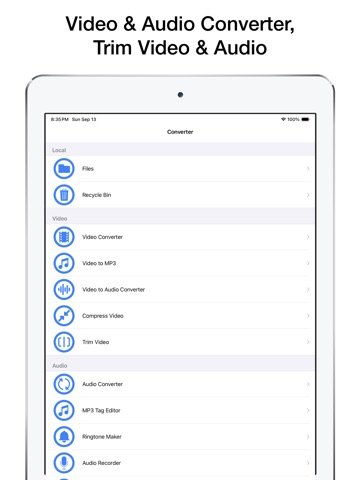
• Video Converter
Convert videos to different formats like MP4, MOV, AVI, 3GP, FLV, MKV, and more. Perfect for changing formats for playback or editing.
• Audio Converter
Convert audio files between MP3, M4A, AAC, WAV, FLAC, OGG, AC3, CAF, and many others. Quickly change formats for compatibility or quality.
• Video to Audio Converter
Extract high-quality MP3 or M4A audio from any video file. Great for saving music, speeches, or soundtracks from video clips.
• Trim Video & Audio
Cut unwanted parts from videos or music files. Perfect for creating clips or ringtones.
• Create Ringtones
Turn your favorite songs into custom iPhone ringtones. Set start and end times easily.
• Edit MP3 Tags
Modify song title, artist, album, genre, and more. Keep your music library organized.
• Built-in Media Player
Play all your converted files directly in the app. Supports most popular video and audio formats.
Supported Formats:
Audio: MP3, M4A, AAC, WAV, FLAC, CAF, AIFC, OGG, AC3, RM, and more
Video: MP4, MOV, M4V, AVI, MKV, FLV, 3GP, RMVB, DIVX, MPV, and others
Import Options:
• Import from iOS Media Library
• Open files from the Files app
• Download files using a URL
• Wi-Fi transfer from PC or Mac
• Add files using iTunes File Sharing
• Receive files from other apps (Email, Messenger, etc.)
Privacy & Security:
• App lock with passcode, Face ID, or Touch ID
• All files stay on your device — your media, your privacy
Why Media Converter?
• Fast and easy file conversions
• Wide format support
• No internet required for conversion
• Clean and user-friendly interface
• One app for all your video and audio needs
Subscription Info:
Payment will be charged to your iTunes account upon confirmation. Subscriptions automatically renew unless auto-renew is turned off at least 24 hours before the end of the current period. You can manage your subscription or turn off auto-renewal in your Account Settings.
Terms of Service: https://www.fingerjoystudios.com/terms-of-service/
Privac