MyCollections - Gallery

MyCollections - Gallery Summary
MyCollections - Gallery is a ad-supported iOS app in Lifestyle by Atsushi Ezaki. Released in Sep 2016 (9 years ago). It has 5.00 ratings with a 3.80★ (average) average. Based on AppGoblin estimates, it reaches roughly 10 monthly active users and generates around $<10K monthly revenue (0% IAP / 100% ads). Store metadata: updated May 22, 2023.
Store info: Last updated on App Store on May 22, 2023 .
3.8★
Ratings: 5.00
Screenshots


App Description
Collection management, organizing application "MyCollections"
It is an application aimed at registering and managing collected items and organizing belongings that they possess.
For example how to use ...
· Register clothes you have> tag it and create a pattern to wear.
· Register a red seal> Register and manage photos and shrines of temples and shrines.
· Register the mountaintops and badges of Hundred Mountain Mountains> Use for managing the number of mountains.
And etc., how to use it!
I think that it is convenient for you to apologize and check that you do not buy the same thing, register the items you are collecting and look at the pictures! It is!
Please do use it by all means.
【Main function】
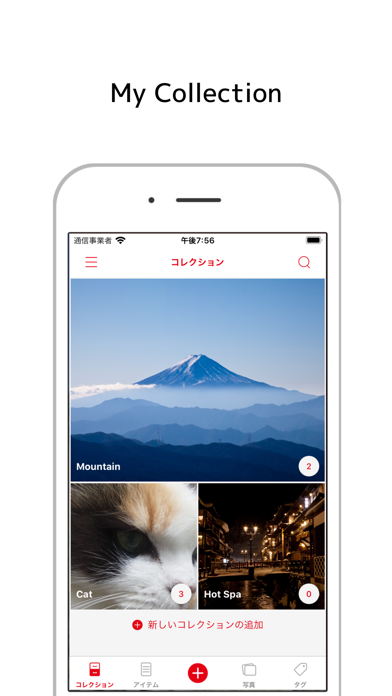
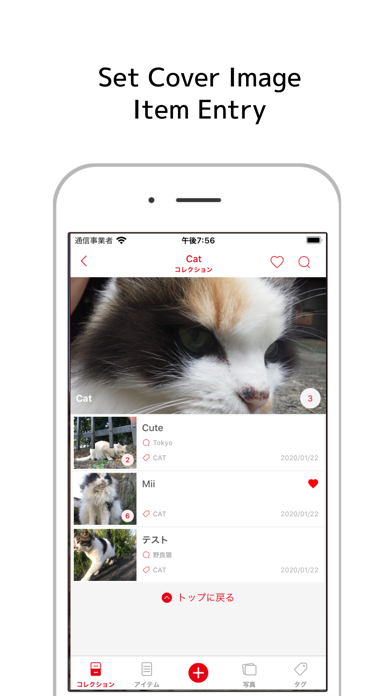
It is possible to set one cover photo in the collection group.
You can also change the display size and rearrange.
Up to 10 pictures can be registered for items to be added to the collection.
Items can be sorted in the collection.
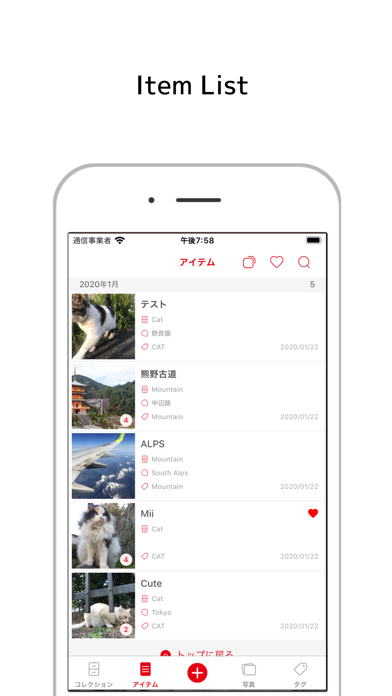
In the item list and the photo list, it is possible to check the item with the back and forth movement button.
By tagging, it is also possible to manage the items across the collection.
In the image widget, you can display images of recently registered items and favorite items.
As the theme function of the application,
- White mode or dark mode
- Font color setting
- Display function of badge
there is.
【screen structure】
Collection list
Item list
Photo list
Tag list
Collection registration edit screen
Item registration edit screen
Item picture screen
settings screen
【Detailed function by screen】
■ Collection list
- Add collection
- Swipe down to change display format (list, 2 columns, individual settings)
- Change display order with long tap
- Size switching with double tap (when display format is set individually)
- Tap on collection name to transition to collection registration edit screen
■ Item list
- Swipe down to resize (list, 2 columns, 4 columns)
- Tap item name to transition to item registration edit screen
Photo list
- Swipe down to resize (large, 2 columns, 4 columns)
- Photo tap to show pictures in detail (enlargeable)
■ Tag List
- Add new tag
- Change display order with long tap
- Delete or rename with left swipe
- Tap to transition to item list screen
■ Collection registration edit screen
- Create cover image
- Size designation in list (valid when individual display)
■ Item registr