SFRef Soccer Referee Watch
SFRef Soccer Referee Watch Summary
SFRef Soccer Referee Watch is a with in-app purchases iOS app in Sports by Peramanayagam Marimuthu. Released in Oct 2016 (9 years ago). It has 480 ratings with a 4.34★ (good) average. Based on AppGoblin estimates, it reaches roughly 3.5K monthly active users and generates around $<10K monthly revenue (100% IAP / 0% ads). Store metadata: updated Jan 22, 2024, version 70421.
Recent activity: 1.00 new ratings this week View trends →
Data tracking: SDKs and third-party integrations were last analyzed on Oct 11, 2025.
Store info: Last updated on App Store on Jan 22, 2024 (version 70421).
SDKs, Trackers & Permissions
SFRef Soccer Referee Watch was last scanned for SDKs 2025-10-11. Below is the overview of third party companies detected in the app. The full list of raw SDKs, app permissions and unknown SDKs is available here.
 Firebase
 Google
 nanopb
App Details
App Store
Ads & App-Ads.txt
AppGoblin SDK Scans
4.34★
Ratings: 480
Screenshots
App Description
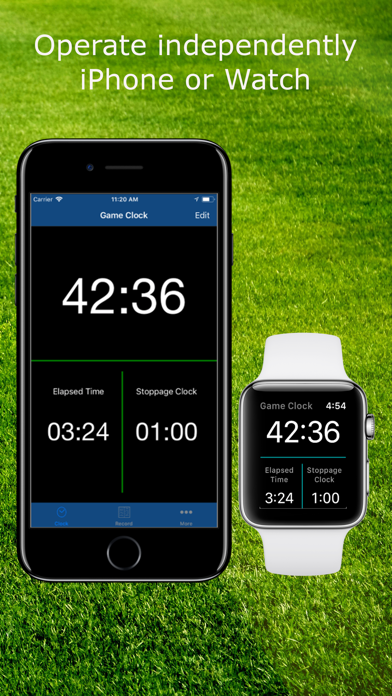
Run the app independently on the watch - don't need the phone at all, even for configuration. You can also setup a match on the phone and transfer it to your watch, if you prefer.
Run the app independently on the iPhone if you don't have a watch.
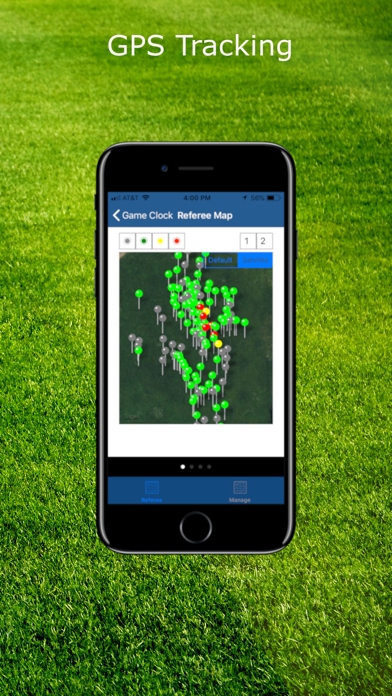
Use GPS to track referee locations on the field.
Preconfigure matches for the next week/month/season and load it up whenever you need it. Your matches can be saved on the phone and/or the watch.
Doing tournaments? Save current match results on the watch and move on to the next match. Your results can be accessed at a later time when you want to file a report.
Track substitutions by enabling them in your match setup. Tracking is not enabled when you do a quick game setup on phone or watch.
Getting rosters late? Ask coach to install app and Airdrop (or send it as an email attachment). You can also scan and use OCR to fill in rosters. No more manual entry.
Setup your match and Airdrop it to your Assistant Refs, so the match is configured on their app also.
Send a game report from your device after the game with the press of a button. Reports include goal/card details as well as player game time.
Look at your workout stats (distance, calories burned heart rate). More statistics will come soon!
See how to set it up on the watch:
https://youtu.be/nv2hU8S2OWI
Tip: Remember to:
- Put your watch in Airplane mode during the game. It ensures you are not interrupted by other events. Your watch will also not constantly search for the phone across the field and lose charge.
Free app can track games with up to 10 minute halves. Purchase in app to track longer duration. Users who purchased the app from 1.0 to 6.5 will have no restrictions.
Now the details:
The app has three timers - game clock, stoppage clock and elapsed time. Elapsed time starts at zero and runs uninterrupted during the game. Game clock and stoppage clock are tied together - either game clock is running during the game or stoppage clock is running. They are controlled by a tap on screen.
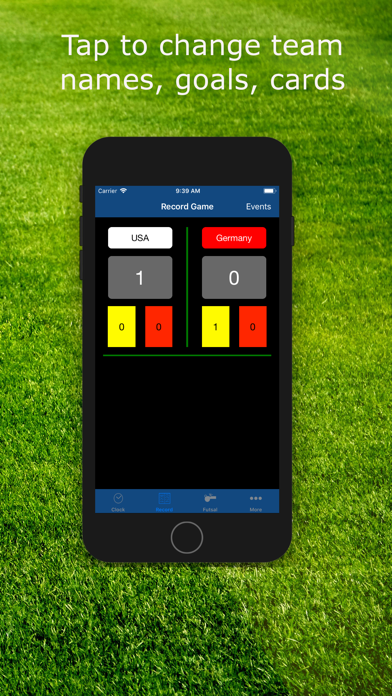
From Game clock screen, swipe left to go to the game record screen. Here all elements are editable with a tap. You can change home and away team names. You can record scores or record yellow and red cards. The app automatically records the time at which the event took place.
In case, you added a goal event or card event in error, you can delete the incorrect entry