Train Go - Railway Simulator

Train Go - Railway Simulator Summary
Train Go - Railway Simulator is a free, ad-supported, with in-app purchases iOS app in Simulation by monois Inc.. Released in Aug 2017 (9 years ago). It has 13K ratings with a 4.45★ (good) average. Based on AppGoblin estimates, it reaches roughly 12K monthly active users and generates around $<10K monthly revenue (31% IAP / 69% ads). Store last updated Sep 28, 2026
Recent activity: 1.00 new ratings this week View trends →
SDK intelligence: AppGoblin detected 2 ad networks(e.g. Google),and 1 development tools integrated into Train Go - Railway Simulator. View full SDK list →
Train Go - Railway Simulator SDKs Summary
Train Go - Railway Simulator was last scanned for SDKs on 2026-07-29. Below is the overview of third-party companies detected in the app. The full list of SDKs, permissions and unknowns is available here.
 Google
 InMobi
 Unity
Unity4.45★
Ratings: 13K
Screenshots


App Description
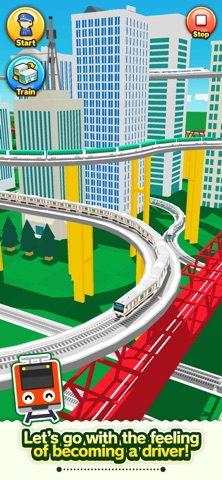
Select the desired rail and connect it.
Just tap to lay rails.
Create a railway with elevated rails, forking rails, etc., as you want.
Create a railway for your favorite train or bullet train and exercise your imagination and creativity.
Great fun to run a train on a railway you created, and a great sense of accomplishment!
Add train stations and tunnels to customize it. Then run trains on it!
Instructions
Tap the screen to add the desired rail.
Tap the arrow in the direction you want to lay the rail. Very easy to lay rails.
Tap on a background part to add buildings and trees wherever you want.
After building the railway, tap on the Put Train button and select a train!
You can add and delete trains and change the running direction.
After you are done, tap the Start Train button to start running the train.
When the train approaches a fork, use the following Fork button to switch the train's direction.
Camera Mode
Press "+" to zoom in.
Press "-" to zoom out.
Press the arrow to change the camera angle.
Train tracking: Press ON to track a train.