Pictream

Pictream Summary
Pictream is a paid iOS app in Photo And Video by sorakaze Inc.. Released in Apr 2017 (9 years ago). It has 1.00 ratings with a 2.00★ (poor) average. Store last updated May 17, 2023
Pictream SDKs Summary
App not yet scanned for SDKs.
2★
Ratings: 1.00
Screenshots


App Description
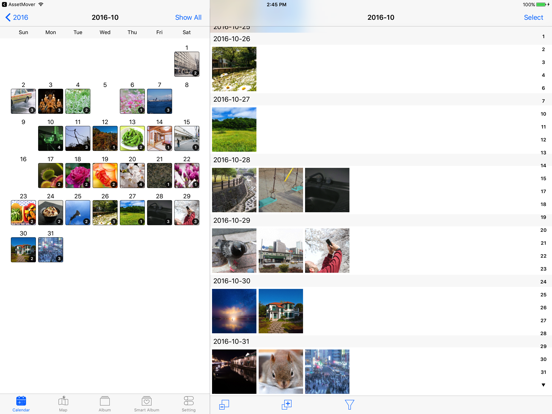
Pictream is a photo browser that allows you to view photos easily by their date and location. Please use this app as a tool for tracing back through your lovely memories. It provides Kiosk Mode and Exhibition Mode functionality, which can be used for displaying catalogs in galleries and shops.
■Calendar Display
- Calendar display of photos per day, month, and year.
- Switch between calendars by flicking sideways on the screen.
- Use "Latest" to display a list of the 100 most recent photos.
■Map Display
- Display photos on a map based on their location information.
- Zoom in and out on the map to rearrange the photos smoothly
■Thumbnail List
- Display photos in sections based on the date they were saved.
- Use the index list on the left to move photos to the desired year, month, and day.
- Pinch in and out on the screen to change the size of the thumbnails.
- Apply a search filter based on the type of photos and videos.
- Select multiple photos to perform a variety of operations, such as adding them to albums or deleting them.
■Preview
- Use the app’s proprietary preview interface to search for other photos quickly, even when in full screen mode.
- View detailed information about photos (EXIF, etc.).
■Simple Editing Function
- Built-in simple editing functionality provided by Adobe.
- Edited photos are saved as new photos.
■3D Touch
- Use 3D Touch to preview not only the photos, but also the calendar display and thumbnail list display.
■Today Widget
- Immediately access photos in the last few days from the widget.
■Slideshow
- Display preview photos as a slideshow.
- Configure timings and transitions on slideshows.
■Kiosk Mode
- This mode prevents you from executing certain operations by mistake while viewing photos.
- Prevents users from editing of photos or transitioning to other screens.
- To cancel this mode, enter a passcode or your TouchID (or restart the app).
■Exhibition Mode
- In addition to kiosk mode, exhibition mode starts a slideshow automatically after the app is left idle for a specified amount of time.
- Touch the screen to pause the slideshow and look through the photos manually.
- You can use this function to display product catalogs in galleries and shops.
■Import Photos from iTunes File Sharing
- Transfer photos from iTunes > Device > App > File Sharing > Pictream.
- Use Settings Tab > Read In to read in