Photos PDF : Scanner Converter

Photos PDF : Scanner Converter Summary
Photos PDF : Scanner Converter is a free, with in-app purchases iOS app in Productivity by DIGISET LLC. Released in Mar 2017 (9 years ago). It has 264K ratings with a 4.83★ (excellent) average. Based on AppGoblin estimates, it reaches roughly 705K monthly active users and generates around $10K+ monthly revenue (100% IAP / 0% ads). Store last updated Oct 29, 2026
Recent activity: 34 new ratings this week View trends →
SDK intelligence: AppGoblin detected 2 development tools(e.g. Alamofire) integrated into Photos PDF : Scanner Converter. View full SDK list →
Photos PDF : Scanner Converter SDKs Summary
Photos PDF : Scanner Converter was last scanned for SDKs on 2026-10-23. Below is the overview of third-party companies detected in the app. The full list of SDKs, permissions and unknowns is available here.
 Alamofire
 MongoDB
4.83★
Ratings: 264K
Screenshots




App Description
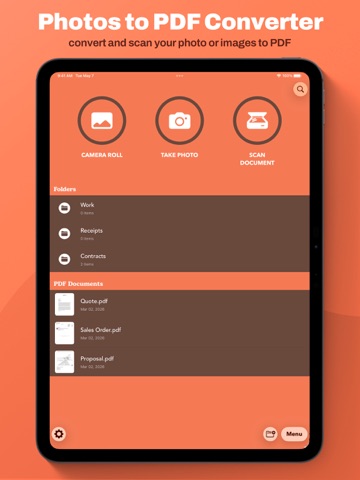
+ Images to PDF in 3 easy steps +
1. Open App
2. Select images or capture new ones
3. Tap 'Convert to PDF'
Experience unparalleled ease! Transforming your images into stunning PDFs has never been simpler. Say goodbye to convoluted apps with unnecessary features. Elevate your productivity effortlessly with Photos to PDF Converter.
Photos to PDF Converter Features:
+ User-Friendly Design +
Our app is designed for everyone—no need for complicated converters. Enjoy a fast and straightforward experience with an intuitive design.
+ Versatility +
Tailor Photos to PDF according to your needs. Whether you desire a basic converter or wish to apply image rotation or filters, we've got you covered.
+ Swift and Secure +
All PDF conversions occur directly on your device, ensuring the security of your images and files. Experience rapid conversions in seconds, just as it should be!
+ Organization Made Easy +
Efficiently manage your PDF documents with folder organization and customizable file names. Keep your app clutter-free, even with a multitude of PDFs!
+ Sign documents +
Just open your PDF, select "Sign", add you signature and done! Sign your documents fast and easy.
+ Share and Print +
Export and share all your PDF documents right from the app with a single tap. Send via iMessage, Open in other apps, Print, etc.
*PDF is created with watermark. To disable watermark, please upgrade to PRO version*