Metadata

Metadata Summary
Metadata is a free, with in-app purchases iOS app in Photo And Video by Thomas Coomer. Released in Mar 2017 (9 years ago). It has 449 ratings with a 4.03★ (good) average. Based on AppGoblin estimates, it reaches roughly 219 monthly active users and generates around $<10K monthly revenue (100% IAP / 0% ads). Store last updated May 26, 2026
Recent activity: 1.00 new ratings this week View trends →
Metadata SDKs Summary
App not yet scanned for SDKs.
4.03★
Ratings: 449
Screenshots


App Description
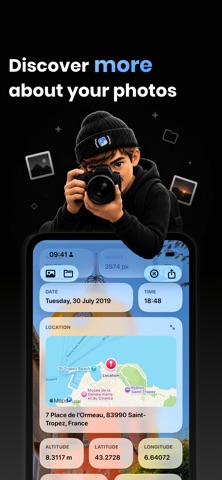
Metadata is the modern photo metadata viewer for photographers, creators and visual professionals.
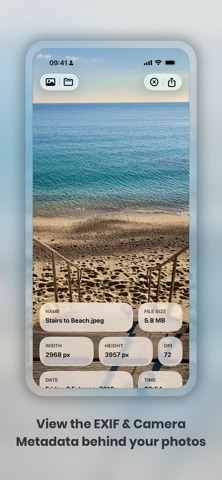
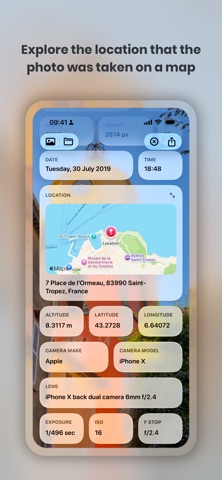
Import an image from Photos or Files and instantly discover the hidden information behind your photos. Explore detailed EXIF data, camera settings, image dimensions, DPI, file size, lens details, location information and more — all displayed in a beautiful interface designed for creative workflows.
Whether you shoot on iPhone, DSLR, mirrorless cameras or create artwork in professional editing apps, Metadata helps you inspect, analyse and better understand your images.
Perfect for:
• Photographers
• Designers
• Content creators
• Social media professionals
• Digital artists
• Print studios
• Creative agencies
FEATURES
• View detailed photo metadata and EXIF information
• Inspect ISO, aperture, exposure, focal length and lens details
• See image dimensions, DPI, colour profile and file size
• View device and location information stored in photos
• Import images from Photos, Files and other apps
• Drag and Drop support for fast professional workflows
• Fast, elegant and modern design
• Optimised for creators and creative professionals
METADATA PRO
Unlock advanced creative tools with Metadata Pro:
• Extract text directly from photos using on-device text recognition
• Copy and share recognised text instantly
• Access advanced photography metadata and camera information
• Calculate print sizes with the built-in DPI calculator
• Check image dimensions for print and production workflows
From analysing exported artwork to checking professional camera settings before print, Metadata gives creators a powerful way to inspect and understand their images anywhere.
- Subscription Details -
Subscriptions will be charged to your iTunes account at confirmation of purchase. Your subscription will automatically renew unless automatic renewal is turned off at least 24 hours before the end of the current period. Your account will be charged for renewal within 24 hours prior to the end of the current period. You can manage your subscriptions and automatic renewal status in Account Settings after purchase. Price may vary by location.
Privacy Policy: https://smudge.app/privacy
Terms and Conditions: https://smudge.app/app-terms