FPL

FPL Summary
FPL is a mobile iOS app in Tools by NextEra Energy, Inc. Released in Jun 2017 (9 years ago). It has 22.9K ratings with a 4.50★ (excellent) average. Based on AppGoblin estimates, it reaches roughly 77.7K monthly active users . Store metadata: updated Jun 3, 2026.
Recent activity: 39 new ratings this week View trends →
Data tracking: SDKs and third-party integrations were last analyzed on Sep 26, 2024.
Store info: Last updated on App Store on Jun 3, 2026 .
4.5★
Ratings: 22.9K
Screenshots


App Description
Get more with just a tap of our app. Your fingerprint or FaceID will give you instant, secure access to your account so you can easily manage your power in the palm of your hand – report an outage and receive updates, get real-time bill notifications and reminders, find out about your next month’s projected bill amount and more!
Features include:
ALERTS AND REMINDERS
-If you’re not already receiving your bill by email, you will be automatically switched to monthly email bills (and mobile app reminders) to quickly view, download and pay your bill – no more paper! Terms and conditions are available at fpl.com/ebillterms
-Receive alerts and reminders when a new bill is ready to view and when it is due
-Receive appointment reminders for scheduled appointments
OUTAGE INFORMATION
-Report a power outage
-Check outage status and track restoration progress
-Receive updates via push notifications
ENERGY USE INFORMATION
-View your projected monthly bill amount
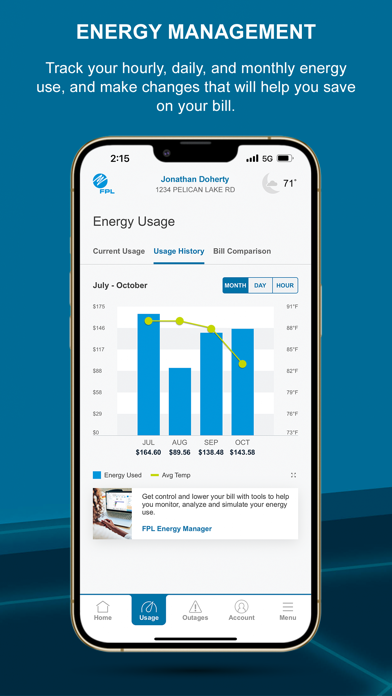
-Track your current, daily, weekly and monthly energy use
-View your daily energy cost average and quickly see how your bill compares to the previous month
ACCOUNT MANAGEMENT
-Fingerprint login to view your real-time account balance, payment due date, balance details
-View and download your bill (PDF)
-Enroll in Pay Online and make a payment
-Manage your saved payment methods
-Schedule a future payment (if qualified)
-Update your account profile – email address, phone number, and mailing address
*FPL app use requires an active FPL account that is registered online at FPL.com