Todoufuken Go - for Japan.

Todoufuken Go - for Japan. Summary
Todoufuken Go - for Japan. is a ad-supported, with in-app purchases iOS app in Travel And Local by mitsunori oishi. Released in Jun 2017 (8 years ago). It has 2.00 ratings with a 5.00★ (excellent) average. Based on AppGoblin estimates, it reaches roughly 5.00 monthly active users and generates around $<10K monthly revenue (27% IAP / 73% ads). Store metadata: updated Oct 17, 2024.
Store info: Last updated on App Store on Oct 17, 2024 .
5★
Ratings: 2.00
Screenshots




App Description
I'm sorry. It is for Japan only.
If you came to Japan, please try using it.
When I look back on my memories of traveling in Japan.
This application classifies photos taken by iPhone by prefecture.
After classification, albums are displayed by prefecture.
Position information of the photo is used for classification.
"Map" shows the presence or absence of shooting.
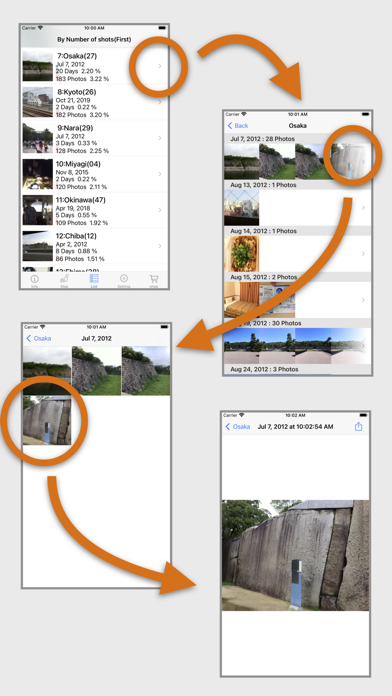
"List" photos, shooting date, number of shots, and number of days are displayed for each prefecture.
※Attention
· Tally only photos that contain location information.
· In the prefectural border, it may be inaccurate.
· Sea location information is not searched except for some.
· Part of the Seto Inland Sea will search for location information on the sea.
· When you delete a photo displayed in each prefecture, the picture will not be displayed.
In that case, please do "Search All" in "Setting".
■ How to use
1. Please allow access to the album at the first start. The search will start.
2. After the search, results are displayed in "Map" "List".
3. Change the display method of "map" "list" with "setting".
4. When next time you start up, if there are new pictures, only that picture will be searched.
5. If you deleted the photo, please do "Search All" again.
■ Map tab
-In period mode, select the aggregation period.
“Until now”: Aggregate for all periods.
“Period”: Totals from the first shooting date to the specified date in monthly units.
“Years”: Aggregates in the specified year.
- Display count results by color by prefecture.
To change the display, use "Display Type" in "Setting".
- When you zoom in, the Prefecture name will be displayed.
When you tap the prefecture name, the number of shots and days are displayed.
Tap "i" to display the picture.
- "+" Show the whole Japan.
- "Up arrow" Share the image of the map.
■ List tab
- Display count results by prefecture in order of number of shots or date.
To change the display, use "Display Type" in "Setting".
* Prefectures without pictures are displayed in ascending order of prefecture codes.
- Display items
"Photo" - "First photographed picture" or "Last photographed picture" set in "Setting" is displayed.
"Japan Prefectures name" - The attached number () in the name next to the name indicates the Prefecture code (JIS X 0401).
"Shooting date" - Shooting date of the displayed photo is displayed.
“Number of days” - Displays