Reverse Audio

Reverse Audio Summary
Reverse Audio is a free, ad-supported, with in-app purchases iOS app in Music And Audio by Nobutaka Yuasa. Released in Jul 2017 (9 years ago). It has 124K ratings with a 4.69★ (excellent) average. Based on AppGoblin estimates, it reaches roughly 328K monthly active users and generates around $10K+ monthly revenue (30% IAP / 70% ads). Store last updated Aug 11, 2026
Recent activity: 291 new ratings this week View trends →
SDK intelligence: AppGoblin detected 4 ad networks(e.g. Google), 2 development tools,and 1 analytics: product integrated into Reverse Audio. View full SDK list →
Reverse Audio SDKs Summary
Reverse Audio was last scanned for SDKs on 2026-10-03. Below is the overview of third-party companies detected in the app. The full list of SDKs, permissions and unknowns is available here.
 Google
 AppLovin
 Pangle
 InMobi
 nanopb
 Firebase
4.69★
Ratings: 124K
Screenshots



App Description
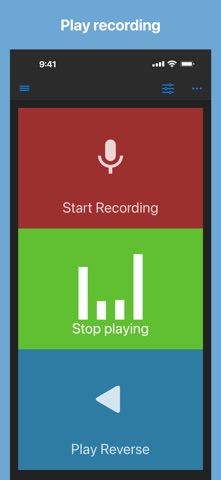
Record, listen, and reverse your audio with just a tap!
Easily record audio from your microphone and play it back forwards or in reverse.
How it works:
1. Record sound using your device’s microphone
2. Play the recorded audio normally or reverse it for a unique listening experience
Perfect for fun, creative projects, or audio experimentation!
When playing audio, you can change
- playback rate (Range: x0.5 to x2.0)
- pitch by a half tone (Range: -2 octave to +2 octave)
This app can import an audio file from other apps by share action or from Files app.
Supported files: wav, mp3, mp4, m4a, aifc, aiff, caf, flac
Saved audio files are also accessible from Files app:
Files app -> On My iPhone/iPad -> Reverse Play -> Audio
Enjoy!
If you have suggestions to improve, just rewrite a review.
I will do my best!