Smart Timetable: Study Planner

Smart Timetable: Study Planner Summary
Smart Timetable: Study Planner is a free, with in-app purchases iOS app in Education by Denis Kravcov. Released in Oct 2017 (9 years ago). It has 76K ratings with a 4.70★ (excellent) average. Based on AppGoblin estimates, it reaches roughly 72K monthly active users and generates around $<10K monthly revenue (100% IAP / 0% ads). Store last updated Oct 12, 2026
Recent activity: 9.00 new ratings this week View trends →
SDK intelligence: AppGoblin detected 3 development tools(e.g. Google),and 1 analytics: product integrated into Smart Timetable: Study Planner. View full SDK list →
Smart Timetable: Study Planner SDKs Summary
Smart Timetable: Study Planner was last scanned for SDKs on 2026-09-22. Below is the overview of third-party companies detected in the app. The full list of SDKs, permissions and unknowns is available here.
 Google
 nanopb
 OpenID
 Firebase
4.7★
Ratings: 76K
Screenshots



App Description
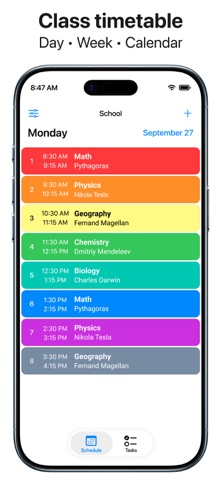
Class schedule for students, teachers and parents.
Features:
• Friendly support.
• Multiple schedules at once.
• Rotating schedule support.
• Schedules for 1, 2, 3, or 4 weeks.
• Today widget with countdown timer.
• iCloud schedule synchronization.
• Lesson and assignment notifications.
• Photos, videos, audio for your tasks.
• Application and widget for Apple Watch.
• Sending schedules to friends and coworkers.
• Chart with useful info about your schedules.
• Sync schedules with Apple Calendar.
• Siri Shortcuts and Voice commands.
• Support iPhone, iPad, Apple Watch.
• Available for your Mac.
This application helps you create as many schedules as you need for anything you might be planning. School, college, gym - you can easily manage it all in one application: Smart Timetable.
User-friendly application widgets display relevant information - whether it’s the current lesson, next lesson, or tomorrow's lesson. The widget automatically switches to the next school day when today's classes are over. The current lesson time will show you how much time is left until it is completed. The timer is available on the Today widget, as well as on the Apple Watch face.
Developer's website: https://smart-timetable.app
Privacy policy: https://smart-timetable.app/docs/privacy-policy.html
Terms of use: https://smart-timetable.app/docs/terms-of-use.html