Afterlight: Cam & Photo Editor

Afterlight: Cam & Photo Editor Summary
Afterlight: Cam & Photo Editor is a free, with in-app purchases iOS app in Photo And Video by Afterlight Collective, Inc. Released in Nov 2017 (8 years ago). It has 60K ratings with a 4.71★ (excellent) average. Based on AppGoblin estimates, it reaches roughly 28K monthly active users and generates around $<10K monthly revenue (100% IAP / 0% ads). Store last updated Oct 18, 2026
Recent activity: 18 new ratings this week View trends →
SDK intelligence: AppGoblin detected 3 development tools(e.g. Google), 2 ad networks,and 1 analytics: product integrated into Afterlight: Cam & Photo Editor. View full SDK list →
Afterlight: Cam & Photo Editor SDKs Summary
Afterlight: Cam & Photo Editor was last scanned for SDKs on 2026-09-24. Below is the overview of third-party companies detected in the app. The full list of SDKs, permissions and unknowns is available here.
 Google
 Facebook
 nanopb
 Alamofire
 Firebase
4.71★
Ratings: 60K
Screenshots


App Description
Afterlight is designed by a small, independent team of creatives & photographers who are deeply committed to creating authentic Presets, Effects, and Overlays, made by people who really use them.
• Introducing Afterlight Camera
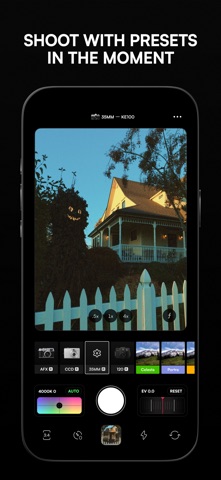
Our all-new camera mode brings Afterlight’s signature looks into the viewfinder, with live filters and a seamless transition from shooting to editing. Explore exclusive RAW presets inspired by classic digital cameras, 35mm film, and medium-format photography, with selectable color profiles to shape your look.
• 300+ Film Inspired Presets
Add character to your photos with a wide selection of one-tap Film Presets inspired by real film photography. Our presets were created to emulate genuine film like Kodak Gold, Portra, Agfa Vista, and Disposable cameras. Combine Effects and Tools to create your own custom look as a Fusion Filter.
• Natural Film Effects
Apply unique film emulation techniques like Double Exposure, add the warm glow of Halation, shift RBG channels with Color Shift, and create chromatic aberration with Chroma.
• 100+ Real Overlays
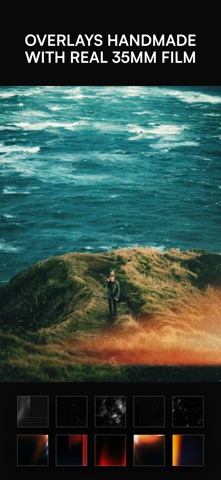
Add fun finishing touches to your photos with our large selection of overlay textures. Experiment with genuine Light Leaks made with real 35mm film, Natural Dust textures, Vintage Paper and VHS effects.
• 30+ Advanced Editing Tools
Take full control of the Brightness, Contrast, Vibrance and Sharpening in your photos and add more detail with Structure, Glow, Grain, Curves, Clarify, Vignette and many more to explore.
• Frames + Borders
Before exporting your final edit, add a color border or apply an Instant Film frame and your own background image.
• We care about true privacy
We do not collect, store or share any of your data in any way. Your photos are always your photos.
Terms of Use & Privacy Policy: https://afterlight.co/privacy
Have a question? Contact us: https://afterlight.co/support
Find us on Instagram: @afterlight