Cold Approach: Pickup & Dating

Cold Approach: Pickup & Dating Summary
Cold Approach: Pickup & Dating is a free, with in-app purchases iOS app in Lifestyle by Pascal Andraos. Released in Jan 2018 (8 years ago). It has 25 ratings with a 4.76★ (excellent) average. Based on AppGoblin estimates, it reaches roughly 52 monthly active users and generates around $<10K monthly revenue (100% IAP / 0% ads). Store last updated Jul 19, 2025
Cold Approach: Pickup & Dating SDKs Summary
App not yet scanned for SDKs.
4.76★
Ratings: 25
Screenshots




App Description
Imagine having superpowers with women.
Imagine approaching any girl and effortlessly seducing her.
Pickup artists worldwide have mastered those skills.
You could be just like them.
Why keep getting paralyzed by approach anxiety, getting rejected, ghosted and flaked on?
The truth is, if you want consistent results with women, you have to get scientific.
To do that, it is vital to keep rigorous and systematic field reports of every minute detail of your approaches.
After all, what gets measured gets improved.
Cold Approach streamlines capturing your approaches on the go, in high fidelity, so you never have to forget any detail.
It aggregates your data so you can objectively track your performance and monitor your progress.
COLD APPROACH FEATURES
1-HOME SCREEN
• Browse through a timeline of all your saved approaches grouped by day.
Approaches are summarized as cards highlighting their most vital details.
• Tap a card to view the full details of an approach, edit it or delete it.
• Search or filter through your timeline.
• Track a weekly goal of approaches to reach.
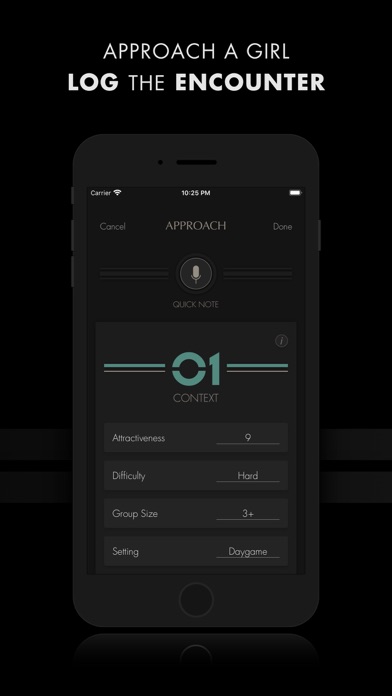
2-APPROACH SCREEN
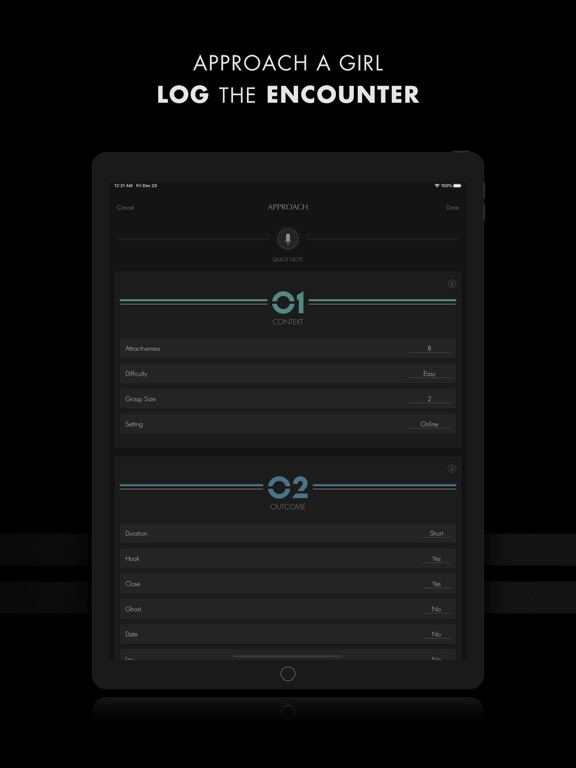
Capture the details of a new approach or edit an older one.
This screen is split into six sections:
• CONTEXT covers the circumstances of the approach.
• OUTCOME covers the results of the approach.
• NOTES lets you add text or voice notes.
• PROFILE/BIO lets you set the personal information of the girl you approached as well as add photos.
• DATE & TIME lets you set the date and the time of the approach.
• LOCATION lets you set the name of the venue and its GPS location on the map.
3-SESSION SCREEN
• Challenge yourself to approach a certain number of girls in a limited time.
• Get a summary of your performance at the end of every session.
4-PERFORMANCE SCREEN
Analyze your progress, sticking points, strengths and weaknesses by breaking your data down and visualizing it in different ways:
• In graph form (line or bar graph) or as a breakdown of stats.
• By day, week, month, year or totals.
• As numbers or percentages.
Focus your analysis even further by applying a wide array of filters.
5-SETTINGS
• Set a weekly goal of approaches to perform.
• Enable motivational notifications pushing you to take action towards your weekly goal.
• Back up all your saved approaches to your Dropbox or Google Drive account.
Cold Approach has been refi