Magic Lumixus ViewFinder

Magic Lumixus ViewFinder Summary
Magic Lumixus ViewFinder is a ad-supported, with in-app purchases iOS app in Photo And Video by Roman Medvid. Released in Mar 2018 (8 years ago). It has 11 ratings with a 4.82★ (excellent) average. Based on AppGoblin estimates, it reaches roughly 3.00 monthly active users and generates around $<10K monthly revenue (27% IAP / 73% ads). Store metadata: updated Mar 17, 2026.
Store info: Last updated on App Store on Mar 17, 2026 .
4.82★
Ratings: 11
Screenshots

App Description
Magic Lumixus ViewFinder presents you a precise framing preview for the real camera/lens combination you'll be shooting with, right where you stand with your iPhone / iPad. It simulates the field of view of Panasonic / Lumix / Olympus digital cameras or lens and can help thousands of professionals in photography and filmmaking.
PLEASE READ: this app does not turn your Apple device into an external monitor, but operates as a stand-alone director's viewfinder.
The app contains ad banners, which can be turned off with additional in-app purchase (in 'Get Premium Features!' menu).
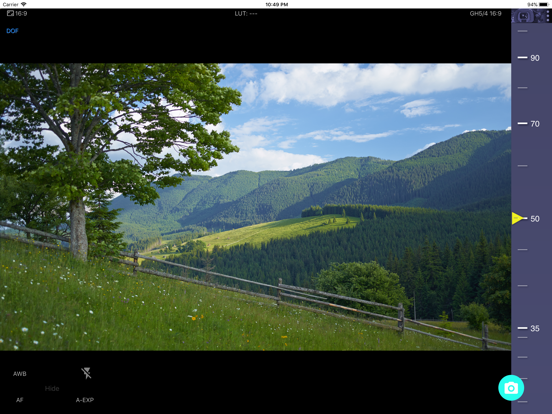
The app is a digital directors viewfinder - it helps you see the exact field of view for your future shot. Select the camera from the menu and rotate the wheel to select the focal length of the lens.
Supported cameras:
- Panasonic Lumix GH5 / GH4 / GH3 / GH2 / G9 / GF7 / GM5 / GM1 / GX7 etc.
- Panasonic AF100.
- Olympus OM-D E-M1 Mark II, Olympus PEN series, Olympus OM-D E-M series
Magic ViewFinder simulates using tele adapters or anamorphic optics on your camera (see menu). From the menu you can also select the aspect ratio of the frame guide overlaying your image.
Magic ViewFinder lets you apply color presets (aka LUTs) to the live picture, which brings you even closer to the final shot.
You may capture the image for future reference, with additional data like the focal length, date/time and camera / lens information.
While capturing, you may lock exposure and turn on/off AF to better control the captured picture.
You can turn on the AF mode, or lock the focus temporarily. You can also tap the live screen to focus on particular objects.
White balance may work in Auto, Locked or Manual mode.
If the field of view of your real camera is wider than your in-device camera, the app adds 'padding' around the image, since the device cannot 'see' what is beyond. It is the best solution that we developed.
Please note that position of your iPhone or iPad should correspond to the 'nodal point' of your real lens, which is somewhere in the middle of the lens. This point is, so to speak, the weighted center of the optics.
Ad policy: The ads are designed to appear non-intrusively. Ads can be turned off (see below).
Additional info about the app may be read at: http://dev.kadru.net/index.php/magic-viewfinder/
If you have any issues please email us for a quick support: dev@kadru.net
To a