PDF Editor ,PDF Book Reader ®

PDF Editor ,PDF Book Reader ® Summary
PDF Editor ,PDF Book Reader ® is a free, with in-app purchases iOS app in Tools by Milad Fakhr. Released in May 2018 (8 years ago). It has 41K ratings with a 4.26★ (good) average. Based on AppGoblin estimates, it reaches roughly 119K monthly active users and generates around $<10K monthly revenue (100% IAP / 0% ads). Store last updated Oct 11, 2026
Recent activity: 5.00 new ratings this week View trends →
PDF Editor ,PDF Book Reader ® SDKs Summary
PDF Editor ,PDF Book Reader ® was last scanned for SDKs on 2026-10-04. No known SDKs were detected. Check the raw list of SDK parts detected here and feel free to request unknown SDKs be added to AppGoblin.
4.26★
Ratings: 41K
Screenshots


App Description
PDF Editor, PDF Book Reader ® — Smart, Private, Made for Apple Intelligence
Read, edit, sign, scan and organize PDFs in one app. Designed with Liquid Glass for iPhone, iPad, Mac, Apple Vision Pro and Apple Watch.
APPLE INTELLIGENCE
- Summaries: understand a long PDF in seconds. Summarize the whole document or one page.
- Smart Categories: each PDF is sorted into a category, like Book, Manual, Receipt, Ticket or Contract, with an icon in your Library. Filter your Library by category in one tap.
- Auto Labels: every PDF gets a short title of its subject, shown under its name. Edit any title, and search finds it too.
- Suggested Tags: select a PDF and get up to three tag ideas from its content. Tap one to add it.
- Private by design: all Apple Intelligence features run on your device. Your documents never leave it.
SIRI AND SHORTCUTS
Just ask Siri:
- "Summarize my PDF with PDF Editor"
- "Open PDF in PDF Editor"
- "Search my documents in PDF Editor"
- "Scan text with PDF Editor"
Build Shortcuts to import files, load a PDF from the camera or iCloud, download a PDF from a link, open documents and rotate pages.
READ AND LISTEN
- Crisp, high-resolution display with smooth zoom.
- Book mode with realistic page curl, and two facing pages in landscape.
- Read Aloud in natural voices, with each word highlighted as it is spoken. Choose the speed, voice and language.
- Translate the current page with Apple Translate.
- Search the text of every PDF, and even your handwritten notes (iOS 27).
- Full Dark Mode support.
EDIT AND ANNOTATE
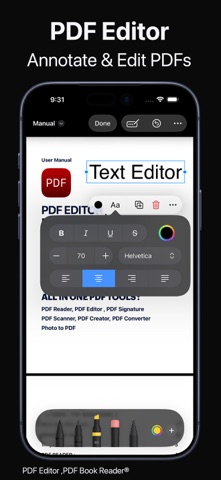
- Highlight, underline and add notes anywhere.
- Draw with Apple Pencil or your finger in any color.
- Add text boxes, shapes, images and photos.
- Fill forms, and create and place signatures.
- Rotate, insert, delete and reorder pages.
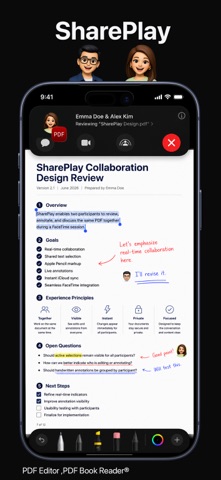
- Annotate together in real time with SharePlay.
SCAN AND CONVERT
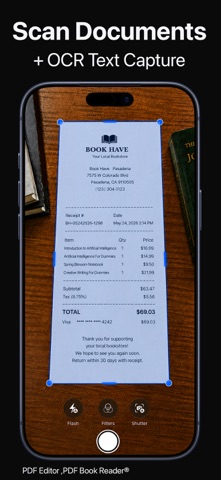
- Scan receipts, notes, contracts and multi-page documents with automatic edge detection.
- Instant Text (OCR): turn images and scans into text.
- Convert photos, images and web pages into PDFs.
- Export to HEIC, JPEG, PNG, Word (.docx), TIFF and PDF.
- Create professional invoices and share them as PDFs.
- Scan from Control Center or the Camera Control button.
ORGANIZE YOUR LIBRARY
- Categories: choose a category for any PDF yourself, on any device, and filter by it.
- Color tags, with a simple Tags button to assign and manage them.
-