Agenda: Notes meets Calendar
Agenda: Notes meets Calendar Summary
Agenda: Notes meets Calendar is a with in-app purchases iOS app in Productivity by Momenta B.V.. Released in May 2018 (8 years ago). It has 11.6K ratings with a 4.55★ (excellent) average. Based on AppGoblin estimates, it reaches roughly 32.3K monthly active users and generates around $<10K monthly revenue (100% IAP / 0% ads). Store metadata: updated May 25, 2026, version 356.
Data tracking: SDKs and third-party integrations were last analyzed on Apr 2, 2026.
Store info: Last updated on App Store on May 25, 2026 (version 356).
4.55★
Ratings: 11.6K
Screenshots


App Description
Most notes apps lose track of time. You write something, it disappears into a folder, and a week later you can't remember why you made that decision or what you prepared for that meeting.
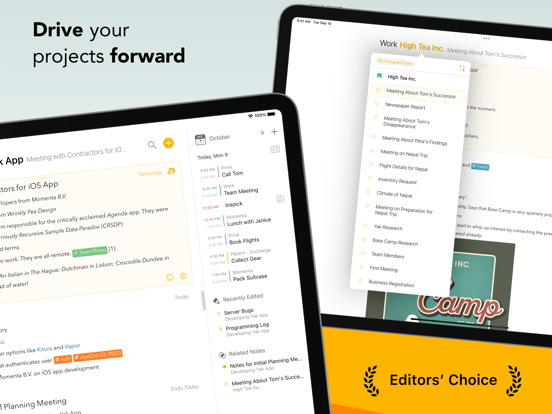
Agenda fixes this. Every note lives on a timeline alongside your calendar. Prepare for next week's client meeting, capture decisions as they happen, and look back at exactly what led you here — all in one view.
"It's my favorite new app in years."
— John Gruber, daringfireball.net
"Every notes app should work like Agenda."
— Khoi Vinh, subtraction.com
"One of the most interesting note-taking apps I've used."
— John Voorhees, MacStories
YOUR NOTES, CONNECTED TO YOUR CALENDAR
Attach any note to a date or link it directly to a calendar event. Mark notes as "On the Agenda" to surface them in a dedicated overview — your shortlist of what matters right now.
A REAL TEXT EDITOR
Headings, lists, tables, checklists, indented blocks, and preformatted text — with the simplicity of plain text input. Focus on what you're writing; Agenda handles how it looks.
FILES, PHOTOS, AND LINKS
Attach files and images to any note. Everything syncs across your devices and can be previewed inline.
PROJECTS AND CATEGORIES
Group notes into projects, group projects into categories. Drag to reorder, collapse to focus, or let the timeline do the organizing for you.
MAC, IPAD, AND IPHONE
Agenda syncs across all your devices via iCloud or Dropbox. Share individual notes for real-time collaboration — useful for team meetings or shared lists.
FREE TO USE, FOREVER
Agenda is free with no time limits. Premium features are available through a yearly subscription — and you keep every feature you unlock, even if you cancel. A one-time lifetime purchase is also available.