Reception App: iPad Check-in

Reception App: iPad Check-in Summary
Reception App: iPad Check-in is a with in-app purchases iOS app in Productivity by Naoki Oguchi. Released in Nov 2018 (7 years ago). Store metadata: updated May 17, 2026.
Store info: Last updated on App Store on May 17, 2026 .
0★
Ratings: 0
Screenshots

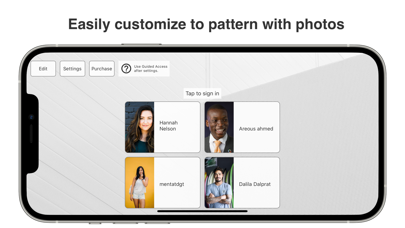


App Description
Transform your iPad into a smart, contactless reception system. Reception App: iPad Check-in lets visitors check in quickly, while staff receive instant notifications via Slack, Microsoft Teams, or Chatwork. Perfect for offices, clinics, salons, and retail stores, this visitor management system streamlines front desk operations and improves visitor experience.
With Reception App, you can set up a fully functional reception in minutes—no sales calls, no complicated onboarding, no extra hardware. Simply install the app on your iPad, customize the buttons and fields, and start receiving real-time visitor alerts. Affordable pricing and a 31-day free trial make it easy to start without risk.
【Who Can Benefit】
- Offices & Coworking Spaces: Manage visitors, deliveries, and meetings without dedicated reception staff, while keeping teams updated instantly via Slack, Microsoft Teams, or Chatwork.
- Clinics & Medical Practices: Reduce waiting room congestion and notify staff instantly when patients arrive.
- Beauty Salons & Spas: Welcome guests and alert stylists or therapists without interrupting service.
- Retail Stores & Showrooms: Greet customers and route them to the right staff without delay.
- Small Businesses: Replace manual visitor logs with an automated, professional solution.
【Key Features】
■ Customizable Check-in Buttons
Create buttons like “Interview,” “Delivery,” or “Guest” based on visitor type. Assign different notification destinations for each button, such as a Slack channel or Teams group.
■ Flexible Input Fields
Choose which details to collect: visitor name, staff to visit, purpose of visit, and more. Hide unnecessary fields to keep the process quick and user-friendly.
■ Destination-based Notifications
Send interview notifications to HR, delivery notifications to admin—no more phone transfers or wasted time.
■ Custom Branding
Upload your company logo, choose background images, and match your brand colors. Edit button labels and instructions to suit your needs.
■ Energy-saving Standby Mode
The screen dims after 30 seconds of inactivity to prevent burn-in and save power. Wake it with a tap.
■ App Lock (Guided Access)
Lock the app to prevent accidental exits or misuse.
Learn how: https://support.apple.com/en-us/HT202612
【Advantages Over Other Apps】
- No sales calls or inquirie