Score: Cornelius Composer

Score: Cornelius Composer Summary
Score: Cornelius Composer is a free, with in-app purchases iOS app in Education by Insignio Labs. Released in Aug 2018 (8 years ago). It has 13 ratings with a 3.77★ (average) average. Based on AppGoblin estimates, it reaches roughly 12 monthly active users and generates around $<10K monthly revenue (100% IAP / 0% ads). Store last updated Mar 24, 2026
Score: Cornelius Composer SDKs Summary
App not yet scanned for SDKs.
3.77★
Ratings: 13
Screenshots



App Description
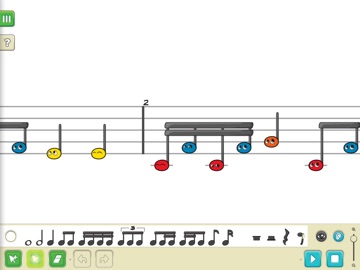
Cornelius composer is the first ANIMATED music editor, where music notes become alive! Compose, import, show, and reproduce your music by adapting the presentation to students' ages with animated and colorful music notes and accessibility features for color-blind beginners! Customize the color scale to match your boomwhackers or other instrument sets in the classroom!
Music teachers can introduce pupils to sheet music and reproduce arrangements and compositions with the world's first SOLFÈGE playback! Create an opportunity in teaching how to read music, it's a unique sight-reading experience!
Do you use Musescore, Sibelius, Finale, Flat, or other professional software? No problem! Feel free to import your work and reproduce it with our educational features. Export and keep editing with other software if you like or share with your students, and let them keep up at home with Cornelius Composer on their tablets, smartphones, or desktop PCs.
Cornelius Composer is a simple sheet music editor with powerful features for everyone to use anywhere!
What is so cool about Cornelius Composer?
• It matches the curriculum and the expectations of music educators in elementary and general music education
• You can create, import, and reproduce arrangements in the classroom and let your students play along
• Use your touchscreen, smart- and interactive boards! User-friendly Interface for large screens
• Introduce students to read sheet music with the solfège feedback – Educational Feature #1
• Animate your music notes to engage younger kids - E. F. #2
• Customize the color of each music note to match with your instruments in the classroom – boomwhackers, Orff, Glockenspiel, or other reading methods – E. F. #3
• Change the whole music staff from melodic to rhythmic view in seconds - E. F. #4
• Let your students compose and let them change the notes during the playback developing their listening skills – E. F. #5
• Kids can use it at home and import your music files
• Accessibility Options for Colorblindness
• Multiple staves for piano, exercises, and small school band arrangements
• Import your work from previously used software or your favorite online content (MusicXML or MIDI)
• Export scores and share them with your students (MusicXML, MIDI, or PDF)
• It makes part of the World of Music App Suite – Elementary Music Educationa