Iriun Webcam for PC and Mac

Iriun Webcam for PC and Mac Summary
Iriun Webcam for PC and Mac is a with in-app purchases iOS app in Photo And Video by Iriun Oy. Released in Dec 2018 (7 years ago). It has 623 ratings with a 3.11★ (mixed) average. Based on AppGoblin estimates, it reaches roughly 491 monthly active users and generates around $<10K monthly revenue (100% IAP / 0% ads). Store metadata: updated Apr 9, 2026, version 61.
Recent activity: -1 new ratings this week View trends →
Data tracking: SDKs and third-party integrations were last analyzed on Apr 24, 2026.
Store info: Last updated on App Store on Apr 9, 2026 (version 61).
3.11★
Ratings: 623
Screenshots

App Description
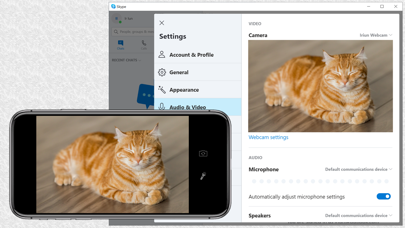
Use your iPhone's camera as a wireless webcam in personal computer. Install needed drivers and enjoy iPhone's sharp image with your favourite PC and Mac video applications.
Installing Iriun Webcam drivers for your computer:
1. Please make sure to download the needed PC/Mac software from https://iriun.com
2. Run the installer and follow instructions on the screen.
Using Iriun Webcam:
1. Launch Iriun Webcam app on your iPhone
2. Start Iriun Webcam Server on your PC/Mac
3. The phone is connected automatically to your computer using wireless WiFi network and the camera is ready to use.
4. Configure PC/Mac applications to use Iriun Webcam as a video source