Evertag: Music Tag Editor

Evertag: Music Tag Editor Summary
Evertag: Music Tag Editor is a free, ad-supported, with in-app purchases iOS app in Music And Audio by EVERAPPZ SL. Released in Jan 2020 (6 years ago). It has 15K ratings with a 4.65★ (excellent) average. Based on AppGoblin estimates, it reaches roughly 41K monthly active users and generates around $<10K monthly revenue (43% IAP / 57% ads). Store last updated Jul 22, 2026
Recent activity: 29 new ratings this week View trends →
SDK intelligence: AppGoblin detected 6 development tools(e.g. Google), 3 ad networks,and 1 analytics: product integrated into Evertag: Music Tag Editor. View full SDK list →
Evertag: Music Tag Editor SDKs Summary
Evertag: Music Tag Editor was last scanned for SDKs on 2026-10-07. Below is the overview of third-party companies detected in the app. The full list of SDKs, permissions and unknowns is available here.
 Google
 Facebook
 AdMob
AdMob nanopb
 Alamofire
 OpenID
 Firebase
4.65★
Ratings: 15K
Screenshots



App Description
Audio Tags Editor and Metadata Manager for iPhone and iPad
Take full control of your music library with Evertag — the powerful audio tag editor and metadata manager designed for music lovers, DJs, podcasters, and audiophiles. Edit ID3 tags, fix missing info, update album artwork, and organize your collection in just a few taps.
- SUPPORTED AUDIO FORMATS
Compatible with 30+ popular audio formats, including MP3, OGG, FLAC, OPUS, M4A, WMA, WAV, AIFF, APE, MOD, XM, S3M, IT, and many more.
- ADVANCED TAG EDITING
Modify 120+ audio tags such as Title, Artist, Album, Genre, Year, BPM, Track Number, Language, Mood, Publisher, Copyright, ISRC, Advisory Rating, and beyond — perfect for fine-tuning every detail of your music files.
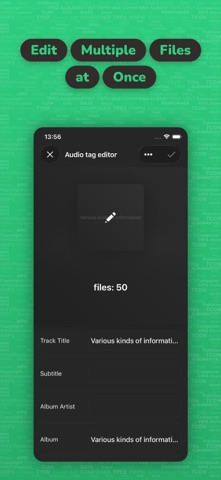
- BATCH EDIT MODE
Update tags across multiple files at once. Save hours of work and keep your music collection perfectly organized.
- ALBUM COVERS AND ARTWORK
Easily find and add missing album covers. Make your music library look as great as it sounds across all your devices.
- AUTO TAG FINDER
Automatically detect and fill in missing metadata, or edit tags manually for full creative control.
- ENCODING FIX
Repair broken characters and encoding errors so every title and artist name displays correctly.
- CLOUD STORAGE INTEGRATION
Open and edit audio files directly from iCloud Drive, Dropbox, Google Drive, OneDrive, and other cloud services — no downloads required.
- BUILT-IN FILE MANAGER
Browse, rename, move, and delete music files with ease. Mark your favorites and quickly access recently edited tracks.
- EXTERNAL FILE SUPPORT
Edit files stored in other apps or shared folders without copying them. Update tags and album covers instantly, right where the files live.
- WI-FI FILE TRANSFER
Send music wirelessly between your device and computer using any web browser. No cables, no extra apps.
- LIGHT AND DARK THEMES
Switch between light and dark modes to match your style or device settings.
----------
Evertag is the all-in-one audio tag editor, metadata manager, and music organizer for iPhone and iPad. Ideal for music collectors, audiobook listeners, DJs, producers, and anyone who wants a clean, well-organized library.
Privacy Policy: https://www.everappz.com/privacy-policy
Terms of Use: https://www.everappz.com/terms-and-conditions