Smart Planner: Calendar, Tasks

Smart Planner: Calendar, Tasks Summary
Smart Planner: Calendar, Tasks is a free, ad-supported, with in-app purchases iOS app in Business by Komorebi Inc.. Released in May 2019 (7 years ago). It has 34K ratings with a 4.55★ (excellent) average. Based on AppGoblin estimates, it reaches roughly 138K monthly active users and generates around $10K+ monthly revenue (23% IAP / 77% ads). Store last updated Mar 13, 2026
Recent activity: 11 new ratings this week View trends →
SDK intelligence: AppGoblin detected 6 ad networks(e.g. Google), 4 development tools,and 1 analytics: product integrated into Smart Planner: Calendar, Tasks. View full SDK list →
Smart Planner: Calendar, Tasks SDKs Summary
Smart Planner: Calendar, Tasks was last scanned for SDKs on 2026-07-10. Below is the overview of third-party companies detected in the app. The full list of SDKs, permissions and unknowns is available here.
 Google
 InMobi
 Vungle
 AdMob
AdMob nanopb
 ReactiveX
 MongoDB
 Firebase
4.55★
Ratings: 34K
Screenshots



App Description
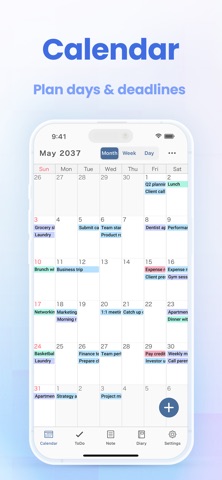
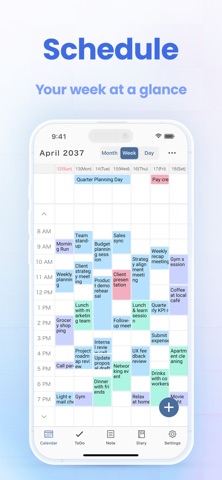
All-in-One Planner App! Smart Planner combines a calendar, to-do list, notepad, and diary in a single easy-to-use app. No registration needed — just open the app and start planning.
Main Features:
● Calendar
- View by month, week, or day
- Sync with iCloud and Google Calendar
- Add memos, links, and maps to events
- Supports recurring events and templates
- Includes widgets for quick access
- Adjust text size and font style
● To-Do
- Set deadlines and reminders
- Organise tasks with colour-coded lists
- Check tasks directly on the calendar
● Notes
- Organise notes into folders
- Customise font size, spacing, and density
- Export notes to your computer
● Diary
- Write multiple entries per day
- Attach multiple photos to each entry
- Export diary entries to your computer
● Customisation & Security
- Choose from 50+ theme colours and app icons
- Select from 18 different fonts
- Supports passcode, Face ID, and Touch ID
- iCloud sync and backup
- Set default startup tab
- Hide unused features
◆ About Premium Plan
The Premium Plan is available as a monthly or annual subscription.
First-time users can enjoy 7-days free trial.
Subscriptions renew automatically unless cancelled at least 24 hours before the end of the period.
Manage your subscription via iPhone or iPad settings anytime.
Note: Cancelling mid-period does not refund the current month or year.
Terms of Use:
https://komorebi-studio.com/planner/tos.html
Privacy Policy:
https://komorebi-studio.com/planner/policy.html