Simple Notes - Notepad Manager

Simple Notes - Notepad Manager Summary
Simple Notes - Notepad Manager is a free, ad-supported, with in-app purchases iOS app in Productivity by Komorebi Inc.. Released in Aug 2019 (7 years ago). It has 47K ratings with a 4.65★ (excellent) average. Based on AppGoblin estimates, it reaches roughly 77K monthly active users and generates around $<10K monthly revenue (24% IAP / 76% ads). Store last updated Oct 27, 2026
SDK intelligence: AppGoblin detected 6 ad networks(e.g. Google), 6 development tools, 1 analytics: product,and 1 business tools integrated into Simple Notes - Notepad Manager. View full SDK list →
Simple Notes - Notepad Manager SDKs Summary
Simple Notes - Notepad Manager was last scanned for SDKs on 2026-09-29. Below is the overview of third-party companies detected in the app. The full list of SDKs, permissions and unknowns is available here.
 Google
 InMobi
 Vungle
 AdMob
AdMob nanopb
 ReactiveX
 MongoDB
 Firebase
 RevenueCat
4.65★
Ratings: 47K
Screenshots




App Description
Simple Notes is an easy-to-use notes app that leaves out the extras, so writing, organizing, and finding notes stay simple.
Notes go into color-coded folders, and you can find them using the calendar or photo album. No account or setup is required, and the app works offline.
Core features are free. Keep everything in one place, from class notes and work memos to a diary or baby journal.
[Features]
■ Add Photos to Notes
- Attach images to any note
- Insert pictures from your photo library, or take a photo on the spot
■ Folder Organization
- Create folders to keep your notes organized
- Choose from 24 folder colors to tell categories apart at a glance
■ Calendar View
- View notes by date using the built-in calendar
- Tap any date to see notes for that date — perfect for locating past entries
■ Photo Album
- Browse all images added to notes in one place
- Tap a photo to jump to its note
■ Home Screen & Lock Screen Widgets
- Keep a note on your Home Screen like a sticky note — no need to open the app
- Lock Screen widgets let you see a note without unlocking your iPhone
- Choose which note to display and its text size
*Widgets are part of the Premium Service*
■ Sort Notes & Bullet Lists
- Sort by note date, date edited, date created, or title, ascending or descending
- Bullet lists make it easy to write shopping and packing lists
■ Passcode Lock
- Protect your notes with a passcode
- Supports Face ID and Touch ID for quick and secure access
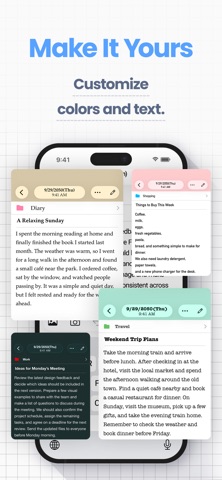
■ Font Styles
- Choose from 12 font styles
- Choose a playful, elegant, or professional look for your notes
■ Themes and App Icons
- Pick from 23 theme colors and matching app icons
- Customize the look of the app and even the Home Screen icon
■ Full-Note Image & PDF
- Turn an entire note, even a long one with photos, into a single image to share
- Export notes as PDFs for work or school
■ Data Backup & Export
- Back up your notes to iCloud or export them to your computer
- Hand exported notes to AI apps for summaries, or save them to Notion or Google Drive
- Export formats: HTML (for Windows), RTFD (for Mac, keeps images), PDF, and TXT
*Data export and iCloud backup are part of the Premium Service; notes are also included in your iPhone’s device backup*
■ iCloud Sync
- Use iCloud to sync notes across your iPhone and iPad (Premium Service)
- Restore your notes on a new device if your