KIA IDPhoto-Passport Visa Pic

KIA IDPhoto-Passport Visa Pic Summary
KIA IDPhoto-Passport Visa Pic is a ad-supported, with in-app purchases iOS app in Business by S Woo. Released in May 2019 (6 years ago). It has 1.2K ratings with a 4.58★ (excellent) average. Based on AppGoblin estimates, it reaches roughly 5.9K monthly active users and generates around $<10K monthly revenue (23% IAP / 77% ads). Store metadata: updated Dec 19, 2023, version 15.
Recent activity: -1 new ratings this week View trends →
Data tracking: SDKs and third-party integrations were last analyzed on Mar 21, 2026.
Store info: Last updated on App Store on Dec 19, 2023 (version 15).
KIA IDPhoto-Passport Visa Pic was last scanned for SDKs 2026-03-21. Below is the overview of third party companies detected in the app. The full list of raw SDKs, app permissions and unknown SDKs is available here.
 Google
4.58★
Ratings: 1.2K
Screenshots




App Description
KIA IDPhoto Wizard provides a fool-proof ID card, passport or Visa photo production wizard.
Portrait separation from the background
IDPhoto Wizard allows you to extract the portrait from the background with a few clicks. For edge and area details, you can use the brush and hair brush for further refinement.
Background style
IDPhoto Wizard provides nearly 20 different styles of background canvas:
* Solid white, blue, red or gray;
* Back spotlight blue, red or gray;
* Bottom spotlight blue, red or gray;
* It also supports transparent background;
* More styles will be online soon…
Beautify
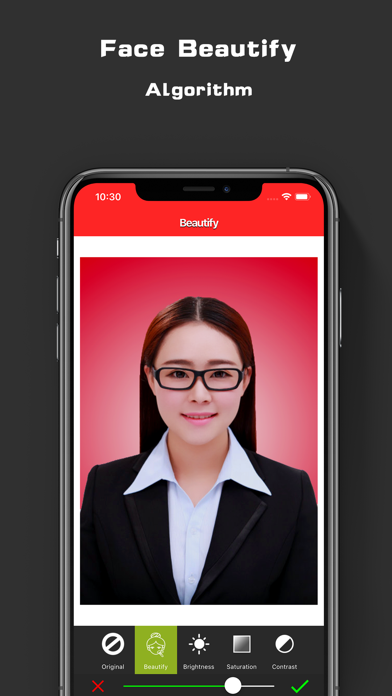
IDPhoto Wizard supports the facial beautify function. You can easily adjust the skin smoothing, skin whitening, saturation and contrast parameters to create extraordinary portraits.
Clothing function
The current version of the App contains 40+ sets of formal men's and women's business wear, more materials will be added in the later releases.
1. You should first wear a low collar costume and take a photo;
2. Select clothing for replacement;
3. Use the brush to erase the extra pixels on the edge;
4. Replace with the desired background canvas.
Photo specification
IDPhoto Wizard supports one-click ratio cropping and resizing of 30+ common photo formats. For example, one inch, two inches, one inch-, one inch+, two inches-, US visa, UK visa, Schengen visa, Japanese visa, Canada Visa, Australia visa, etc.
Steps of usage:
1. You first tap the Aspect-ratio Crop button to crop your photo according to the photo requirement, such as the US visa;
2. Tap resize button to adjust the photo to standard 50mm x 50mm or 590x590 pixels (Note: based on 300dpi);
3. Export the photo
Export format and quality compression
IDPhoto Wizard supports to save user photos as JPG or PNG
* The PNG file format contains an alpha channel for saving transparent background photos. The user can first separate the portrait from the background and set the background to be transparent and export in PNG format.
* JPG selection has 9 scale image quality options that allows you to compress the image file size.
More features are still in development. Stay tune.
VIP Subscription
- Payment will be charged to iTunes Account at confirmation of purchase
- Subscription automatically renews unless auto-renew is turned off at least 24-hours before the end of the period
- Length of subscriptions: half year
- Account wil