PennyworthLite Expense Tracker

PennyworthLite Expense Tracker Summary
PennyworthLite Expense Tracker is a free, ad-supported, with in-app purchases iOS app in Finance by Jack Xuan. Released in Jul 2019 (7 years ago). It has 1.7K ratings with a 4.73★ (excellent) average. Based on AppGoblin estimates, it reaches roughly 15K monthly active users and generates around $<10K monthly revenue (24% IAP / 76% ads). Store last updated Jun 3, 2026
PennyworthLite Expense Tracker SDKs Summary
App not yet scanned for SDKs.
4.73★
Ratings: 1.7K
Screenshots


App Description
Easy Budget & Expense Tracker helps you record daily income and expenses quickly, check your budget, save receipt photos, and understand your spending with clear charts.
It is designed for people who want a simple budget book without complicated account management. Record what you spent, what you earned, and where your money went — then review your monthly balance, categories, receipts, and trends whenever you need.
◆ Recommended for
・People who want to keep a simple budget book
・People who want to record expenses and income quickly
・People who want to check monthly budgets and remaining amounts
・People who want to save receipt photos with their records
・People who want to manage recurring bills, subscriptions, rent, salary, or other regular income and expenses
・People who want separate books for personal, household, or allowance tracking
・People who prefer simple daily records over complicated bank account or transfer management
◆ Main features
【Quick income and expense tracking】
Record the date, amount, category, person, tags, photos, and notes.
Frequently used records can be reused as favorites or templates, making daily entry faster and easier.
【Calendar and list views】
Review your records in calendar view or list view.
You can check recent records, search, filter, and sort transactions to find what you need.
【Receipt photo storage】
Attach receipt or invoice photos to your records.
You can review receipt photos by month and manage them together with your spending history.
【Budget management】
Set monthly, yearly, and category budgets.
Check your budget progress and remaining amount to notice overspending before it becomes a problem.
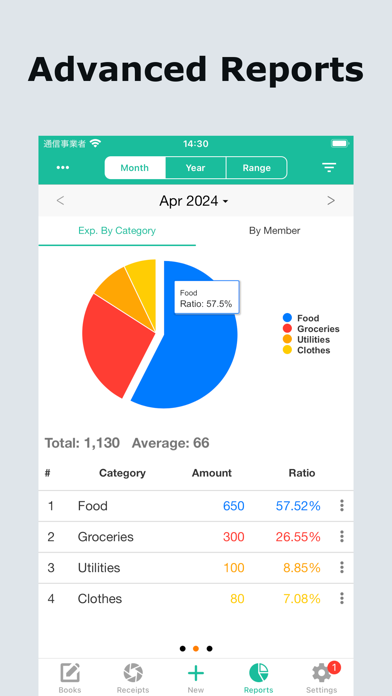
【Clear charts and analysis】
Analyze income and expenses by month, year, or custom period.
Use charts to see spending categories, income categories, and overall balance at a glance.
【Recurring income and expenses】
Manage regular records such as rent, subscriptions, utility bills, phone bills, salary, and other repeated income or expenses.
This helps reduce forgotten entries and keeps your monthly budget more accurate.
【Categories, tags, and people】
Organize records with expense categories, income categories, category groups, tags, and people.
This makes it easier to review spending by purpose, family member, project, or lifestyle.
【Separate books for different needs