VideoCopy: Video Editor, Play

VideoCopy: Video Editor, Play Summary
VideoCopy: Video Editor, Play is a free, ad-supported, with in-app purchases iOS app in Music And Audio by Softnoesis. Released in Sep 2019 (7 years ago). It has 21K ratings with a 4.50★ (excellent) average. Based on AppGoblin estimates, it reaches roughly 45K monthly active users and generates around $<10K monthly revenue (25% IAP / 75% ads). Store last updated Sep 12, 2026
Recent activity: 7.00 new ratings this week View trends →
SDK intelligence: AppGoblin detected 4 development tools(e.g. Google), 2 ad networks,and 1 analytics: product integrated into VideoCopy: Video Editor, Play. View full SDK list →
VideoCopy: Video Editor, Play SDKs Summary
VideoCopy: Video Editor, Play was last scanned for SDKs on 2026-08-16. Below is the overview of third-party companies detected in the app. The full list of SDKs, permissions and unknowns is available here.
 Google
 Snap
Snap nanopb
 SDWebImage
 OpenID
 Firebase
4.5★
Ratings: 21K
Screenshots


App Description
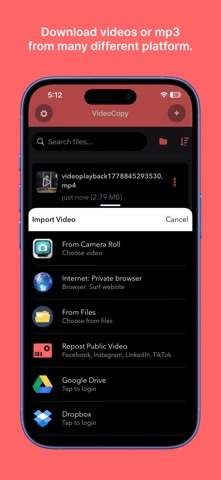
"We have added feature which allow user to download your own video/songs/mp3 from Google Drive, Dropbox, and OneDrive. Turn any video into a captioned, polished clip in minutes. VideoCopy adds AI-powered auto captions (100+ languages), pro editing tools (trim, merge, filters, stickers), and a background music player — all in one app. The awesome player which helps you play item on nano screen and background mode as well. Edit your video using several tools like filters, trimming, adding caption & sticker, convert to mp3 and many more.
Create the best video to share on Facebook, Instagram, Inshots, Youtube, likee app, Dubsmash, etc.
Downloader|Saver:
- Allow importing video and songs from Google Drive, Dropbox, and Onedrive
- Wifi sharing also allows from computer to iPhone
AI powered Auto Caption Video:
- Upload your own video
- Choose your needs caption style
- It will upload to server and generate karaoke style captioned video
- It support all world major languages in auto caption.
Playlist:
- Create any number of playlist
- Add any number of items of each playlist
- Play any selected song
- Allow playing by the shuffle
- Drag the video or song to any position
Awesome music player:
- Can play both video, m4a, and mp3 songs
- Nano player
- Seek music to any time
- Next and previous track play
- Play music in the background mode and on the lock screen as well
Video editor tools:
- Apply different video filters
- Trim video
- Add sticker
- Add caption
- Reverse video
- Merge video
- Remove audio from video
- Convert to Audio M4A
File Manager:
- Create your own subfolders
- Add video from any third-party application like Whatsapp, Telegram, etc.
- Rename, Delete, Share and Save files
For unlocking all features and content, Premium membership offers an auto-renewable subscription.
3 months Premium: subscription renewal time period is 3 month
Yearly Premium: subscription renewal time period is one year
Lifetime Premium: This is a one-time charge and never need to pay again.
Content provided during subscription period:
- No folder or file download limitation
- No advertisement
- All video editing tool allowed to use
End of trial and subscription renewal:
* Payment will be charged to iTunes Account at confirmation of purchase
* The price will be differed from country to country according to the Price Matrix.
* Subscription automatically renews un