Animal School Simulator
Animal School Simulator Summary
Animal School Simulator is a with in-app purchases iOS app in Games by YOUTA HISAMICHI. Released in Sep 2019 (6 years ago). It has 13.2K ratings with a 4.42★ (good) average. Based on AppGoblin estimates, it reaches roughly 16.5K monthly active users and generates around $<10K monthly revenue (100% IAP / 0% ads). Store metadata: updated Aug 24, 2021.
Recent activity: 3.00 new ratings this week View trends →
Store info: Last updated on App Store on Aug 24, 2021 .
4.42★
Ratings: 13.2K
Screenshots


App Description
“Unusual” school simulator is born!
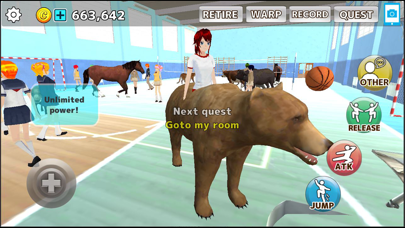
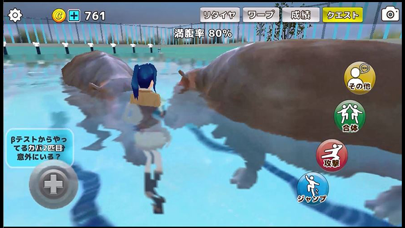
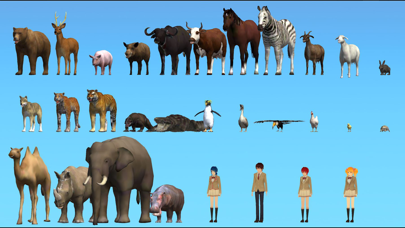
An interesting school simulator that allows you to “Fusion” with 26 different animals. You can also run around the school as an animal itself. When combined with a desk, police car or helicopter ...! ?
There are more than 100 quests, and it is a rewarding perfect score! Let's experience cute and surreal "I can't do it but it's real, high school life here"!
“This school is like a zoo” cannot be denied in this game!
[Usable animals]
School girls x3
School boys
Bear
Penguin
Deer
Goat
Pig
Sheep
Horse
Leopard
cow
Chicken
Chick
Duck
Wild boar
Buffalo
Tiger
Crocodile
Turtle
Komodo Dragon
Rabbit
Wolf
Toucan
Zebra
Camel
Rhino
Elephant
Hippopotamus
Raccoon
All can be used and combined, so it is also recommended for Minotaur and Centaur lovers!
[Screen Description]
This game has two screens. "Edit" and "Game". The editis almost the start screen, where you can change characters and costumes. The game is a game screen as its name suggests. You can explore the school freely.
[School map overview]
In the initial release, there are currently “high school”, “university”, “home” and a road connecting them. We will add interesting shops to meet your needs.
[How to operate]
[Game screen btns]
1. Swipe left on the screen: Move the character. You can press anything other than the cross btn.
2. Swipe right on screen: Move the camera. In other words, you can move the viewpoint. I think 1 and 2 are general operations.
3. Jump btn: Jump a little
4. Attack btn: Attack. You can enjoy this game without forcing an attack. What you do is free. I recommend you to find and create interesting sights.
5. Fusion btn: fusion with nearby characters and objects. In addition to people and animals, it can be combined with desks, chairs, balls, cars and helicopters. In some cases, the combined ability can be used. It can be united if you stick together.
6. Throw btn: When fusioned, the fusionbtn will throw instead of the Fusionbtn. In other words, you can carry things and characters. When you finish throwing it, it will return to the coalesced btn.
7. Other btns: Press this btn to display detailed operation btns. Press again to return.
8. Greeting btn: Greetings. He / she returns around greetings.
9. Follow me: btns will follow me. Depending on the character, it will follow at a good speed.
Ten. Sit btn: Sit on a nearby